Preview every page
Read the document as you fill in the form.
Fill in your details, edit the vehicle bill of sale text and check each page before downloading.
These pictures show the same document generator with fictional example details.
Replace the example names and contact details in the form. Keep only information that belongs in this document.
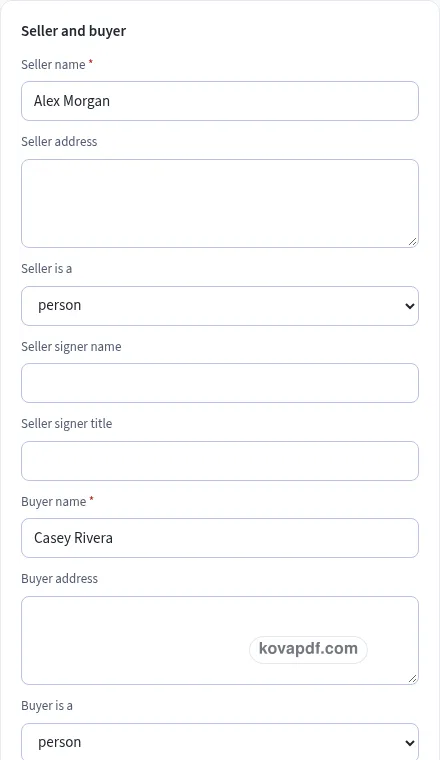
Check the page preview after changing the text. Read the amounts, dates and page breaks before exporting.
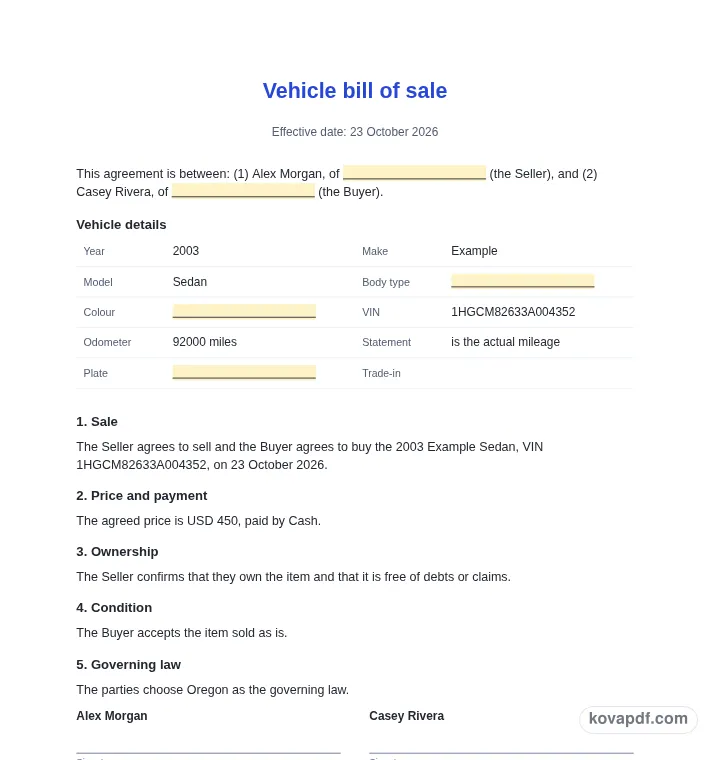
Use the download controls above the preview. Open the saved file and give it one final read before sharing.

Read the document as you fill in the form.
Compare Classic, Modern and Minimal layouts.
Save a copy when the names and figures are right.
The generator works on this device.
Use A4 or Letter and check the page breaks.
Return to the form to correct a detail before sharing.
These are fictional details. Choose an example, then replace them with your own.
Begin with seller, buyer, year, make, model, VIN, odometer, unit and price. Keep your source notes beside you while entering them. The vehicle bill of sale preview follows those fields, so check names and dates before working on the wording. Leave a detail blank while you look it up rather than entering an answer that you have not confirmed.
Open the Text card and read each paragraph for a vehicle sale draft with identifying details the parties can compare. You can change individual wording, turn optional passages off and move optional passages with Up or Down. An Edited label means that paragraph now keeps your own words. Reset to default text makes it follow the fields again. Read the complete result after every substantial change.
Use the checklist and page preview to review this vehicle bill of sale. Look at the final page as well as the first one. Download PDF for a fixed page layout or Download Word (.docx) for further editing. If you change the downloaded Word file, check its page breaks again before sharing it with the intended reader.
This template is a starting point in plain English. It is not legal advice, and laws differ between states and countries. For anything important or high in value, ask a lawyer to check it before you sign. Enter the year, make and model first, then compare the VIN with the vehicle and the records you are using. Body type, colour and plate number give further context but do not replace the VIN. The draft prints a vehicle details table so both parties can review the identifying information together before looking at the price and condition clauses.
The normal VIN check looks for seventeen characters and excludes the letters I, O and Q. A warning does not block drafting because older vehicles may have shorter VINs. Use the older, shorter VIN toggle only when that describes the vehicle, and recheck the number character by character. Passing the format check does not verify the vehicle’s history or establish that the number is correct.
A transposed character can be easy to miss on a small screen. Compare the preview with the source you used to enter the VIN. Ask the other party to read the details independently. The generator helps present the number clearly, but it cannot inspect the vehicle or reconcile conflicting records.
Enter the odometer number and select miles or kilometres. Then choose the statement that the parties intend to record: actual mileage, exceeding mechanical limits or not actual mileage. Check all three pieces together. A number without its unit or a statement copied from another sale can give a very different impression from what you mean. The form does not decide which statement applies.
The draft includes price, payment method, condition, ownership and optional delivery details. Add a trade-in description when relevant and read how it appears beside the payment wording. Some states and countries have their own official vehicle bill of sale or transfer form; check with your local motor vehicle office. This page makes no other claim about registration or transfer rules. Review the proposed agreement and any separate information you need before signing.
Read the vehicle bill of sale as a recipient would. Confirm seller, buyer, year, make, model, VIN, odometer, unit and price, then compare the wording with a vehicle sale draft with identifying details the parties can compare. A field can be filled in and still contain an error, so the checklist is a prompt for your review rather than proof that the document is right. A VIN format warning or a completed details table does not verify a vehicle’s history. Remove notes meant only for you and make sure optional text does not contradict a sentence you have edited elsewhere.
The browser keeps this vehicle bill of sale draft on the device you are using when storage is available. Avoid leaving personal information on a shared computer. Use Clear saved details to remove this draft when you have finished, and keep a downloaded copy somewhere you control if you need it later. A PDF preserves the displayed wording and page arrangement. A Word file lets you revise the document in another editor; compare that version with your intended meaning before you send it. Preview the longest paragraphs, confirm the typed names at the end and give the file a name that helps you find the right version.
The format check expects seventeen characters without I, O or Q. Recheck any warning against the vehicle details. It is a drafting prompt, not a vehicle-history search or proof that a VIN is valid.
Yes. Use the older, shorter VIN toggle when it fits the vehicle. The warning is not a download block. Confirm the number from the records and the vehicle rather than guessing missing characters.
The odometer unit select offers miles and km. Read the number, unit and odometer statement together in the preview so the final description reflects what the parties mean to record.
There is an optional trade-in text field. Review how it sits with the price and payment clause. Add clear wording if the parties need to distinguish the trade-in from the cash part of the deal.
Some states and countries have their own official vehicle bill of sale or transfer form. Check with your local motor vehicle office. This generator does not decide which form applies to your transaction.
The agreement includes a column for each party with signature, name and date lines, plus a title line for a company. Check the seller and buyer names before downloading or opening the signing tools.