Preview every page
Read the document as you fill in the form.
Fill in your details, edit the proof of income letter text and check each page before downloading.
These pictures show the same document generator with fictional example details.
Replace the example names and contact details in the form. Keep only information that belongs in this document.
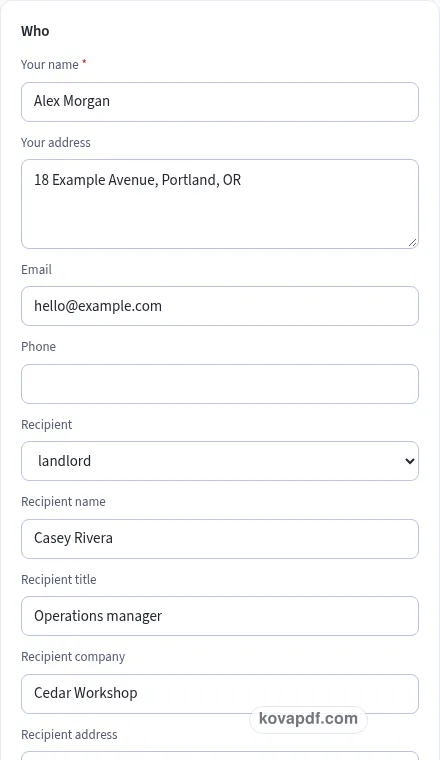
Check the page preview after changing the text. Read the amounts, dates and page breaks before exporting.
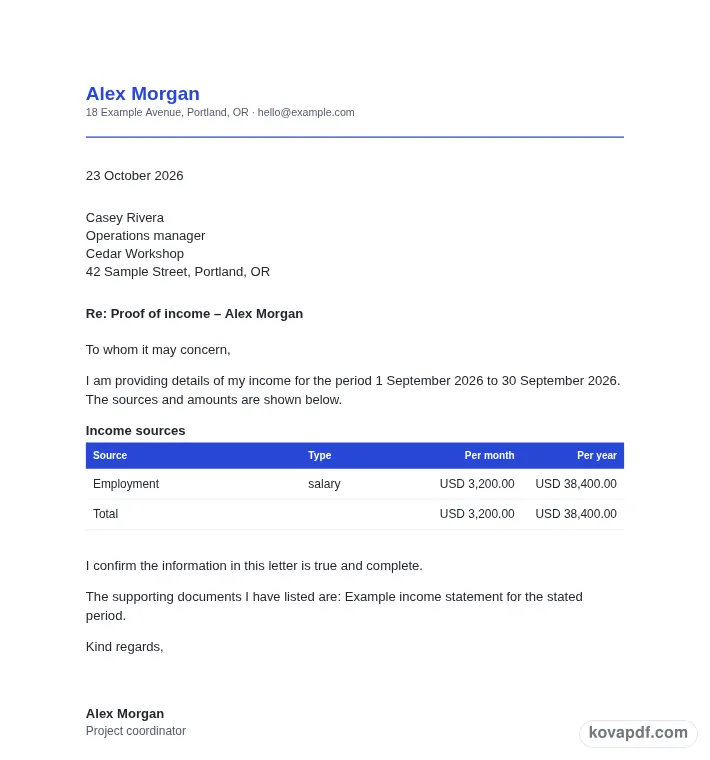
Use the download controls above the preview. Open the saved file and give it one final read before sharing.

Read the document as you fill in the form.
Compare Classic, Modern and Minimal layouts.
Save a copy when the names and figures are right.
The generator works on this device.
Use A4 or Letter and check the page breaks.
Return to the form to correct a detail before sharing.
These are fictional details. Choose an example, then replace them with your own.
Begin with your name, reporting period, income sources, amounts and attachment list. Keep your source notes beside you while entering them. The proof of income letter preview follows those fields, so check names and dates before working on the wording. Leave a detail blank while you look it up rather than entering an answer that you have not confirmed.
Open the Text card and read each paragraph for an income summary whose figures can be compared with your records. You can change individual wording, turn optional passages off and move optional passages with Up or Down. An Edited label means that paragraph now keeps your own words. Reset to default text makes it follow the fields again. Read the complete result after every substantial change.
Use the checklist and page preview to review this proof of income letter. Look at the final page as well as the first one. Download PDF for a fixed page layout or Download Word (.docx) for further editing. If you change the downloaded Word file, check its page breaks again before sharing it with the intended reader.
A proof of income letter needs a clear reporting period. Enter the from and to dates before adding sources. The reader should be able to distinguish a current income summary from a description of an earlier period. If your income changes from month to month, explain the basis of the amounts in an edited paragraph instead of allowing a single figure to suggest a level of certainty you do not intend.
This page is for someone describing their own income, such as a freelancer, self-employed person or renter. Choose landlord, lender or other and add the recipient’s name when available. It does not obtain account information or independently confirm earnings. You supply the sources, amounts and supporting documents you want the reader to consider.
Use a separate row for each source or client you want to list. Choose salary, self-employment, rental, benefits, pension or other as a description. The category helps organise the table; it does not classify income for tax purposes. Make the source name understandable without adding private account numbers or unnecessary details about a client relationship.
Each row has an amount and a month or year unit. Check those together. A yearly amount is divided by twelve for the monthly column and rounded to the cent. A monthly amount is multiplied by twelve for the yearly column. The table presents those comparisons so the reader can see the scale of each source using a consistent time unit.
The form shows Total per month and Total per year. Those figures come from the rows you enter, so a mistyped amount or the wrong time unit will flow into the totals. Compare the result with your records. The monthly figure for a yearly source is a rounded comparison, not a statement that you received exactly that amount in each individual month.
Attachments can include bank statements, a tax return, contracts or other documents you choose to describe. The list does not attach files to the generated letter. Check that your eventual package contains the documents you say it contains. The declaration starts on and says the information is true and complete. Read it carefully, correct the figures and remove anything you cannot support before adding your name or signature.
Read the proof of income letter as a recipient would. Confirm your name, reporting period, income sources, amounts and attachment list, then compare the wording with an income summary whose figures can be compared with your records. A field can be filled in and still contain an error, so the checklist is a prompt for your review rather than proof that the document is right. A completed table does not independently verify the income you have entered. Remove notes meant only for you and make sure optional text does not contradict a sentence you have edited elsewhere.
The browser keeps this proof of income letter draft on the device you are using when storage is available. Avoid leaving personal information on a shared computer. Use Clear saved details to remove this draft when you have finished, and keep a downloaded copy somewhere you control if you need it later. A PDF preserves the displayed wording and page arrangement. A Word file lets you revise the document in another editor; compare that version with your intended meaning before you send it. Preview the longest paragraphs, confirm the typed names at the end and give the file a name that helps you find the right version.
Yes. Each row records which time unit you used. The table then shows a monthly and yearly comparison for that source and adds the corresponding columns to produce the displayed totals.
A yearly source is divided by twelve and rounded to the nearest cent for its monthly comparison. That rounded amount describes the conversion; it does not create a record of actual monthly receipts.
No. You type the income information and choose what supporting documents to list. The generator does not retrieve account details, confirm a deposit or check the figures against outside records.
The attachment list is text in the letter. Add the actual supporting files separately when you prepare the package for the recipient. Make sure the names match what you intend to provide.
You can identify sources or clients in separate rows. Use a level of detail suitable for the intended reader and avoid information that is unnecessary for the income summary you are giving.
Yes. It is an editable paragraph and can also be turned off. Whatever wording you use, review every source, amount and period before signing or sharing the finished proof of income letter.