Resize Image
Get a photo or signature to the exact KB and pixel size a form asks for. Check it, then download.
- Free to use
- Works on any device
- Stays on your device
- An exact size in KB
- Pixels, cm, mm or inches
- Plain background made white
- Checked before you download
JPG · PNG · WebP
Get a photo or signature to the exact size a form asks for
JPG, PNG, WebP, GIF, BMP or HEIC · set the KB and the pixels, and check every rule before you download. Your picture stays on this device
Drag & drop files here
or choose a file from your device
Everything Resize Image can do
Make a photo or signature the exact size a form asks for, in KB and pixels, and check it before you download. Free, on your own device.
The size you need
- An exact size in KB: tap 20, 50, 100 or 200, or type any number
- A smallest size too, when the form has a minimum, such as 10 to 20 KB
- Width and height in pixels, centimetres, millimetres or inches
- A plain background made white, or pure white, with you left as you are
Checked before you download
- A live preview beside the options, updated as you change them
- The exact size in KB and in bytes
- A tick for every rule: size, pixels, JPG, file name
- A before and after view, with a zoom to see the detail
- A plain message when the size you asked for is not possible
Signatures
- Paper made white and ink made dark
- Trimmed to the signature, never stretched
- Reaches a minimum size by adding blank data inside the JPEG, and says so
Your pictures
- JPG, PNG and WebP, and HEIC in Safari on iPhone
- A phone photo taken sideways comes out the right way up
- Nothing hidden in the result: no location, no camera details
- Many pictures at once, downloaded together in a ZIP
- The picture stays on your device and is never uploaded
How it works
Resize Image in three steps
Add your picture
Drag your picture onto the panel, or click it to pick one from your device. Everything happens in your browser, so the picture stays on your device and is never uploaded.
Choose the look, then type the size
In the bar above the preview, choose Photo or Signature, and a Background: Original, White or White, fully. A signature starts on White, which makes the paper white and the ink darker. Then type the largest size your form allows in the File size box, or tap 20, 50, 100 or 200 KB, and type the Width and Height if the form gives them.
Check it and download
The preview beside the options updates as you change them and shows the exact size in KB and pixels, with a tick for every rule. If something does not pass, it says which rule and what to change. Then press Resize picture and download.
Resize Image: a visual walkthrough
Get a picture to the size a form asks for, in KB and pixels.
Add your picture
Drag your picture onto the panel, or click it to pick one from your device. Everything happens in your browser, so the picture stays on your device and is never uploaded.
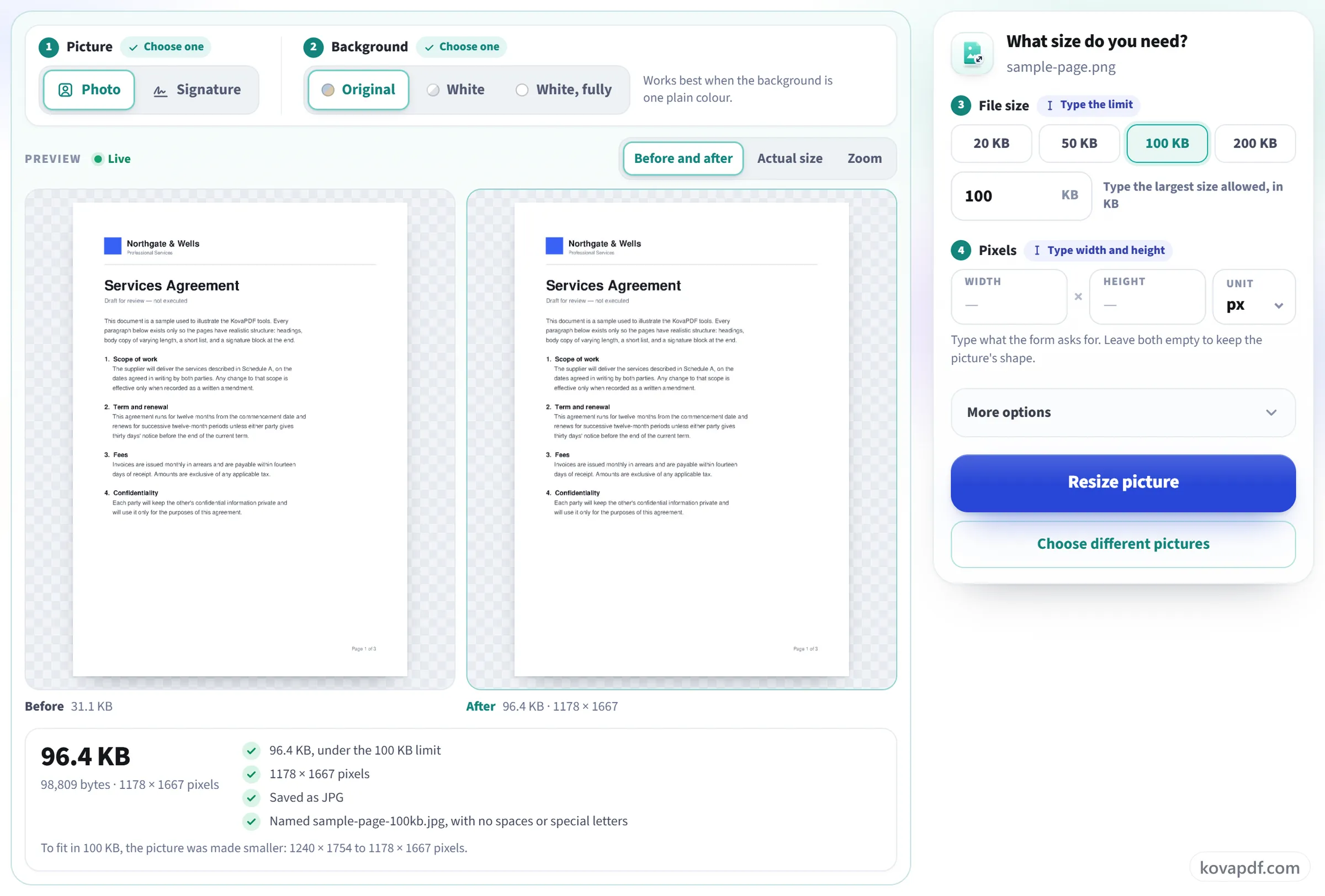
Choose the look, then type the size
In the bar above the preview, choose Photo or Signature, and a Background: Original, White or White, fully. A signature starts on White, which makes the paper white and the ink darker. Then type the largest size your form allows in the File size box, or tap 20, 50, 100 or 200 KB, and type the Width and Height if the form gives them.
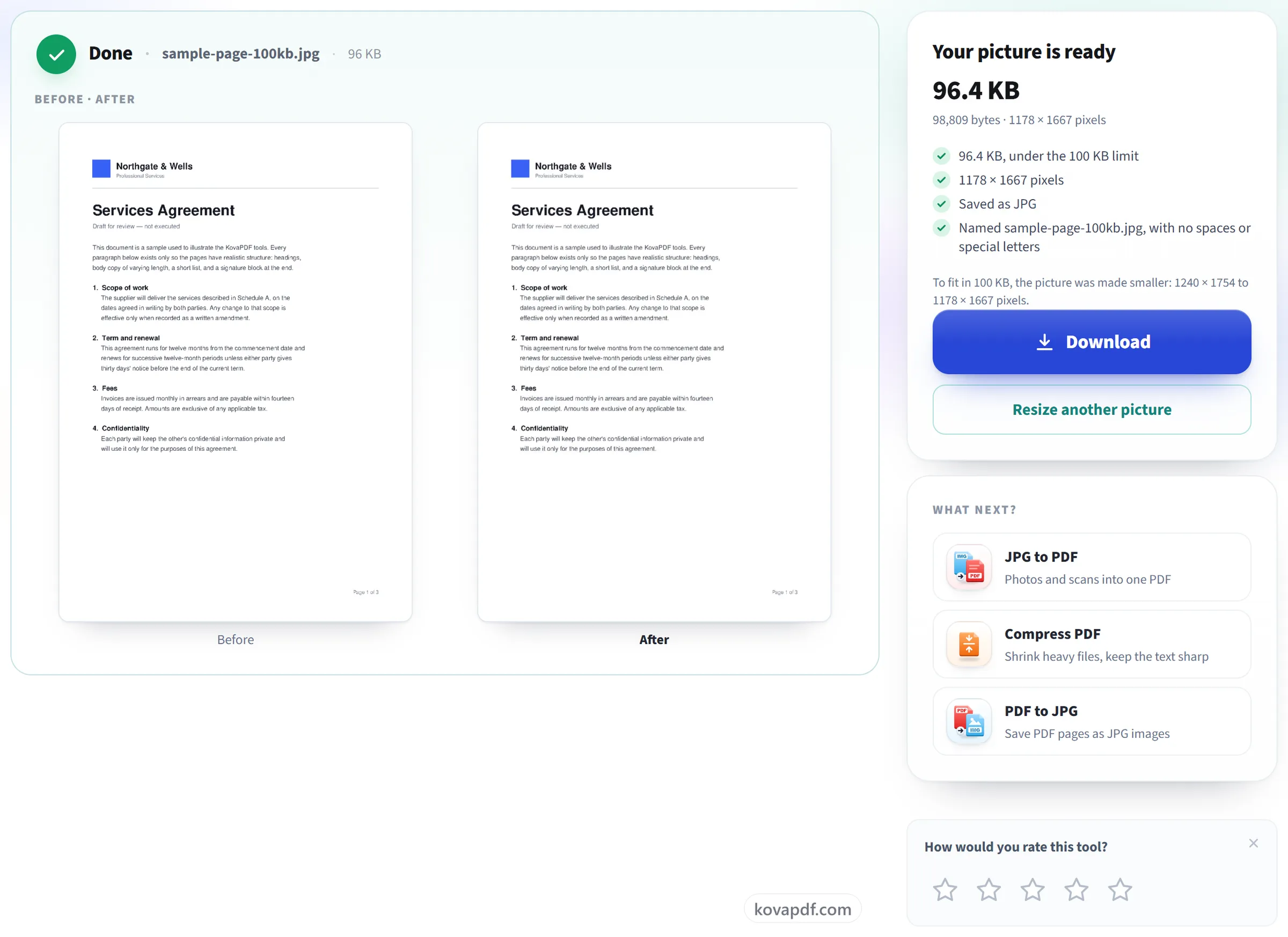
Check it and download
The preview beside the options updates as you change them and shows the exact size in KB and pixels, with a tick for every rule. If something does not pass, it says which rule and what to change. Then press Resize picture and download.
Frequently asked questions about Resize Image
How do I make a photo a certain size in KB?
Add the photo, then type the largest size your form allows in the File size box, or tap 20, 50, 100 or 200 KB. If the form gives pixels too, type them in Width and Height. The preview shows the exact size before you download.
Can it make the background of my photo white?
Yes, when the background is one plain colour. Under Background, White lightens a light or grey wall to white, and White, fully makes a plain background pure white, a light blue or cream one too. Only the background around the edges changes; you stay as you are. If no plain background is found, the photo is left as it is and the page says so.
Why is my signature too small for a 10 KB minimum?
A clean signature can be only about 3 KB. The tool reaches the minimum by adding blank data inside the JPEG, and tells you when it did. The signature itself is unchanged.
Why is the result a little under the size I asked for?
Some portals count a kilobyte as 1,000 bytes and some as 1,024. The tool keeps the file under the smaller count, so it passes on both.
What happens to my photo?
It stays on your device. The picture is resized in your browser and is never sent to us. Only the fact that a task ran is counted.
What if the size I need is not possible?
The tool says so and offers other choices, instead of showing a result that breaks the rule. A full phone photo cannot be 20 KB at 2000 × 2600 pixels, for example, so it shows the smaller size it needs.
Can I resize many pictures at once?
Yes. They all use the same settings and download together in one ZIP. If one picture cannot be read, the others still finish.
Is it free?
Yes. Every tool works without paying and without an account. Files can be up to 200 pages and 80 MB, and a run that fails costs you nothing.
Do I need to create an account?
No. All tools work without signing in. An account raises your hourly allowance and lets you see what you have processed.
What happens to my file?
Your file stays on our server only for a short time while it is processed, then it is deleted. It is sent over an encrypted connection. We keep a record that the tool was used, but not the file name or what is in the file.
Resize Image guides and articles
Related tools
All PDF tools · 15 step-by-step guides · How your files are handled
By format: Resize Image to 20 KB · Resize Image to 50 KB · Resize Image to 100 KB · Signature Resize