Preview every page
Read the document as you fill in the form.
Record a vehicle sale with identifying details. Compare the filled example, check each detail and save your own copy.
These pictures show the same document generator with fictional example details.
Replace the example names and contact details in the form. Keep only information that belongs in this document.
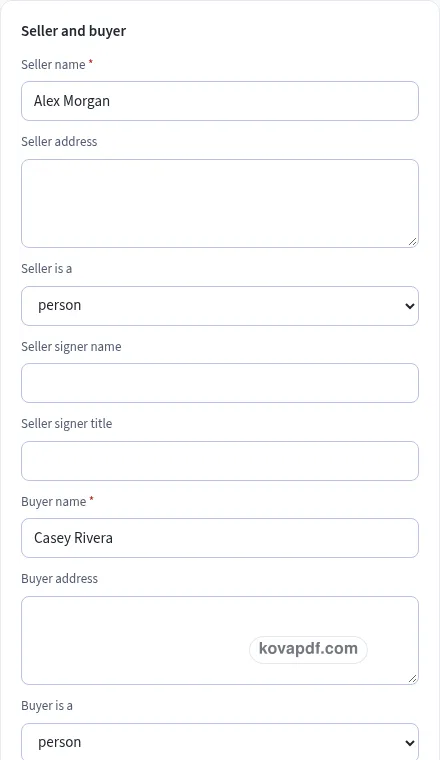
Check the page preview after changing the text. Read the amounts, dates and page breaks before exporting.
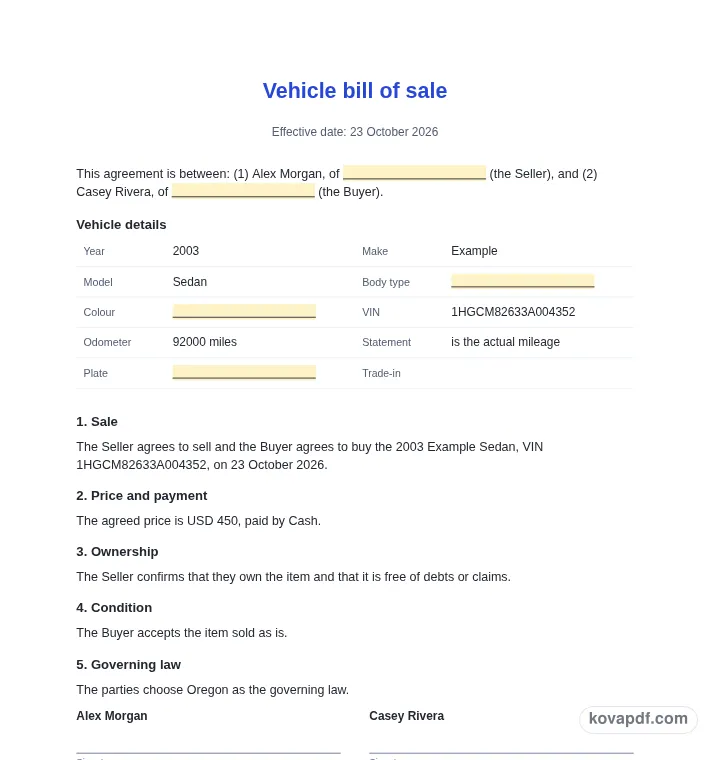
Use the download controls above the preview. Open the saved file and give it one final read before sharing.

Read the document as you fill in the form.
Compare Classic, Modern and Minimal layouts.
Save a copy when the names and figures are right.
The generator works on this device.
Use A4 or Letter and check the page breaks.
Return to the form to correct a detail before sharing.
These are fictional details. Choose an example, then replace them with your own.
Start with seller and buyer and vehicle identity. Replace the fictional sample with information from your own records.
Check odometer beside payment method. Read each page from the perspective of the buyer and seller checking the transaction record.
Choose PDF or Word above the preview. Check delivery and signatures in the saved copy before sharing it.
This modern vehicle bill of sale uses an accent band to separate the document heading from its content. The filled preview concerns a used vehicle sale with its identification number and odometer reading. It is intended to help you record a vehicle sale with identifying details. Start with the example to compare the visual layout, then work through the details below from the perspective of the buyer and seller checking the transaction record.
A Modern vehicle bill of sale should make seller and buyer easy to find. Try the filled example, the actual parties to the sale, to see how this detail sits in the document. Use complete names and check who owns the vehicle. Then turn to vehicle identity: the two entries need to describe the same situation. Use the preview to check your replacement text, especially when a name or description is longer than the sample.
A Modern vehicle bill of sale should make vehicle identity easy to find. Try the filled example, year, make, model and body type, to see how this detail sits in the document. Compare these entries with the vehicle and the records you are using. Then turn to vehicle identification number: the two entries need to describe the same situation. Use the preview to check your replacement text, especially when a name or description is longer than the sample.
A Modern vehicle bill of sale should make vehicle identification number easy to find. Try the filled example, the full VIN from the vehicle record, to see how this detail sits in the document. Copy the characters carefully. Then turn to odometer: the two entries need to describe the same situation. Use the preview to check your replacement text, especially when a name or description is longer than the sample.
A Modern vehicle bill of sale should make odometer easy to find. Try the filled example, 92000 miles in the example, to see how this detail sits in the document. Enter the reading and its unit separately. Then turn to price and currency: the two entries need to describe the same situation. Use the preview to check your replacement text, especially when a name or description is longer than the sample.
A Modern vehicle bill of sale should make price and currency easy to find. Try the filled example, the amount agreed for this vehicle, to see how this detail sits in the document. Make the price clear and check how any trade-in is described. Then turn to payment method: the two entries need to describe the same situation. Use the preview to check your replacement text, especially when a name or description is longer than the sample.
A Modern vehicle bill of sale should make payment method easy to find. Try the filled example, the method used for the sale, to see how this detail sits in the document. Review payment wording with the buyer. Then turn to condition and warranty: the two entries need to describe the same situation. Use the preview to check your replacement text, especially when a name or description is longer than the sample.
A Modern vehicle bill of sale should make condition and warranty easy to find. Try the filled example, the sale terms the parties intend to record, to see how this detail sits in the document. Read the optional condition wording carefully. Then turn to delivery and signatures: the two entries need to describe the same situation. Use the preview to check your replacement text, especially when a name or description is longer than the sample.
A Modern vehicle bill of sale should make delivery and signatures easy to find. Try the filled example, the agreed handover details and party names, to see how this detail sits in the document. Read the draft against your own sale records before signing. Then turn to seller and buyer: the two entries need to describe the same situation. Use the preview to check your replacement text, especially when a name or description is longer than the sample.
The accent heading should leave the main vehicle bill of sale information easy to read. Check a long entry such as seller and buyer after typing it, since a real name may take more room than the fictional one. Continue down to price and currency and check where the next section starts. Use the preview controls to compare a page at fit width and at a larger zoom. On a phone, switch from Edit to Preview to read the page without the form taking the screen. Before exporting, select the intended paper size under Design. Recheck the last page after that change. The file should present the complete vehicle bill of sale, including any final note or signing area that belongs with a used vehicle sale with its identification number and odometer reading.
The Modern design uses a stronger accent band and a different visual hierarchy. The fields still describe a used vehicle sale with its identification number and odometer reading. Check the longest entries, including price and currency, in the page preview after you edit them.
Use the accent controls under Design. Compare the heading with seller and buyer and read the body text at normal size. A color choice should support the document rather than draw attention away from its meaning.
Use the form to enter vehicle identity and then work through payment method. The preview updates from your entries. All names and figures in the gallery are fictional and need checking before use.
PDF preserves the previewed page arrangement. Word provides editable text and may reflow when opened. Use the current draft to record a vehicle sale with identifying details; whichever format you choose, inspect the saved copy before sharing it with the buyer and seller checking the transaction record.
No. Download the checked copy, then choose how to share it. Your entries are used on this device. On a shared computer, clear the saved draft when you no longer want those details stored in the browser.