Preview every page
Read the document as you fill in the form.
Ask a customer to pay for agreed work. Compare the filled example, check each detail and save your own copy.
All set
Invoice rules in the US depend on your state. This tool helps you lay out an invoice; it is not tax advice.
These pictures show the same document generator with fictional example details.
Replace the example names and contact details in the form. Keep only information that belongs in this document.
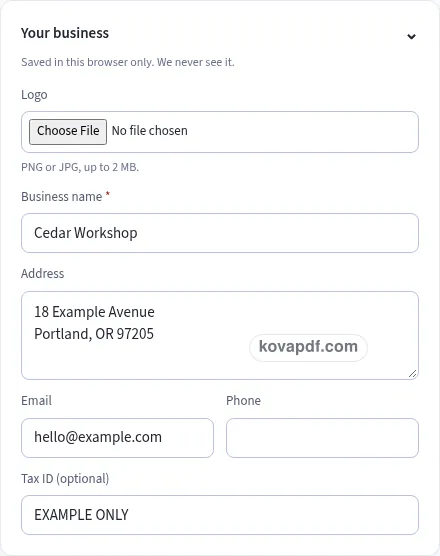
Check the page preview after changing the text. Read the amounts, dates and page breaks before exporting.
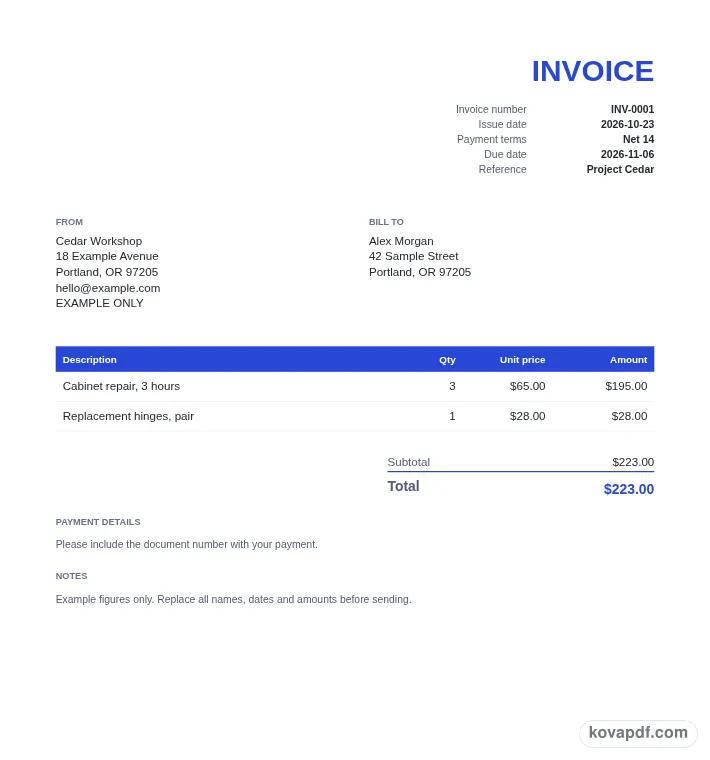
Use the download controls above the preview. Open the saved file and give it one final read before sharing.

Read the document as you fill in the form.
Compare Classic, Modern and Minimal layouts.
Save a copy when the names and figures are right.
The generator works on this device.
Use A4 or Letter and check the page breaks.
Return to the form to correct a detail before sharing.
These are fictional details. Choose an example, then replace them with your own.
Start with business name and customer. Replace the fictional sample with information from your own records.
Check issue and due dates beside materials. Read each page from the perspective of the person approving the bill.
Choose PDF or Word above the preview. Check payment instructions in the saved copy before sharing it.
An invoice template PDF is most useful when the page you send already contains the final names, dates and charges. Fill the form here to create that document. The preview shows a finished repair with labor and replacement parts. Check it as the person approving the bill would: identify the work, read the calculation and find the instructions for paying the balance.
In the invoice PDF, look for business name and read it at normal page size. The example shows cedar Workshop. Use the name the customer knows from the order. Compare it with customer before saving. A PDF is useful for a finished page layout, which makes this review worthwhile: the next reader sees the exported words and figures, without the form labels that helped you enter them.
In the invoice PDF, look for customer and read it at normal page size. The example shows alex Morgan. Name the person or business being billed. Compare it with invoice number before saving. A PDF is useful for a finished page layout, which makes this review worthwhile: the next reader sees the exported words and figures, without the form labels that helped you enter them.
In the invoice PDF, look for invoice number and read it at normal page size. The example shows iNV-0104. Choose a reference you can find again. Compare it with issue and due dates before saving. A PDF is useful for a finished page layout, which makes this review worthwhile: the next reader sees the exported words and figures, without the form labels that helped you enter them.
In the invoice PDF, look for issue and due dates and read it at normal page size. The example shows october 23 and November 6. Record when you issue the bill and when you expect payment. Compare it with labor description before saving. A PDF is useful for a finished page layout, which makes this review worthwhile: the next reader sees the exported words and figures, without the form labels that helped you enter them.
In the invoice PDF, look for labor description and read it at normal page size. The example shows cabinet repair, 3 hours. Describe the work closely enough to compare it with the accepted quote. Compare it with materials before saving. A PDF is useful for a finished page layout, which makes this review worthwhile: the next reader sees the exported words and figures, without the form labels that helped you enter them.
In the invoice PDF, look for materials and read it at normal page size. The example shows replacement hinges, one pair. Give parts their own rows when they were priced separately. Compare it with amount already paid before saving. A PDF is useful for a finished page layout, which makes this review worthwhile: the next reader sees the exported words and figures, without the form labels that helped you enter them.
In the invoice PDF, look for amount already paid and read it at normal page size. The example shows a deposit recorded before this bill. Enter money actually received in the paid field. Compare it with payment instructions before saving. A PDF is useful for a finished page layout, which makes this review worthwhile: the next reader sees the exported words and figures, without the form labels that helped you enter them.
In the invoice PDF, look for payment instructions and read it at normal page size. The example shows include INV-0104 with the payment. Tell the customer how to identify this bill when paying. Compare it with business name before saving. A PDF is useful for a finished page layout, which makes this review worthwhile: the next reader sees the exported words and figures, without the form labels that helped you enter them.
Review the PDF at a size that lets you read the actual text, rather than judging only the thumbnail. Open the saved file and check the customer address, invoice reference and final balance. Read any item description that wraps onto a second line, then look for notes or payment details near the bottom of the document. If something is wrong, return to the form and correct the source details before downloading again. Keep track of which copy you sent so a later draft is not mistaken for the issued bill. The PDF contains the pages generated from your current entries; the online form is where changes to quantities and rates update the calculations. A final review should cover the work being billed as well as the totals.
The download uses the current form values. Replace the sample before saving and review the preview, including the invoice number and remaining balance. You are creating a completed PDF rather than downloading an empty form to upload elsewhere.
You can revise the form and download again, or open the generated document in the PDF editor. Keep the invoice details consistent across the copies you send. Check any change to a charge against the corresponding total.
Use the form to enter customer and then work through materials. The preview updates from your entries. All names and figures in the gallery are fictional and need checking before use.
PDF preserves the previewed page arrangement. Word provides editable text and may reflow when opened. Use the current draft to ask a customer to pay for agreed work; whichever format you choose, inspect the saved copy before sharing it with the person approving the bill.
No. Download the checked copy, then choose how to share it. Your entries are used on this device. On a shared computer, clear the saved draft when you no longer want those details stored in the browser.