Preview every page
Read the document as you fill in the form.
Ask a customer to pay for agreed work. Compare the filled example, check each detail and save your own copy.
All set
Based on official guidance from the Canada Revenue Agency, checked 22 October 2026. This tool helps you lay out an invoice; it is not tax advice.
These pictures show the same document generator with fictional example details.
Replace the example names and contact details in the form. Keep only information that belongs in this document.
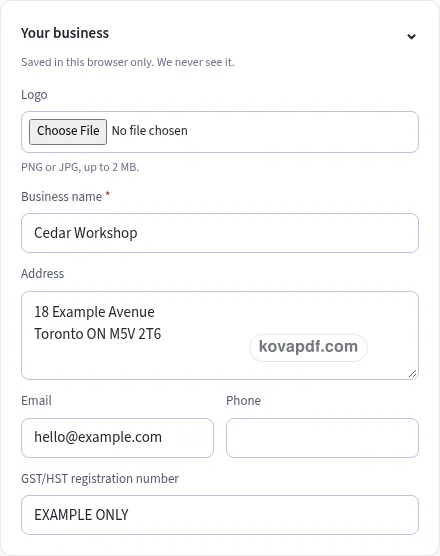
Check the page preview after changing the text. Read the amounts, dates and page breaks before exporting.
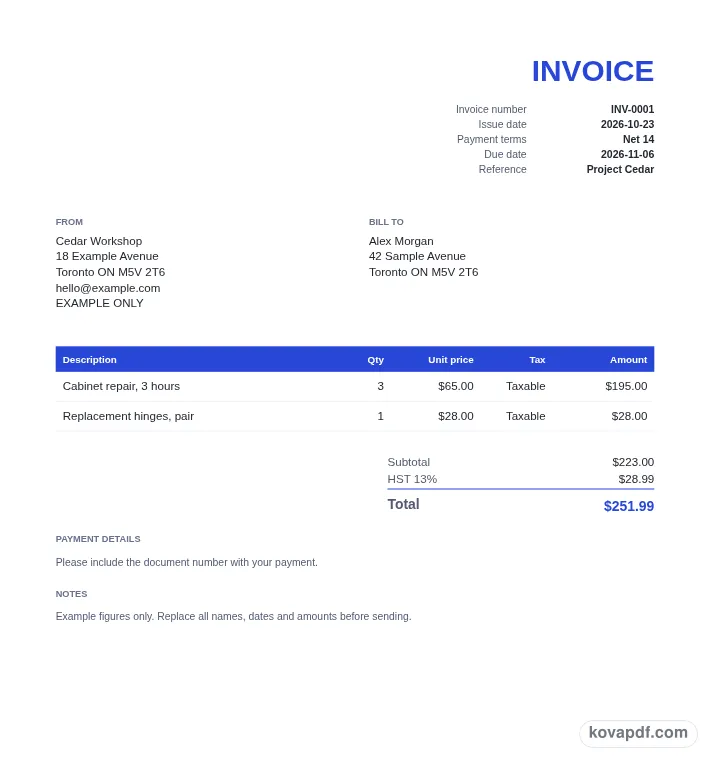
Use the download controls above the preview. Open the saved file and give it one final read before sharing.

Read the document as you fill in the form.
Compare Classic, Modern and Minimal layouts.
Save a copy when the names and figures are right.
The generator works on this device.
Use A4 or Letter and check the page breaks.
Return to the form to correct a detail before sharing.
These are fictional details. Choose an example, then replace them with your own.
Start with supplier and registration and province or territory. Replace the fictional sample with information from your own records.
Check pst or qst choices beside cad amount checks. Read each page from the perspective of the person approving the bill.
Choose PDF or Word above the preview. Check foreign currency notice in the saved copy before sharing it.
A simple Canadian GST/HST invoice leaves space for the details that matter to the person approving the bill. The Minimal style keeps decoration quiet while you ask a customer to pay for agreed work. The illustration shows a Canadian GST/HST invoice for a service visit with separately listed parts. Replace that example with your own information and keep enough context for a reader who was not part of the original conversation.
Keep supplier and registration specific in a simple Canadian GST/HST invoice. Here, the business details used for the sale shows the sort of entry to replace. The example identifier is fictional and must be replaced or removed as appropriate. Minimal uses less decoration, which leaves the actual Canadian GST/HST invoice wording doing more of the work. Check province or territory as well. Shortening an entry is useful only when the person approving the bill can still understand what it means.
Keep province or territory specific in a simple Canadian GST/HST invoice. Here, the location selected for the sale shows the sort of entry to replace. The provincial selection affects the tax choices shown in the generator and should match your checked transaction information. Minimal uses less decoration, which leaves the actual Canadian GST/HST invoice wording doing more of the work. Check gST and HST breakdown as well. Shortening an entry is useful only when the person approving the bill can still understand what it means.
Keep gST and HST breakdown specific in a simple Canadian GST/HST invoice. Here, the labeled tax rows in the preview shows the sort of entry to replace. The tool lays out the amounts from your selections; it does not decide how a particular sale should be classified. Minimal uses less decoration, which leaves the actual Canadian GST/HST invoice wording doing more of the work. Check pST or QST choices as well. Shortening an entry is useful only when the person approving the bill can still understand what it means.
Keep pST or QST choices specific in a simple Canadian GST/HST invoice. Here, the additional choice relevant to your selected province shows the sort of entry to replace. Only add PST when registered to collect it in that province, as the form reminder states. Minimal uses less decoration, which leaves the actual Canadian GST/HST invoice wording doing more of the work. Check taxable and zero-rated items as well. Shortening an entry is useful only when the person approving the bill can still understand what it means.
Keep taxable and zero-rated items specific in a simple Canadian GST/HST invoice. Here, a separate status for each listed supply shows the sort of entry to replace. A mixed list needs enough detail for the reader to see which treatment you applied to each item. Minimal uses less decoration, which leaves the actual Canadian GST/HST invoice wording doing more of the work. Check cAD amount checks as well. Shortening an entry is useful only when the person approving the bill can still understand what it means.
Keep cAD amount checks specific in a simple Canadian GST/HST invoice. Here, the total shown in Canadian dollars shows the sort of entry to replace. Read the registration and tax checks at $100 or more, and the additional buyer, description and payment term checks at $500 or more. Minimal uses less decoration, which leaves the actual Canadian GST/HST invoice wording doing more of the work. Check payment terms as well. Shortening an entry is useful only when the person approving the bill can still understand what it means.
Keep payment terms specific in a simple Canadian GST/HST invoice. Here, the agreed due date for the customer shows the sort of entry to replace. Changing a tax setting should not distract you from checking the basic instructions for paying the bill. Minimal uses less decoration, which leaves the actual Canadian GST/HST invoice wording doing more of the work. Check foreign currency notice as well. Shortening an entry is useful only when the person approving the bill can still understand what it means.
Keep foreign currency notice specific in a simple Canadian GST/HST invoice. Here, a chosen invoice currency other than CAD shows the sort of entry to replace. Read the currency notice and check the underlying information before treating the draft as ready to share. Minimal uses less decoration, which leaves the actual Canadian GST/HST invoice wording doing more of the work. Check supplier and registration as well. Shortening an entry is useful only when the person approving the bill can still understand what it means.
Use the extra visual space in the simple Canadian GST/HST invoice to make the wording precise. For example, a separate status for each listed supply gives more context than a label copied without thought. Keep that context if the person approving the bill would otherwise need to ask what the entry covers. Read payment terms separately from the heading: a plain layout still needs the details that explain the situation. The Design controls let you compare paper sizes without rewriting your text. After changing size, read the page breaks and the final lines in Preview. If the Canadian GST/HST invoice needs another page, keep the necessary wording. A simple document is one the intended reader can follow, even when a Canadian GST/HST invoice for a service visit with separately listed parts requires more than a short note.
Keep the information needed to ask a customer to pay for agreed work. Simpler styling does not mean omitting pST or QST choices or making cAD amount checks unclear. Review optional entries individually instead of removing detail just to shorten the page.
Yes. Length follows the text and entries you provide. The Minimal design is a visual choice rather than a one-page promise. Read each page, including the final foreign currency notice entry, before downloading.
Use the form to enter province or territory and then work through cAD amount checks. The preview updates from your entries. All names and figures in the gallery are fictional and need checking before use.
PDF preserves the previewed page arrangement. Word provides editable text and may reflow when opened. Use the current draft to ask a customer to pay for agreed work; whichever format you choose, inspect the saved copy before sharing it with the person approving the bill.
No. Download the checked copy, then choose how to share it. Your entries are used on this device. On a shared computer, clear the saved draft when you no longer want those details stored in the browser.