Preview every page
Read the document as you fill in the form.
Ask a customer to pay for agreed work. Compare the filled example, check each detail and save your own copy.
All set
If the supply happened on a different day from the invoice date, add it.
Simplified invoices may be used for amounts up to €100.
Based on official guidance from the Revenue Commissioners, checked 22 October 2026. This tool helps you lay out an invoice; it is not tax advice.
These pictures show the same document generator with fictional example details.
Replace the example names and contact details in the form. Keep only information that belongs in this document.
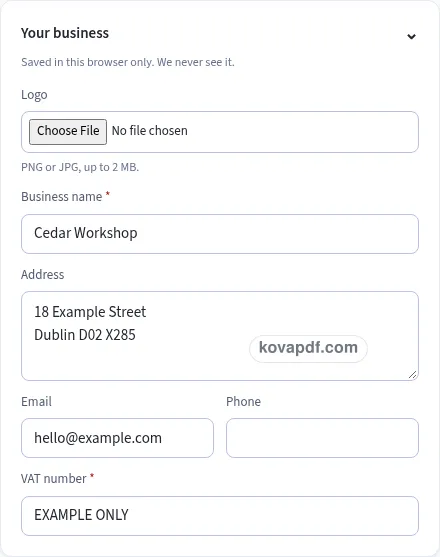
Check the page preview after changing the text. Read the amounts, dates and page breaks before exporting.
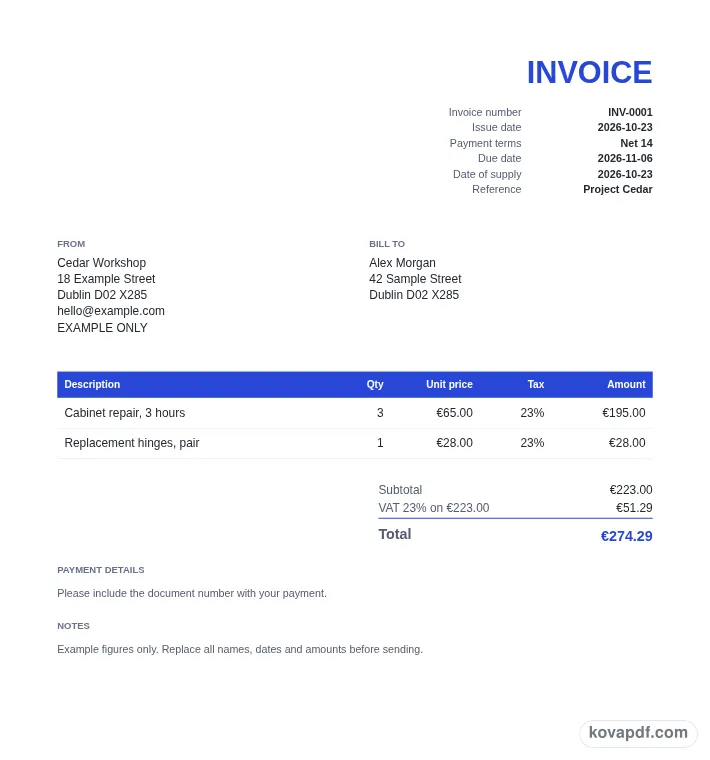
Use the download controls above the preview. Open the saved file and give it one final read before sharing.

Read the document as you fill in the form.
Compare Classic, Modern and Minimal layouts.
Save a copy when the names and figures are right.
The generator works on this device.
Use A4 or Letter and check the page breaks.
Return to the form to correct a detail before sharing.
These are fictional details. Choose an example, then replace them with your own.
Start with supplier name, address and vat number and customer identity. Replace the fictional sample with information from your own records.
Check date of supply beside vat breakdown and discount. Read each page from the perspective of the person approving the bill.
Choose PDF or Word above the preview. Check euro amounts in the saved copy before sharing it.
A professional Irish VAT invoice gives the person approving the bill a familiar structure to read. This Classic version is filled with a Irish VAT invoice for a service visit with separately listed parts. Use it to ask a customer to pay for agreed work, then replace the fictional details before sharing it. The style is a presentation choice. It does not verify the facts or change the meaning of the wording you enter.
For the Irish VAT invoice, start this part with supplier name, address and VAT number. The example uses the seller details from your own registration records. Keep the full business identity together. A logo or trading name does not replace the address and registration entries expected in the supplier block. Read this entry beside customer identity before you keep it. That comparison helps the person approving the bill understand the Irish VAT invoice without a separate explanation. The Classic layout gives the wording a clear place on the page, but the information still needs your attention.
For the Irish VAT invoice, start this part with customer identity. The example uses the buyer name, address and VAT number. Review the customer block carefully, especially where the buyer is a business. Use the details intended for this transaction rather than another account with a similar name. Read this entry beside sequential number and issue date before you keep it. That comparison helps the person approving the bill understand the Irish VAT invoice without a separate explanation. The Classic layout gives the wording a clear place on the page, but the information still needs your attention.
For the Irish VAT invoice, start this part with sequential number and issue date. The example uses the next invoice reference in your records. Give the invoice an identifiable number and a checked date. A restored draft may still contain the reference of an earlier transaction. Read this entry beside date of supply before you keep it. That comparison helps the person approving the bill understand the Irish VAT invoice without a separate explanation. The Classic layout gives the wording a clear place on the page, but the information still needs your attention.
For the Irish VAT invoice, start this part with date of supply. The example uses the actual supply date where it differs. Use the separate field to make that date explicit. Compare it with the issue date so the finished document describes the timing of the supply accurately. Read this entry beside rate per item before you keep it. That comparison helps the person approving the bill understand the Irish VAT invoice without a separate explanation. The Classic layout gives the wording a clear place on the page, but the information still needs your attention.
For the Irish VAT invoice, start this part with rate per item. The example uses the checked VAT choice for the item. Select the rate or status for each listed supply. The tool provides choices and a calculation, not a decision about the correct treatment of your particular sale. Read this entry beside vAT breakdown and discount before you keep it. That comparison helps the person approving the bill understand the Irish VAT invoice without a separate explanation. The Classic layout gives the wording a clear place on the page, but the information still needs your attention.
For the Irish VAT invoice, start this part with vAT breakdown and discount. The example uses the net value and tax groups after an agreed discount. Read the totals after changing quantities or discounts. Check that the customer can follow the net charge and VAT without reconstructing the calculation from an unexplained total. Read this entry beside reverse charge details before you keep it. That comparison helps the person approving the bill understand the Irish VAT invoice without a separate explanation. The Classic layout gives the wording a clear place on the page, but the information still needs your attention.
For the Irish VAT invoice, start this part with reverse charge details. The example uses the customer VAT number and the visible reverse charge note. Use this option only when it applies based on your checked information. The generator looks for the customer VAT number and prints the corresponding note. Read this entry beside euro amounts before you keep it. That comparison helps the person approving the bill understand the Irish VAT invoice without a separate explanation. The Classic layout gives the wording a clear place on the page, but the information still needs your attention.
For the Irish VAT invoice, start this part with euro amounts. The example uses the EUR VAT amounts for a foreign-currency invoice. Enter an exchange rate when it is required for those amounts. Changing the invoice currency label alone does not convert the values you have already entered. Read this entry beside supplier name, address and VAT number before you keep it. That comparison helps the person approving the bill understand the Irish VAT invoice without a separate explanation. The Classic layout gives the wording a clear place on the page, but the information still needs your attention.
Before choosing a final file, compare the Classic heading with the first block of Irish VAT invoice details. Keep supplier name, address and VAT number readable without enlarging the whole page. Then follow the document through rate per item to the ending. On a printed copy, the reader has no form controls to reveal what an unclear entry was meant to say. Use A4 or Letter to match the paper you intend to use and read every page after switching. A longer Irish VAT invoice can flow onto another page. Keep the complete text when it is needed to explain a Irish VAT invoice for a service visit with separately listed parts; a conventional appearance is not a reason to cut information the reader needs. Save the version you checked so later changes do not become confused with it.
Classic gives the Irish VAT invoice a conventional heading and clear divisions. Use it when the person approving the bill needs a familiar document to file or compare. Still read sequential number and issue date and rate per item before saving.
No. The appearance does not verify supplier name, address and VAT number or settle questions about reverse charge details. You supply the underlying facts and arrange any review needed for the situation.
Use the form to enter customer identity and then work through vAT breakdown and discount. The preview updates from your entries. All names and figures in the gallery are fictional and need checking before use.
PDF preserves the previewed page arrangement. Word provides editable text and may reflow when opened. Use the current draft to ask a customer to pay for agreed work; whichever format you choose, inspect the saved copy before sharing it with the person approving the bill.
No. Download the checked copy, then choose how to share it. Your entries are used on this device. On a shared computer, clear the saved draft when you no longer want those details stored in the browser.