Convert PDF to editable Word
Every word comes across as real text you can type over, in the font and size it had, with tables rebuilt as Word tables.
- Keeps your layout
- Works on any device
- Deleted after processing
- A genuinely editable .docx
- Text in positioned, editable boxes
- Tables and images carried over
- Opens in Word or LibreOffice
Drag & drop file here
or choose a file from your device
PDF files only
On your computer? Get the Windows appOn your phone? Get the phone app
Everything PDF to Word can do
Turn a PDF into a real .docx you can rewrite in Word, free and online, with no account.
Text you can edit
- Real, selectable Word text, not a picture of a page
- Typeface, size, weight, italics and colour carried across
- Each line keeps the break and spacing the PDF gave it
- Every page becomes its own Word section
- Page size, orientation and margins taken from each page
Tables and rules
- Rules the page actually drew become real Word tables
- The source's own column widths, row heights and merges
- Border thickness reproduced edge by edge
- Loose rules become paragraph borders at their exact position
- Underlines land on the text they sit beneath
Logos and artwork
- Logos, seals, barcodes and signatures floated at their own coordinates
- Shaded banners and coloured blocks come across with the page
- A scanned page is placed whole, so it prints like the original
Your route through it
- Switch the target to Excel or PowerPoint without uploading again
- Download the same document in another Office format afterwards
- Open the PDF in the PDF Editor first and still finish in Word
- Send a scan to OCR PDF and finish in Word
How it works
Convert PDF to editable Word in three steps
Add the PDF
Drop it in. A PDF with real text is converted in your browser.
Create Word File
Standard Conversion is the one for typed documents. A scan needs OCR Enhanced.
Download the .docx
Open it in Word, Pages or Google Docs and change what you need.
Convert PDF to editable Word: a visual walkthrough
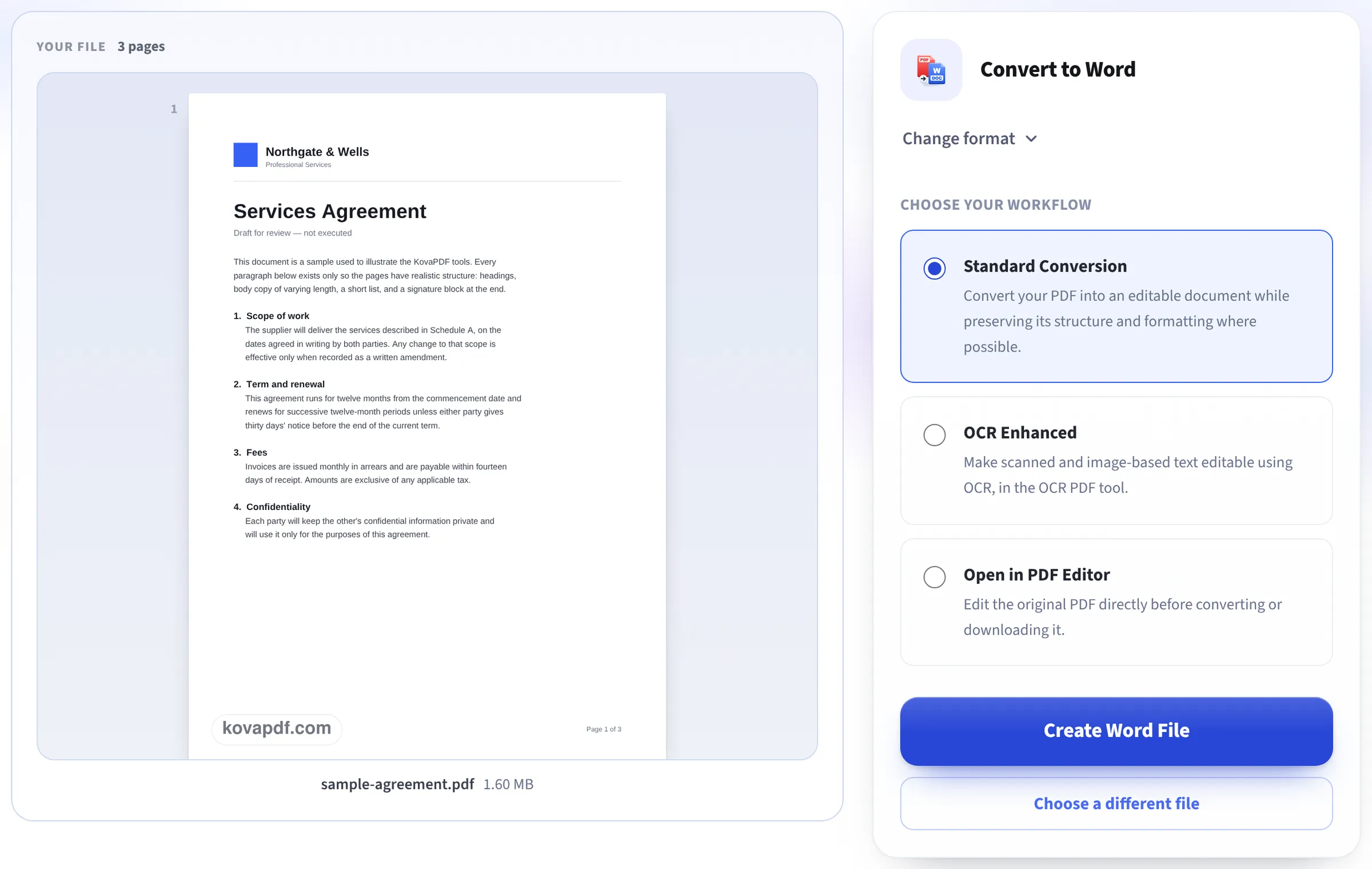
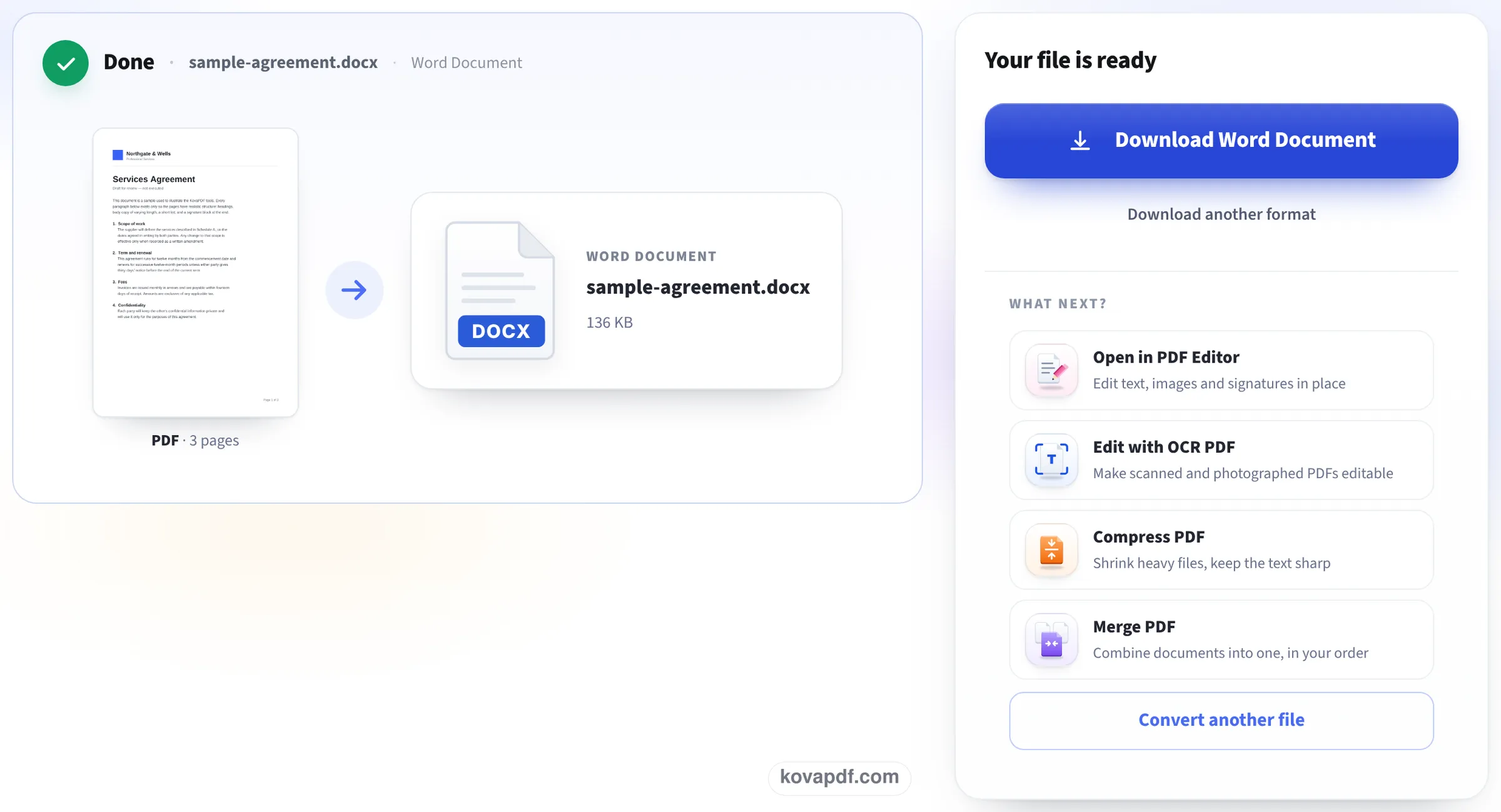
Three screens from this page, photographed while converting our sample agreement: the box you drop the PDF into, the workflow choice with the file already read, and the finished Word file.
Drop the PDF on the page
The upload box takes one PDF. A document typed on a computer has a text layer, so it is read in your browser and nothing is sent anywhere for this step.

Leave Standard Conversion on and press Create Word File
The first page appears on the left with its page count. Standard Conversion turns the text layer into Word text; OCR Enhanced is only for scans, and Open in PDF Editor lets you fix the PDF first.
Save the Word document
Done shows the PDF on one side and the .docx on the other with its size. Download Word Document saves it; Download another format gives Excel or PowerPoint from the same file.
Three of our PDFs in Word, and one scan
We converted our own PDFs on this page with Standard Conversion and opened each .docx to count words, paragraphs and tables and read the fonts. Measured on October 24, 2026.
| Word file | What we found | |
|---|---|---|
| 3-page letter, 22.3 KB | 11.1 KB | All 931 words as editable text in Times New Roman 12 pt, as in the PDF; 77 lines, each its own paragraph |
| 1-page invoice with a table | 9.4 KB | A real 8 × 4 Word table with every amount in its own cell; heading and payment line as text; all 62 words |
| 10-page report, 44.7 KB | 13.7 KB | All 2,140 words over 10 pages, one Word section per page |
| 1-page scan (no text layer) | 215 KB | The page as a picture with a notice saying so; no editable words |
Keeping the look of the PDF means each line sits where it was on the page. Changing a word, a figure or a name inside a line works as in any Word file. A long new sentence makes its own line longer instead of pushing the next lines down, so for heavy rewriting, copy the text into a fresh document.
A scan has no text to convert. OCR Enhanced reads it first: see Scanned PDF to Word.
Why some PDF to Word files are not really editable
A converter can cheat in two ways: put a picture of each page into Word, which looks perfect but has nothing to edit, or pour all the text into one long paragraph, which is editable but loses every heading, table and column. Both are common.
This one does neither: the words are real text with their own fonts, tables are Word tables, and the page layout is kept. When a page has no text at all, because it is a scan, the result screen says so instead of quietly handing you a picture.
Getting the most out of the Word file
A few tips once it is open:
- Small corrections (a date, a name, a figure in a table): click and type.
- Rewriting whole paragraphs: copy the text into a new document and apply your own styles.
- Need only the words? PDF to Text gives plain text without any layout.
- Just a few changes and the result should stay a PDF? Edit it directly in the PDF Editor instead.
Good to know
A font that is not installed on your computer is shown by Word in a similar one. A password-protected PDF needs unlocking first. The .docx opens in Word, Pages and Google Docs.
Read next: Scanned PDF to Word · PDF to PowerPoint, editable · Edit a PDF on Mac
Frequently asked questions about Convert PDF to editable Word
How do I convert a PDF to an editable Word document?
Add it here and press Create Word File. The .docx has real text you can change, in the PDF's fonts and sizes, with tables as Word tables.
Will the formatting be kept?
Fonts, sizes, bold, italic, tables and the position of every line are kept. Our 3-page letter came back in Times New Roman 12 pt, like the PDF.
Why can't I edit my converted file?
The PDF was probably a scan, so there was no text to convert, only a picture. Use OCR Enhanced to read the words first.
Is my PDF uploaded?
A PDF with real text is converted in your browser and stays on your device. Scans go to our server, which deletes them once the file is built.
Can I open the result in Google Docs or Pages?
Yes. It is a standard .docx file.
Do I need Microsoft Word to do this?
No. The conversion runs in your browser; you only need something to open the .docx afterwards.
Convert PDF to editable Word guides and articles




Related tools
All PDF tools · 15 step-by-step guides · How your files are handled
Also: PDF to Word · Scanned PDF to Word