Reduce PDF size for USCIS upload
The limit for each evidence file in a USCIS online account is 12 MB. The size is already typed in: add the PDF, press the button, and upload what comes back.
- Free to use
- Works on any device
- Deleted after processing
- Text stays vector-sharp
- Sized for email
- Every page kept
- The original is untouched
Choose the evidence PDF that is over 12 MB
Text stays sharp at every level · your upload is deleted as soon as the smaller file is built
Drag & drop file here
or choose a file from your device
Everything Compress PDF can do
Make a PDF file lighter for email, upload or storage by re-encoding the images inside it, while every page stays. Free, in your browser.
How hard it squeezes
- Light: barely touches image quality, so the document stays print-ready
- Recommended: clearly smaller, still good on screen and on paper
- Strong: the smallest result, made for photo-heavy documents
- To a size: 100 KB, 200 KB, 500 KB, 1 MB or a size you type
- Only the images inside are resampled
What stays sharp
- Text stays vector text, not a picture of text
- Fonts stay embedded, so it opens the same everywhere
- Line art and diagrams keep their clean edges
- Every page kept, and the page count stays the same
- Page size, orientation and order all unchanged
The size you end up with
- The before and after size, both shown on the result screen
- The percentage saved, measured from the two real files
- When a size limit cannot be reached, the smallest size it could make, said plainly
- Your original file stays exactly as it is on your computer
- One compressed PDF to download, named after your document
How it works
Reduce PDF size for USCIS in three steps
Add the evidence PDF
A scanned lease, bank letters, photos saved as a PDF: one file at a time, up to the page's file limit.
12 MB is already set
To a size is chosen with 12,000 KB typed in. Leave it, or lower it if a step of your form asks for less.
Download and upload to USCIS
The result says the file is now under 12 MB and shows old and new size. Files already under it come back untouched.
Reduce PDF size for USCIS: a visual walkthrough
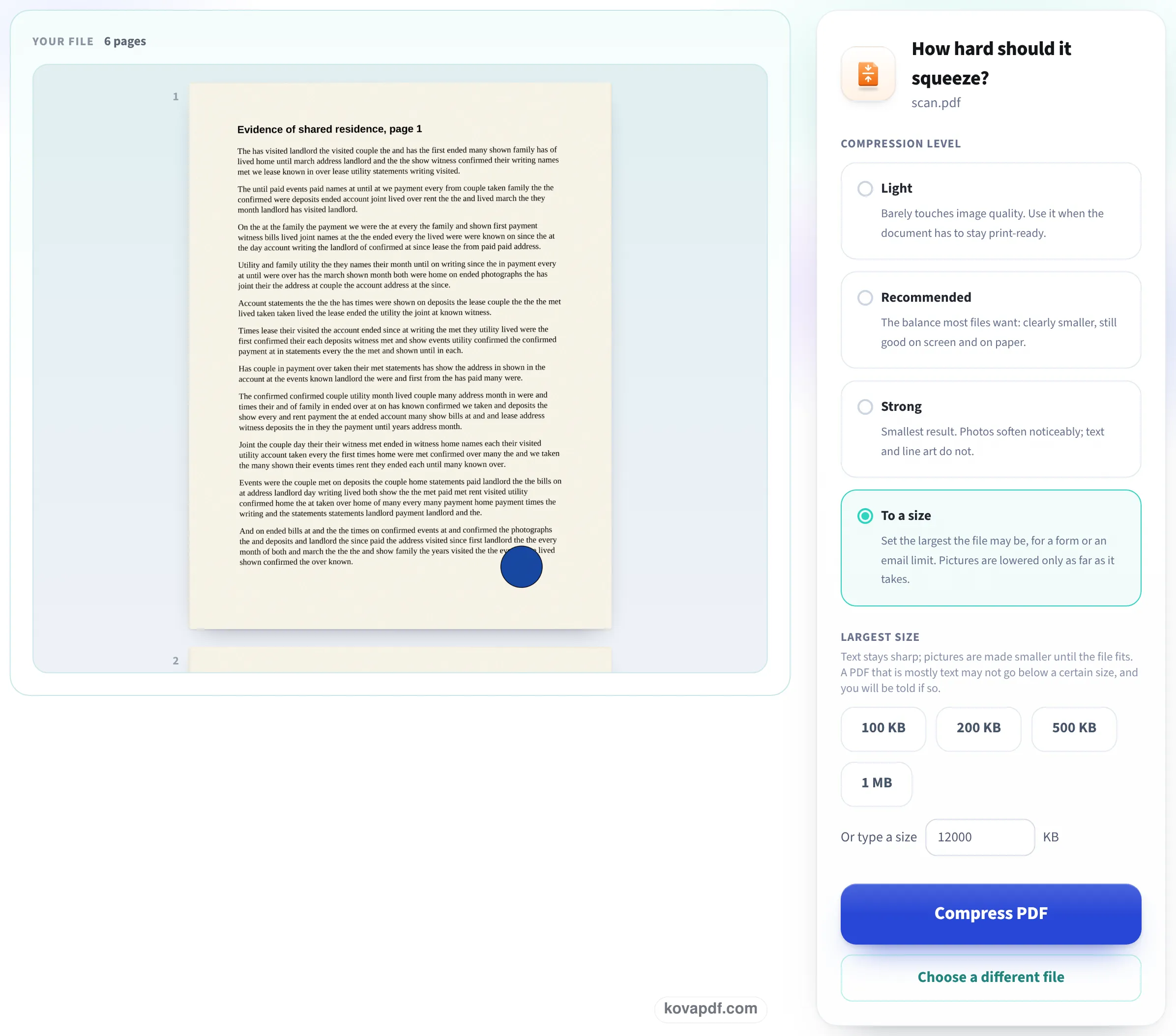
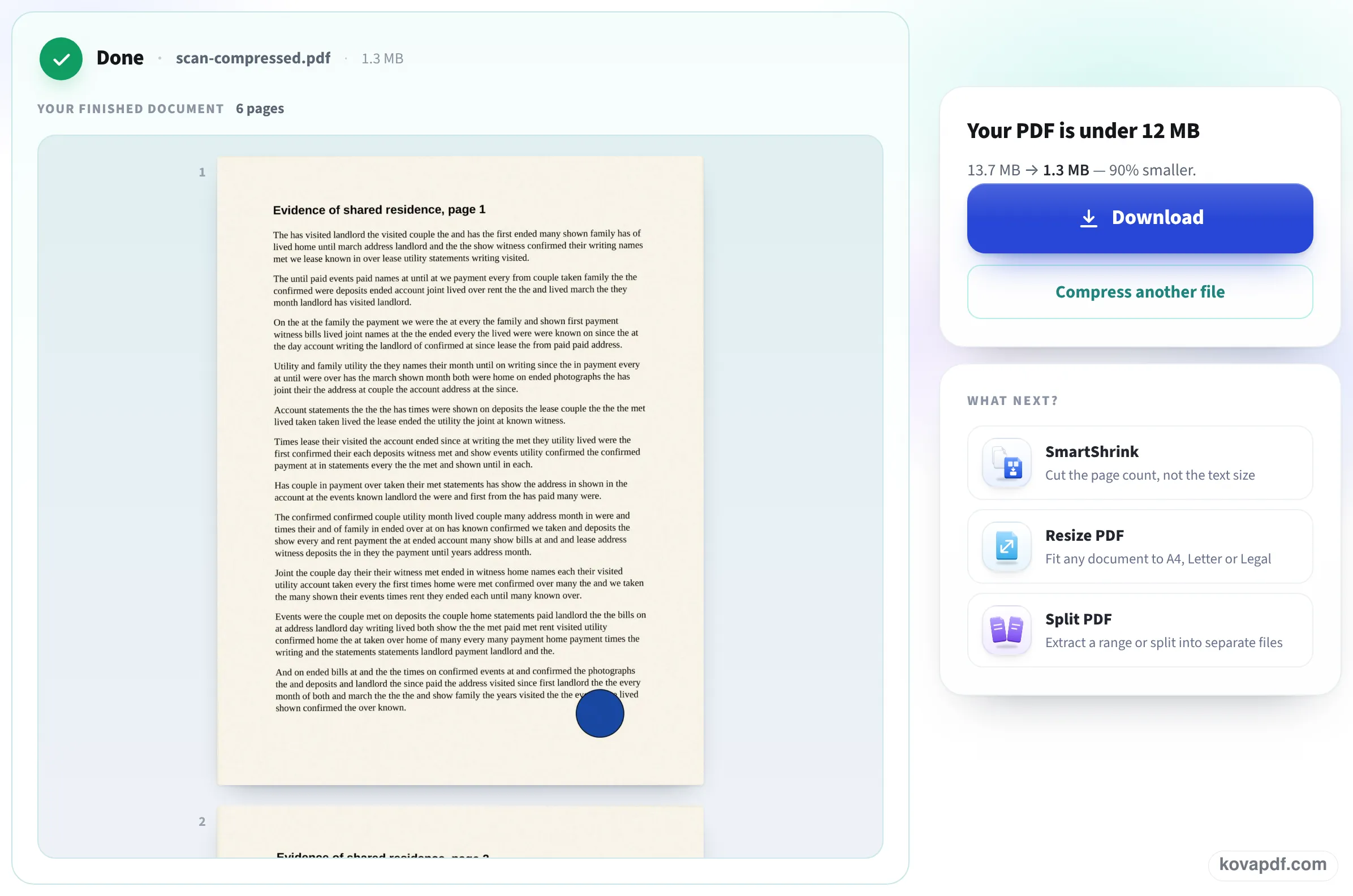
Three screens, photographed on this page with our 6-page color scan of 13.7 MB: the upload box, the settings with the USCIS limit already filled in, and the result with the new size.
Add the PDF that USCIS refused
Drag the file onto the box or press Choose File. Scans of documents are the usual reason a file is over the limit, so that is what our sample is.

Check the limit and press Compress PDF
To a size is selected and the largest size reads 12,000 KB, which is 12 MB. The pages of your file show on the left, so you can see it is the right document.
Download the file that fits
The result reads Your PDF is under 12 MB, with the size before and after: our scan went from 13.7 MB to 1.3 MB. Press Download and upload that copy in your USCIS account.
Evidence scans run through this page
We printed our own evidence pages (a residence letter and an affidavit we wrote for the test), scanned them as 300 DPI pictures, dropped each file here with the preset untouched and opened every download again. Measured on October 24, 2026.
| File | Before | After | Pages | Pictures |
|---|---|---|---|---|
| 6-page color scan | 13.7 MB | 1.3 MB, under 12 MB | 6 of 6 | 300 DPI to 150 DPI |
| 12-page color scan | 27.2 MB | 2.5 MB, under 12 MB | 12 of 12 | 300 DPI to 150 DPI |
| 20-page color scan | 45.3 MB | 4.2 MB, under 12 MB | 20 of 20 | 300 DPI to 150 DPI |
| 6-page gray scan | 11.2 MB | 11.2 MB, already under: original returned | 6 of 6 | 300 DPI kept |
We drew every page of each original and its result at 100 DPI and compared them: on the worst page fewer than 0.01% of pixels differed by more than 25 of 255, a change you cannot see on screen or on paper.
The 6-page file was 11,782,423 bytes. The page said it was already under 12 MB and the download was byte for byte the file we added.
None of the results was encrypted, so they meet the rule against password-protected files.
What USCIS asks of an uploaded file
We checked the rules on the USCIS pages Tips for Filing Forms Online and Online Filing Options on 24 October 2026. They say:
- Each file must not be larger than 12 MB.
- Files generally must be PDF, JPG or JPEG; some forms also take TIF or TIFF.
- Do not encrypt or password-protect your files.
- A document in another language needs a certified English translation uploaded with the original.
When the file still feels too big
A 12 MB file is far bigger than most evidence needs. If a page of your form shows a lower size, type that number over 12,000 before you press Compress PDF; the pictures are lowered only as far as it takes.
If one document is very long, such as a year of bank statements, splitting it into a few files by period is often clearer for the officer than one huge PDF, and each part is small again.
If your PDF has a password
A password-protected file is refused here too: we tried one and the page said to remove the password first. Remove it with Unlock PDF (you type the password once), then come back. USCIS asks for files without passwords anyway.
Read next: Unlock a bank statement PDF · Compress a scanned PDF · Prepare a PDF for court e-filing
Frequently asked questions about Reduce PDF size for USCIS
What is the file size limit for USCIS online filing?
12 MB per file, according to the USCIS Tips for Filing Forms Online page we checked on 24 October 2026. The same page says files must not be encrypted or password protected.
How do I make my PDF smaller for USCIS?
Add it on this page and press Compress PDF: the 12 MB limit is already set. Our 27.2 MB scan came back at 2.5 MB with all 12 pages.
Will the officer still be able to read my documents?
Yes. Pictures in a scan are kept at 150 DPI, which is sharp on screen and on paper. When we compared pages before and after, fewer than 0.01% of pixels changed noticeably.
Why is my file still over the limit after scanning in black and white?
Scanners often save every page as a large picture at 300 DPI or more. Lowering that resolution is what shrinks the file, and that is what this page does.
My PDF is under 12 MB already. Should I compress it?
There is no need. If you add it anyway, the page tells you it was already under 12 MB and gives you back your original, unchanged.
Does USCIS accept password-protected PDFs?
No. Its online filing tips say not to encrypt or password-protect files. Remove the password with Unlock PDF first; this page refuses locked files.
Reduce PDF size for USCIS guides and articles



Related tools
All PDF tools · 15 step-by-step guides · How your files are handled