Getting the most out of PDFs
PDF file size exceeds the limit allowed: how to make it fit
In short
Find the receiving form’s actual size cap, then create and measure a smaller working copy. Use a target below the cap and reopen the result before uploading. If readable compression cannot meet the requirement, ask which alternative submission method is accepted.
Try it on your file
Make your PDF fit the limit
Choose To a size and type the form's limit. Pictures are lowered only as far as it takes; the text stays sharp.
Make a heavy PDF smaller
Text stays sharp at every level · your upload is deleted as soon as the smaller file is built
Drag & drop file here
or choose a file from your device
What limit is the form actually enforcing?
Read the message beside the upload field, including whether it applies per file or to the whole submission. A cap for one attachment is different from a total cap across several files. File type, page count and password rules can also cause rejection even when the byte size is small enough.
Record the exact cap and current file size before opening Compress PDF. Keep the original separately. A filename such as smaller-final.pdf does not establish how many bytes the file contains.
What did a target-size run achieve?
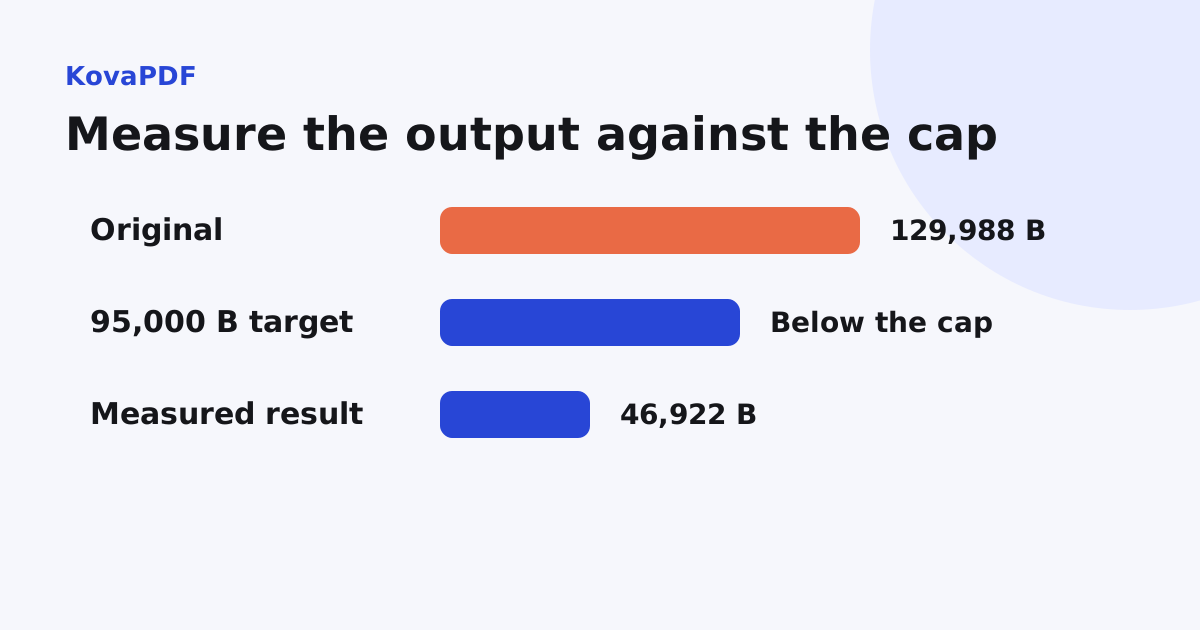
We ran KovaPDF's target compression on a 129,988 byte, 3 page scanned fixture with a target of 95,000 bytes. It returned 46,922 bytes and reported that the target was met. All three pages remained.
This was a simple controlled document. The result does not predict the smallest readable size of your application, contract or scan. A target is something to test, and the tool's achieved result is the fact to compare with the receiving form.
How do I retry without guessing?
- Confirm the receiving cap and allowed file type.
- Run a compression target below that cap on a copy.
- Check the downloaded file's actual bytes.
- Reopen the first, final and most detailed pages.
- Upload that reviewed output and keep the receipt or error message.
A small buffer below the cap avoids relying on ambiguous displayed rounding. For a cap expressed as 100 KB, the 100 KB guide explains why exact bytes and readability need special attention.
What if compression does not save enough?
Inspect the reason the PDF is heavy using the file-size diagnosis. A typed document may already be compact. Image-heavy scans can have more room for reduction, but there is a point where small text and stamps no longer survive acceptably.
Do not remove required pages, erase evidence or turn a legible document into an unreadable one just to satisfy the cap. Ask whether the receiver accepts several files, a different authorised channel or an updated source export. Use Split PDF only when the recipient permits separate components.
What if it fits and still fails?
Check that the file is a real PDF, can be opened, meets the page limit and is not password protected when the form forbids that. Check the total size of all attachments. Preserve the exact error rather than assuming every failed upload is still a compression problem.
Try the reviewed output in the receiving workflow only after confirming those requirements. If the form gives no useful explanation, send the responsible support team the error details and file properties through their approved route.
How is an email rejection different?
Email adds message encoding and has sender and recipient limits. If the problem occurs in mail rather than a web form, follow the attachment guide. The file may be below one advertised attachment cap while the complete encoded message exceeds another.
Common questions
Should I aim exactly at the displayed upload cap?
Use an output safely below it and compare actual bytes. A rounded size display can hide that the cap is still exceeded.
Does setting a target guarantee success?
No. Check the achieved output and target status. Some documents cannot fit readably at the requested size.
Can I split the PDF to solve the rejection?
Only when the recipient permits separate components. Do not omit required pages or change the submission structure without acceptance.
What if a small enough file still fails?
Check file type, page count, encryption rules and the total attachment size, then retain the exact error.