Getting the most out of PDFs
Why is my PDF so large?
In short
PDF size depends on the objects stored inside it, not just its page count. Large scans, repeated images, embedded fonts and retained revisions can dominate the bytes. Identify the likely payload before reducing quality or rearranging pages.

Why does page count predict so little?
A page with a few text objects can be small. A page containing a high resolution photograph can be much larger. Two PDFs with the same visible page count can therefore have very different payloads. A blank-looking page can also reference large objects elsewhere in the file.
Start by checking whether the document is mostly typed content, scans or photographs. Compress PDF changes byte size. It should not be confused with a layout tool that places several original pages onto a new sheet.
What did our files weigh?
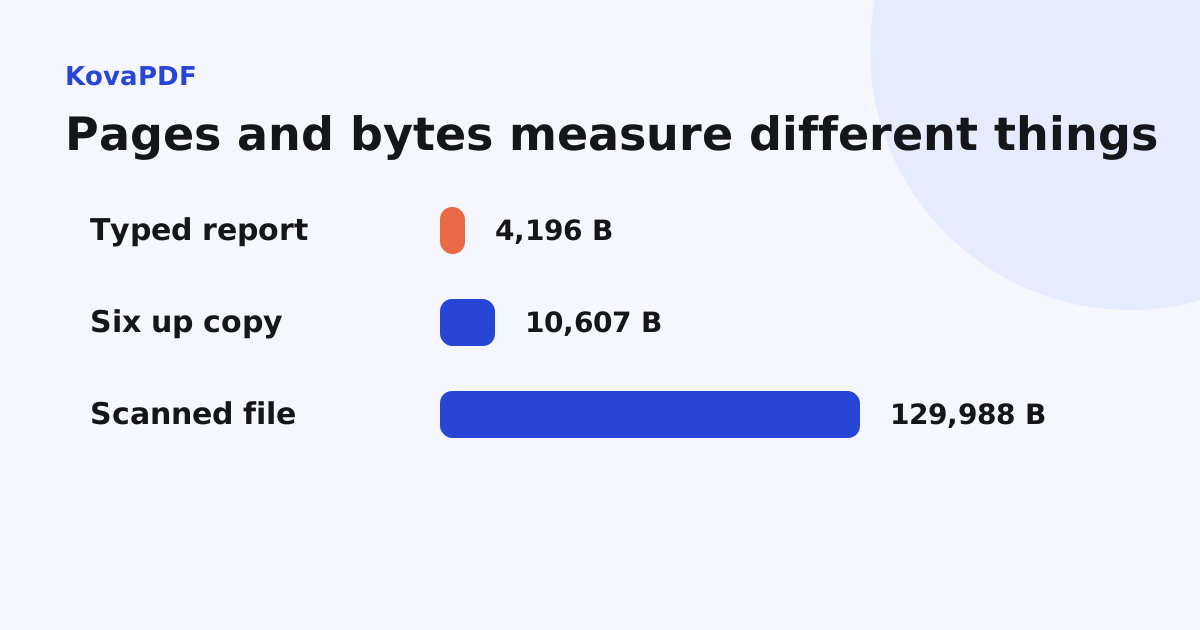
Our 12 page typed report used 4,196 bytes. A fixed six-up layout made 2 pages but used 10,607 bytes before optimisation. A separate 3 page scanned fixture used 129,988 bytes. Fewer pages did not imply fewer bytes.
The six-up layout introduced new page-placement structure. The scan carried images. These measurements explain why diagnosing the contents is more useful than assuming that any long document is heavy or any short document is light.
Are pictures the main cause?
Often, especially for scans. Pixel dimensions, colour and image encoding all affect the payload. A full page camera image can hold far more detail than its final use needs. Repeatedly embedding copies of a picture can add more data than reusing one object, depending on how the file was created.
The scanned PDF size guide focuses on capture settings. For a file that is already made, compare a compressed working copy with the original at the smallest important detail. Do not assume a large percentage saving is useful if a reference number becomes unreadable.
Can fonts and revisions matter too?
Yes. Embedded font data, attachments and retained editing or signing revisions can contribute bytes even when the page appearance is simple. A certificate signature also adds structures and evidence that are not ordinary visible text.
Keep signed originals. Rewriting their bytes to remove overhead can affect verification. Do not describe every nonvisual object as waste: some objects preserve accessibility, forms, links or evidence the recipient needs.
How should I choose the next operation?
If an upload reports a maximum file size, follow the upload limit workflow. If an email fails, use attachment diagnosis, which also considers message overhead and delivery errors. If the file is easy to send but wasteful to print, use the compression versus page count decision.
An unusually small target such as under 100 KB needs a separate acceptance test. It may be impossible without changing content or readability. Keep those decisions explicit rather than treating a target number as a promise.
What should I measure after changing it?
Record bytes, page count and a visual check of critical details. Check any text, forms or signatures required by the workflow. A smaller downloaded file is only one part of a successful result.
Keep the source and the best acceptable output separately. If several compression passes are needed, return to the original rather than repeatedly degrading the previous output. The right result is the smallest copy that still fulfils the document's purpose.
Common questions
Does a PDF with fewer pages always use fewer bytes?
No. Our twelve page typed fixture was 4,196 bytes, while its two page fixed six-up copy was 10,607 bytes before optimisation.
What commonly makes a scan heavy?
Large image dimensions, colour information, image encoding and repeated image payloads can dominate its size.
Is every nonvisible object unnecessary?
No. Fonts, accessibility information, forms and signature evidence may be needed even when they are not obvious on the page.
What should I record after compression?
Record actual bytes and page count, then check legibility and any required document features.
KovaPDF on your computer and phone
Use KovaPDF on your computer, where many tools work with no internet, and on your phone. The same account works in both.