PDF to JPG High Resolution
300 DPI is already chosen: every page comes out as a sharp JPG, about 2550 × 3300 pixels for a Letter page, ready to print.
- Keeps your layout
- Works on any device
- Stays on your device
Choose the PDF to turn into high-resolution JPGs
Every page as PNG or JPG at 72, 150 or 300 DPI, or just the pictures inside · one PDF or many at once · your PDFs stay on your device and are never uploaded
Drag & drop files here
or choose a file from your device
Everything PDF to JPG can do
Save the pages of a PDF as JPG pictures, ready to share, post or drop into a slide. Free, online.
Which pages
- Every page, one page, or a range such as 2-5 or 1,4,9
- Only the photos inside the PDF instead, each at its own resolution
The JPGs
- 72, 150 or 300 DPI; 150 makes an A4 page about 1240 × 1754 pixels
- Small for photo pages: our photo page came out at 94 KB as a JPG, against 546 KB as a PNG
- Named page-001, page-002 and so on, in one ZIP when there are several
How it works
PDF to JPG high resolution in three steps
Add your PDF
Drop it in or pick it. The pages are drawn in your browser; nothing is uploaded.
300 DPI and JPG are set
Leave Pages empty for all pages, or type 1 or 2-4 for some. Choose PNG for the crispest text edges.
Download
One page comes as a single JPG; several come as a ZIP named page-001.jpg, page-002.jpg and so on.
PDF to JPG high resolution: a visual walkthrough
The three screens of a high-resolution conversion, photographed on this page with our three-page sample agreement.
Add the PDF
Drag the PDF onto the box or click it to choose one. The file is opened by your browser, so even a long document is not sent anywhere.

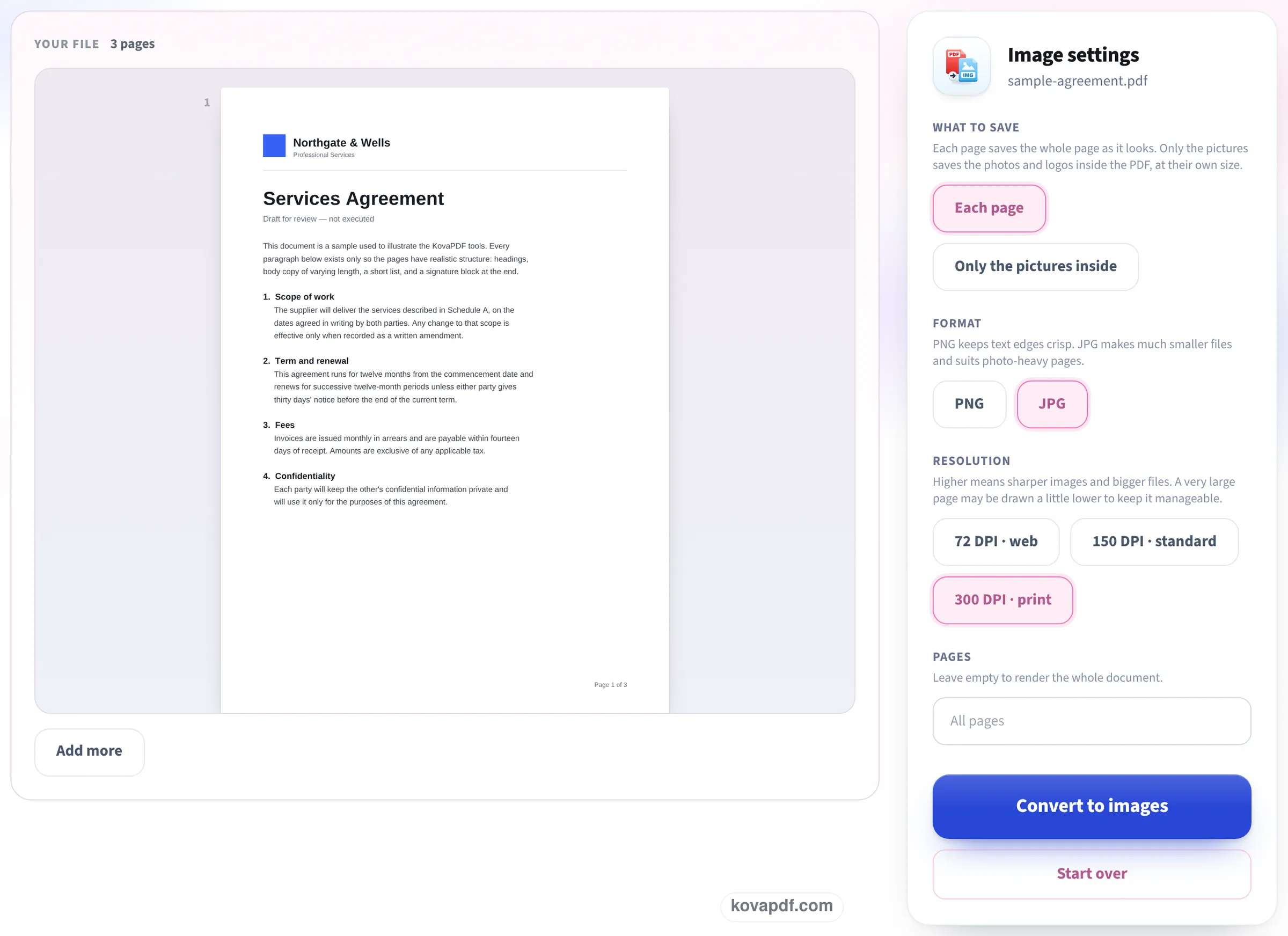
Check the settings: JPG at 300 DPI
Each page, JPG and 300 DPI · print are already picked. The Pages box is empty, which means every page; type a number or a range to convert only those.
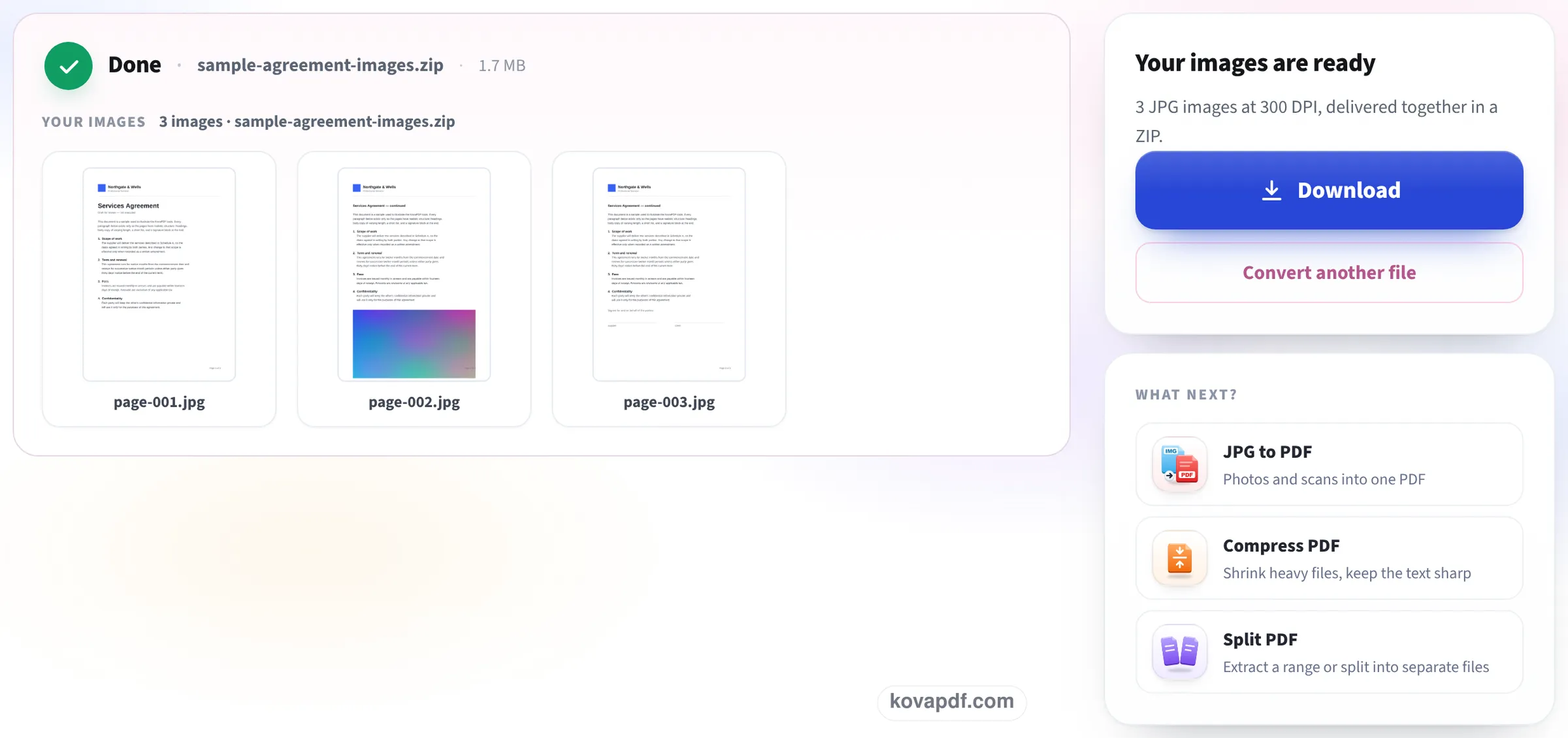
Download the pictures
Press Convert to images. The finished screen states how many JPGs were made and the DPI they were really drawn at; several pages arrive as one ZIP.
One letter at three resolutions
We converted our 3-page typed letter at each setting on this page and opened the pictures to read their pixel size and file size. Measured on October 22, 2026.
| Setting | Pixels per Letter page | JPG per page | ZIP of 3 pages |
|---|---|---|---|
| 72 DPI · web | 612 × 792 | 70 to 74 KB | 216 KB |
| 150 DPI · standard | 1275 × 1650 | 210 to 218 KB | 640 KB |
| 300 DPI · print | 2550 × 3300 | 528 to 548 KB | 1.62 MB |
| 300 DPI, PNG instead of JPG | 2550 × 3300 | 514 to 538 KB | 1.58 MB |
Doubling the DPI gives four times the pixels, and here about two and a half times the file size. For a page of text, PNG at 300 DPI came out no bigger than JPG and keeps letter edges perfectly clean; for pages with photos, JPG is far smaller.
A one-page 300 DPI color scan came back as a single 2550 × 3300 JPG of 1.37 MB. Each conversion took about a second.
Checked again on 24 October
A different three-page letter, set tighter with more words to the page, dropped on this page as it opens (JPG, 300 DPI) and converted with the button. We unpacked the ZIP and opened each picture. Measured on October 24, 2026.
| File | Pictures | JPG per page | ZIP | Ready in |
|---|---|---|---|---|
| 3-page letter, dense text | 3 JPGs, each 2550 × 3300 | 928 to 970 KB | 2.85 MB | 1.2 s |
Same pixels as before, larger files: a page packed with small type has far more edges to store than a short letter, and JPG size follows the detail on the page, not just the DPI.
Which resolution do you need?
DPI means how many pixels go into each inch of the page. Pick by where the picture is going:
- Printing at full size, or a picture someone will zoom into: 300 DPI.
- A slide, a document on screen, a picture in a Word file: 150 DPI is plenty and a third of the size.
- A web page, a chat message or a thumbnail: 72 DPI.
- A small detail you want very sharp, such as a signature or a map: convert at 300 DPI, then crop the picture.
Why some converted JPGs look blurry
Most quick converters draw pages at screen resolution, around 72 to 96 DPI, which looks fine at first and soft as soon as you zoom or print. A scanned PDF has a second limit: the picture can never be sharper than the scan inside it. Our 300 DPI scan converted at 300 DPI kept every detail; converting a 150 DPI scan at 300 DPI would only make a bigger file, not a sharper one.
If the PDF holds photos and you want them exactly as they were put in, choose Only the pictures inside: the photos are saved at their own resolution instead of being redrawn.
Good to know
Pages are drawn on white, so transparent areas become white. Every page keeps its own shape: a landscape page gives a landscape picture. A password-protected PDF has to be unlocked first.
Read next: PDF to PNG · Save a PDF page as an image · Split PDF into single pages
Frequently asked questions about PDF to JPG high resolution
How do I convert a PDF to a high-resolution JPG?
Add the PDF here and press Convert to images: 300 DPI and JPG are already chosen. A Letter page comes out at 2550 × 3300 pixels.
What DPI should I use for printing?
300 DPI. It is the resolution printers and print shops work to, and the picture prints sharp at the page's full size.
Why is my converted JPG blurry?
It was probably made at screen resolution, 72 to 96 DPI. Convert again at 300 DPI. If the PDF is a scan, the result cannot be sharper than the scan itself.
Can I convert at 600 DPI?
Not here: 300 DPI is the highest setting. For a page of text or a scan, 300 DPI already holds all the detail a printer can use; 600 DPI would quadruple the file size.
JPG or PNG?
JPG for pages with photos: much smaller files. PNG for text and line drawings: perfectly clean edges, and for our text letter, no bigger than JPG.
Can I convert only one page?
Yes. Type the page number in Pages, for example 3, and you get a single JPG instead of a ZIP.
PDF to JPG high resolution guides and articles


Related tools
All PDF tools · 15 step-by-step guides · How your files are handled
Also: PDF to JPG · PDF to PNG