Two column resume template
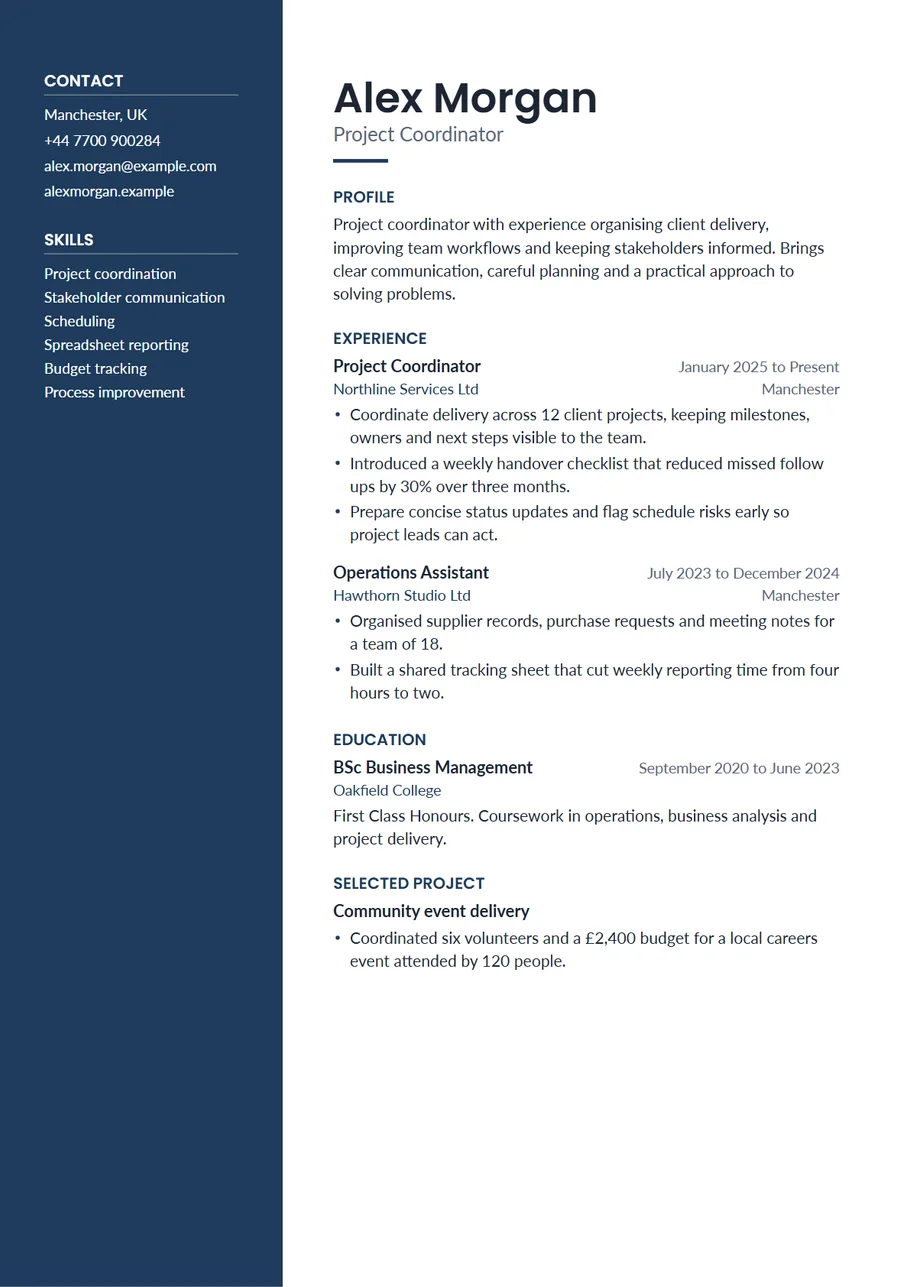
A two column resume gives each kind of information its own place. Short facts the reader looks up, such as your phone number, your skills and your languages, sit in a narrow column down the side. The part they actually read, your experience and what you achieved, gets the wide column. This layout is called Sidebar in the CV Maker, and it is the one people usually mean when they search for a modern two column resume.
It works best when you have a good list of skills or tools to show and a work history of two or more roles. The side column fills naturally, the main column stays focused, and the whole page looks finished without any decoration that gets in the way of the words.
Free, no account needed. Your CV is built in your browser and downloads as a PDF or an editable Word file, in A4 or US Letter.
What goes in each column
The template sorts sections for you. Short sections go to the side column and long ones to the main column, in the order you set in the editor.
- Side column: your photo if you add one, then contact details, skills, languages, certifications, memberships and awards. These are scanned rather than read, so short lines work best.
- Main column: your name and target role at the top, then your profile, experience, education, projects and anything else that needs sentences.
- Dates and places sit on the right of each job, so the reader sees how long you stayed without having to hunt for it.
If the side column grows longer than the main one, trim the skills list to the ten that matter most for this job. A side column that runs onto page two looks unplanned.
Choosing the side column colour
The side column comes in navy, but any of the ten colours in the Design panel, or one of your own, will work. Dark colours print well and keep white text easy to read. If you would rather have a lighter page, switch the side column to Light: it becomes a soft tint of the same colour with dark text, which suits conservative fields and saves printer ink.
Pick one colour and let it carry the page. The name, headings and small details follow it automatically, so the page never ends up with three competing accents.
Example skills for the side column
Keep each skill to a few words, and list the ones a hiring manager could test you on:
- Project scheduling, stakeholder updates, risk logs
- Spreadsheet modelling, pivot tables, data cleaning
- Customer onboarding, account reviews, renewals
- Spanish (fluent), French (conversational)
Leave out general traits such as hard working or team player. They take space in the column and the reader cannot check them. Show them in your experience instead.
Two columns and application systems
The PDF this template makes keeps real, selectable text and a sensible reading order: name, role, contact details, profile, then each section in turn. Many application systems read that well. Some older ones flatten every page into plain text and can mix up two columns. If an advert says to upload a plain or simple file, or if you are pasting your resume into a web form, switch to the Plain or Essential template for that one application. Your words come with you, so it takes a click.
How long it should be
One page is the goal for most people, and two is the limit. The two column layout fits a lot on one page because the side column uses space a single column would leave empty. If you still run over, choose Small text or Tight spacing in the Design panel before you start cutting, then shorten older roles to a title, an employer and dates.
Tailoring it for each application
The side column is the easiest part of a two column resume to tailor. Before you apply, read the advert and reorder your skills so the ones it mentions come first, then remove any that have nothing to do with the job. In the main column, move the most relevant bullet point of each role to the top. Save a job specific copy on the review screen, so you can come back to this version later without losing your general one.
If you apply for two different kinds of role, for example project coordination and operations, keep one saved copy for each. The design stays the same and only the words change, which is quicker than starting again every time.
Start with the Sidebar layout
The CV Maker opens with this template chosen. Fill in one section at a time and watch the page update beside the form. If you change your mind, switch layout on the first step or the review screen: everything you typed comes with you.
Use the Sidebar templateQuestions about this template
Is a two column resume a good idea?
For most jobs where a person reads the resume first, yes. It is quick to scan and looks organised. For a strict online form or a request for a plain file, a one column template is the safer choice, and you can switch in one click.
Can I put the side column on the right?
Yes. In the Design panel choose Side column on the right under Layout. The Slate template also has a light side column on the right.
Does the side column come out in the Word file?
Yes. The Word file uses a two cell table without borders, the usual way Word documents make a side column, and the text stays editable.
Can I add a photo?
Yes. Add one in the Contact section and it appears at the top of the side column. You can make it round, rounded or square in the Design panel.