Creative resume template
A creative resume should show some personality without making the reader work for the facts. This template, called Creative in the CV Maker, does it with colour and shape rather than clutter: a softly tinted side column, a round photo if you want one, skill tags that read like labels, and headings marked with a short bar of colour.
It suits marketing, content, social media, design support, events, hospitality, retail, education and start up roles: anywhere the people hiring want to see a little of who you are as well as what you have done.
Free, no account needed. Your CV is built in your browser and downloads as a PDF or an editable Word file, in A4 or US Letter.
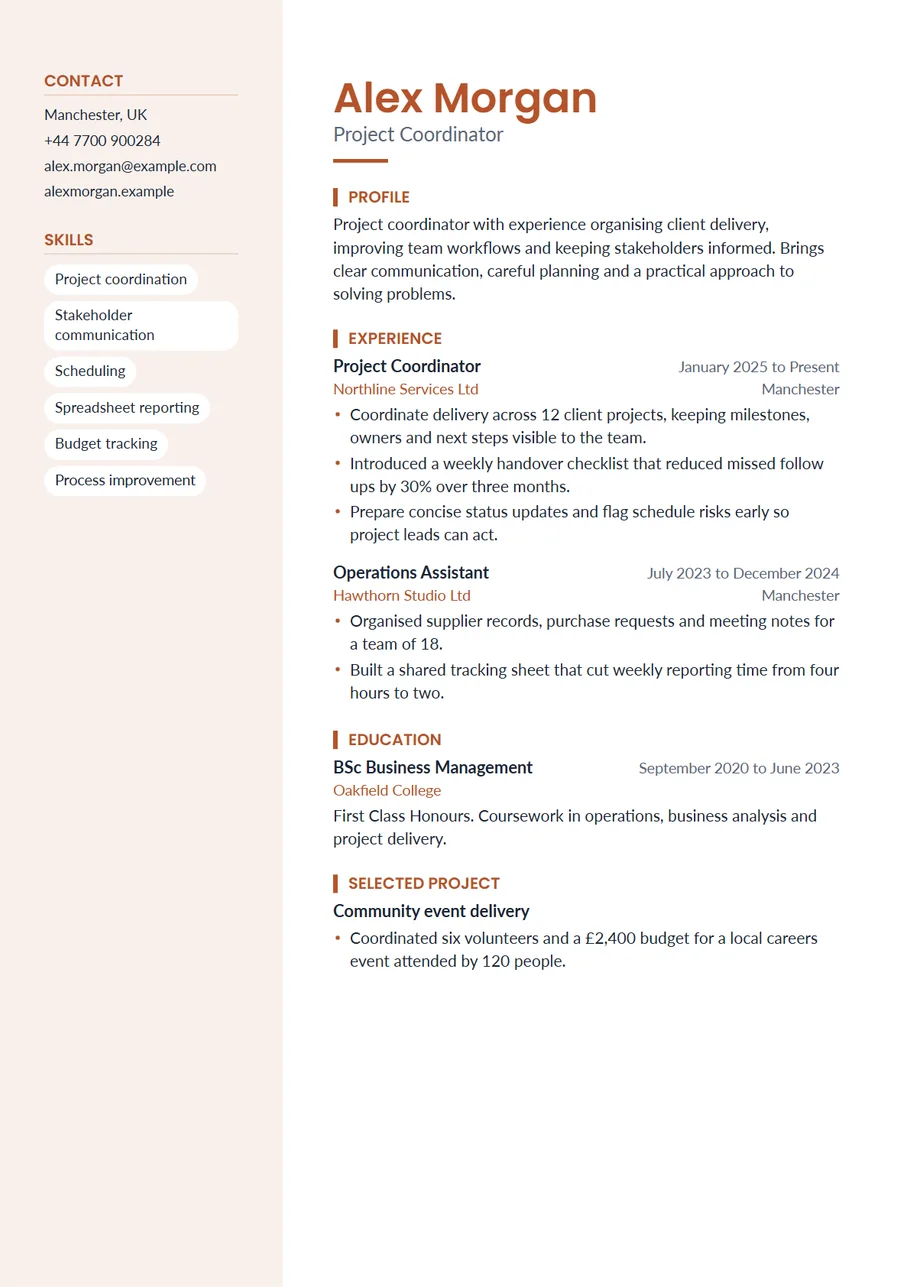
Creative, but still readable
A creative layout fails when the reader has to search for your job title or your dates. This one keeps the essentials exactly where people expect them:
- Your name large at the top of the main column, with your target role under it.
- Contact details first in the side column, one per line.
- Each job with its title in bold and its dates on the right.
- Skills as tags that can be scanned in two seconds.
Writing for a creative role
Show your work rather than describe your personality. A link to a portfolio, a showreel or a live campaign is worth more than any adjective, so add it to the Contact section where it sits at the top of the side column. In your experience, name the projects: the launch, the event, the campaign, the redesign, and what happened because of it.
- Planned and ran a three day product launch for 400 guests, delivered on budget.
- Grew the brand's short video channel from 2,000 to 48,000 followers in a year.
- Wrote and designed a monthly newsletter that kept a 41% open rate.
Choosing your colour
Creative comes in rust, a warm colour that prints well and feels friendly. Plum, emerald, teal and royal blue also work beautifully with the tinted column; pick one in the Design panel or choose your own. If you are applying to a brand you admire, a colour close to theirs is a small, thoughtful touch, but keep it dark enough that the headings stay easy to read.
Photo or no photo
The template has room for a round photo at the top of the side column, and it looks just as good without one. Photos are common in parts of Europe, Asia and the Middle East and in client facing roles. In the US, UK, Canada and Ireland most employers prefer resumes without photos, so keep a version without one for those applications. You can save a job specific copy of your CV for each.
When to use a plainer template
If an advert asks for a simple file or you are pasting into a web form, switch to Plain or Essential for that application. Your words come with you. For senior corporate roles, Sidebar gives a similar two column structure in a more reserved navy.
Writing a profile with personality
In a creative role, the profile can be a little warmer than usual, but it still needs facts. Say what you make or do, who for, and one thing that shows you are good at it: Content producer who makes short videos and newsletters for food and travel brands, with a channel that grew to 48,000 followers in a year. Then say what you want next. Avoid describing yourself as creative; let the examples show it.
If your work is visual, the most useful thing on this page is the link to it. Check the link works on a phone, make sure the first thing it shows is your best piece, and keep the portfolio as up to date as the resume.
Projects as well as jobs
Freelance work, side projects and volunteering count, especially early in a creative career. Add them under Projects in Extra sections with a title, the client or organisation, dates and one or two lines on what you made and what happened. A well run community event or a self published zine can say as much about you as a paid job.
A last check before you send it
Open the downloaded PDF on a phone as well as a laptop, because creative roles are often screened on a phone first. Check that the side column is readable, that your portfolio address is correct and that the skill tags still make sense out of context. Then print one page in black and white to be sure the headings and tags still stand out without colour.
Start with the Creative layout
The CV Maker opens with this template chosen. Fill in one section at a time and watch the page update beside the form. If you change your mind, switch layout on the first step or the review screen: everything you typed comes with you.
Use the Creative templateQuestions about this template
Will a creative resume look unprofessional?
Not this one. It uses one colour, clear headings and the usual order of information. The personality comes from colour and shape, not from clutter.
Can I switch the tags back to a list?
Yes. In the Design panel choose List under Skills. You can also move the side column to the right or make it full colour.
Does the Word file keep the side column?
Yes. It becomes a borderless two cell table with the same tint, and the text stays editable. Skill tags become a simple list in Word.
Can I add a portfolio link?
Yes. Add it in the Contact section as your portfolio or profile, and it appears with your other contact details.