Modern CV template
Modern does not have to mean two columns, icons and skill bars. Those designs look good as a thumbnail and then fall apart when a recruiter prints them, an online form copies them, or a screen reader reaches the sidebar before the job history. This template takes the parts of modern design that help: a single accent colour, a stronger rule under the header and headings you can find without reading.
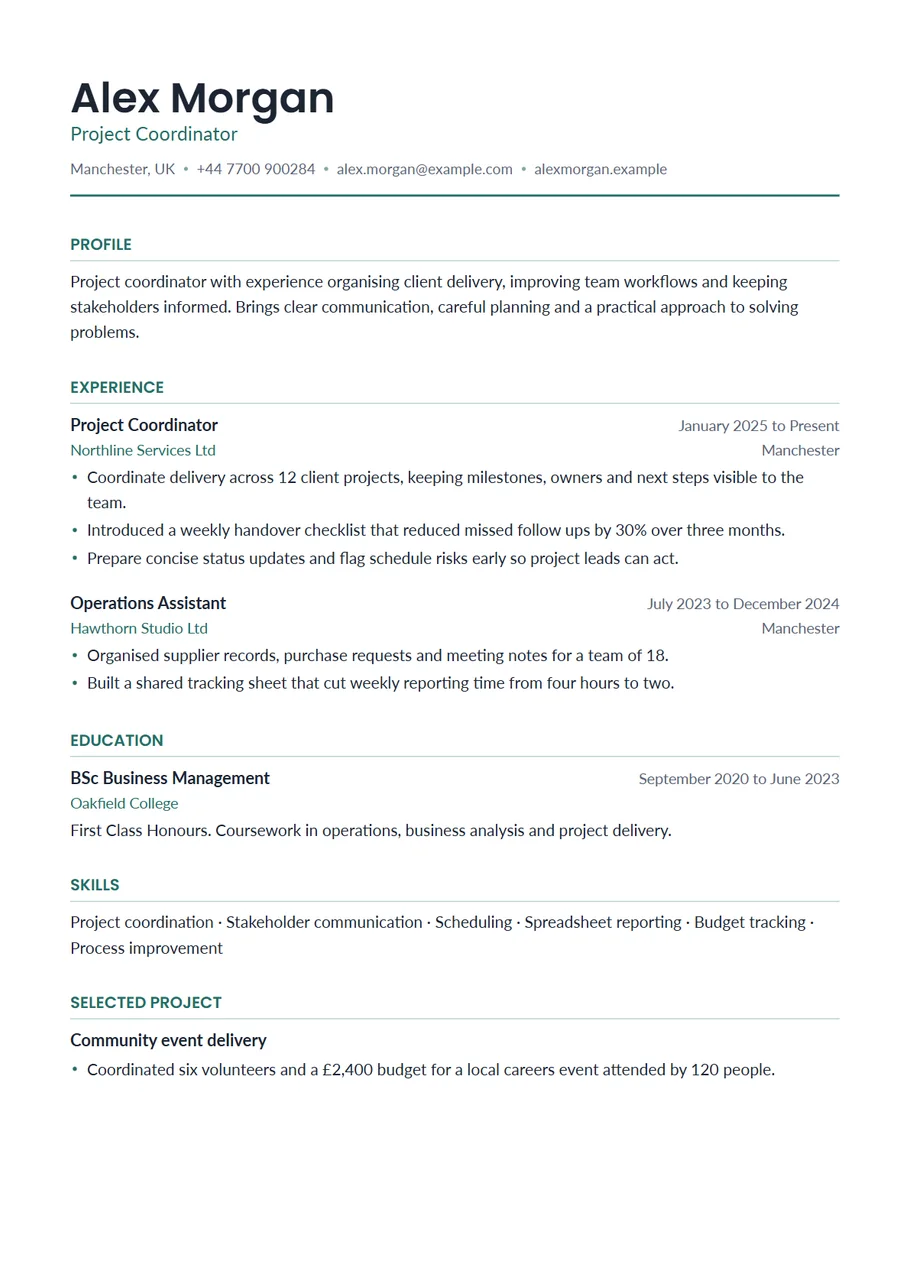
The name and section headings are set in a quiet teal with a matching rule under the header. Everything else is dark grey on white in one column, so the page still reads top to bottom in the order you wrote it.
Free, no account needed. Your CV is built in your browser and downloads as a PDF or an editable Word file, in A4 or US Letter.
Who the modern layout suits
It fits marketing, communications, design adjacent jobs, customer success, hospitality management, start ups and graduate schemes at companies whose own brand looks contemporary. If you are applying to a law firm, a bank or the civil service, the Simple template is the more conservative choice; the content can stay exactly the same, because you can switch templates without retyping anything.
Sections and their order
- Header: name, target role, location, phone, email and one link. A portfolio link is worth more here than on most CVs, so add it if you have one.
- Profile: two to four lines that say what you do and what you want to do next. Avoid lists of adjectives; one concrete example says more.
- Experience: most recent first, with the job title in bold, employer and place underneath, dates on the right, and three to five lines per role.
- Education: degree or qualification, institution and dates. Add modules or a dissertation title only if they relate to the job.
- Skills: tools and methods, grouped on two or three lines. The template separates items with a centred dot, which reads better than commas when the list is long.
- Projects, certifications or languages, if they add something the experience section does not.
Example bullet points for a modern CV
Short lines suit the extra spacing. Lead with a verb and keep each line to one idea:
- Planned and wrote a monthly customer newsletter that grew from 1,200 to 3,000 subscribers over a year.
- Ran A/B tests on landing page headlines and kept the versions that improved sign ups.
- Coordinated three product launches with design, sales and support, keeping one shared timeline.
- Answered social media enquiries within the same working day and passed complaints to the right team.
- Rewrote the onboarding emails for new customers, cutting the number of setup questions sent to support.
Length and spacing
Aim for one page if you have under five years of experience. One page comfortably fits two roles with three or four lines each, a short education section and two lines of skills, which is the shape of Alex Morgan's sample above. If you have more to say, a second page is fine, but cut weak lines before you accept it. Never shrink the text to squeeze it in: the template will not do it for you, and a recruiter will notice.
What to leave out
- Skill bars, star ratings and percentages. Nobody knows what 80% of Excel means.
- A second colour. One accent is what keeps the page calm.
- Icons in place of words for phone and email. Write them out so they can be copied.
- Quotes, mission statements and taglines under your name. The target role is enough.
Writing the profile for a modern layout
The profile sits right under the teal rule, so it is the first block of text anyone reads. Treat it like the opening line of a cover letter rather than a list of qualities. Name your current role or field, give one fact that shows your level, and say what you are looking for. Marketing assistant with two years in a B2B software company, running email campaigns and the events calendar, now looking for a content or campaign role is specific and believable. Creative, driven marketer passionate about brands could be anyone. Rewrite the last sentence for each application so it matches the advert.
A note for US applications
In the US the same document is a resume, usually on US Letter paper and usually one page for anyone with under ten years of experience. Switch the paper size above the preview, and keep the profile to two lines. Leave out the photo and personal details; US employers generally prefer not to receive them.
Start with the Modern layout
The CV Maker opens with this template chosen. Fill in one section at a time and watch the page update beside the form. If you change your mind, switch layout on the first step or the review screen: everything you typed comes with you.
Use the Modern templateQuestions about this template
Can I change the accent colour?
Not at the moment. Modern uses one teal accent, chosen to stay readable when printed in greyscale. If you would rather have no colour at all, switch to the Simple template.
Is a modern CV template suitable for every industry?
It works in most, but conservative fields such as law, finance and the public sector often prefer a plainer look. Your details move with you when you change template, so you can keep two versions.
Does the modern template use two columns?
No. Everything sits in one column so the reading order stays the same in print, in an online form and with a screen reader. Dates and places sit on the right of the same line, not in a sidebar.
Will the teal headings print well?
Yes. The teal is dark enough to read clearly on a black and white printer.