Simple CV template
A simple CV is not a lazy one. It is a page where the reader finds your current job, your dates and your strongest result in the first ten seconds, because nothing else is competing for their eye. This layout, called Essential in the CV Maker, does exactly that: your name set in a serif face, a thin rule, then one column of plain headings with dates aligned on the right.
Use it when you want the content to do the work. It suits office, retail, public sector, healthcare support, trades and most applications where the person reading it will print it, skim it on a laptop or paste it into an internal system.
Free, no account needed. Your CV is built in your browser and downloads as a PDF or an editable Word file, in A4 or US Letter.
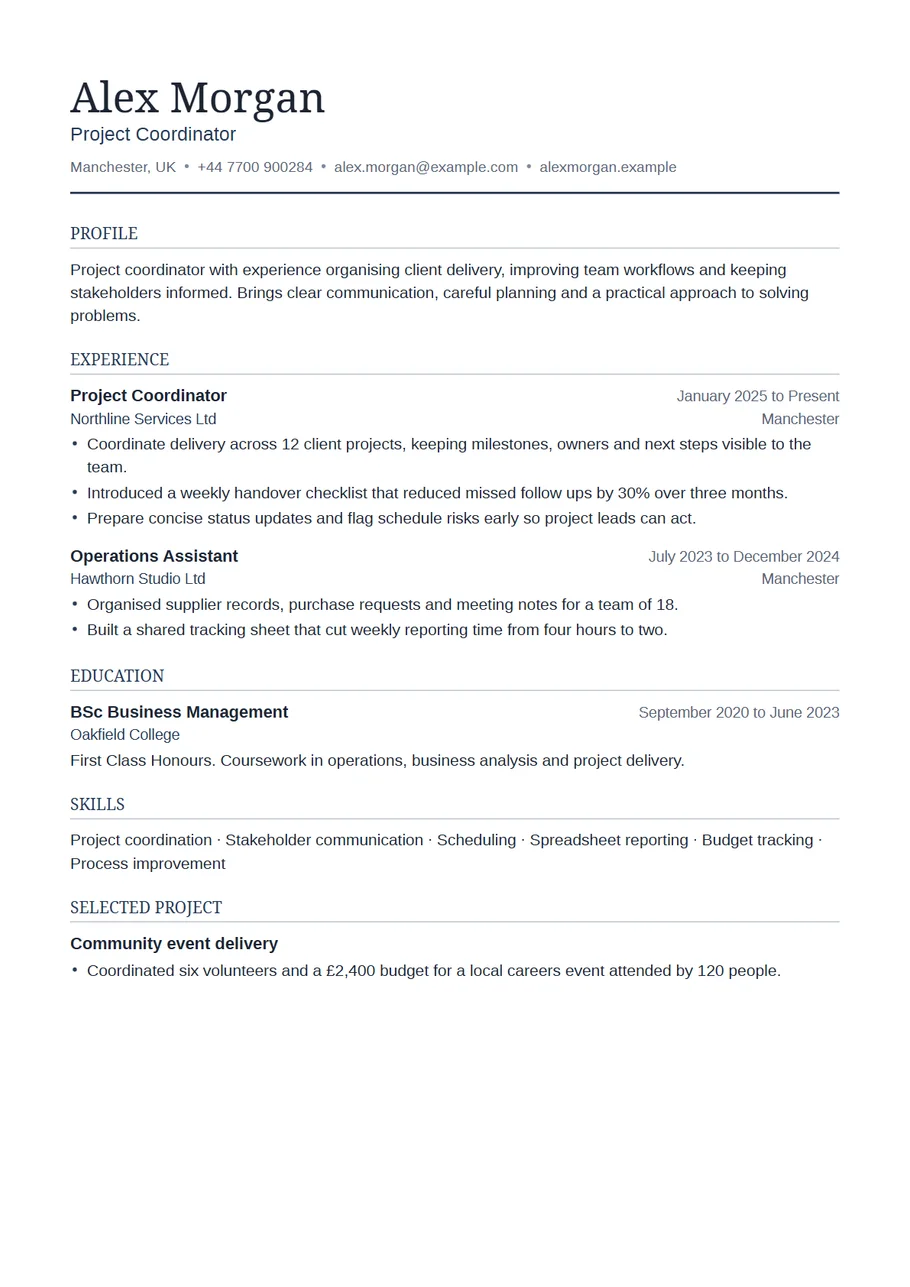
What goes on a simple CV, in this order
The order below is the one the template uses by default. You can move any section up or down in the editor, but most people should not need to.
- Name and contact line. Full name, the role you are aiming for, town and country, one phone number, one email address and, if you have one, a portfolio or LinkedIn address. A full street address is not needed.
- Profile. Three or four lines: what you do now, what you are good at with one piece of evidence, and the kind of role you want next. Write it last, once the rest is done.
- Experience. Most recent job first. Job title, employer, place, start and end month, then two to five lines on what you did and what changed because of it.
- Education. Degree, college or school, dates, and a grade if it helps. Once you have a few years of work behind you, one line per qualification is plenty.
- Skills. A short list of things a hiring manager would actually test you on: software, languages, licences, methods. Leave out traits like hard working.
- Extras only if they earn their place: training, certifications, volunteering or a project that fills a gap.
How long it should be
For most people one page is enough and two is the limit. If you have under five years of work, aim for one. If you have a longer history, keep the last ten years in detail and shorten older roles to a title, employer and dates. The preview shows the page count as you type, and the template never squeezes the text to make it fit, so if it spills onto a second page that is a sign to cut rather than a layout problem.
Example lines you can adapt
Plain wording reads best in a plain layout. Each line starts with what you did and ends with what it led to:
- Handled 40 to 60 customer calls a day and resolved most billing questions on the first call.
- Rebuilt the weekly rota in a shared spreadsheet, which stopped double bookings over the summer.
- Trained four new starters on the till system and stock checks during their first month.
- Kept supplier invoices filed and matched to orders, so month end closed two days earlier.
Use your own numbers only where you can stand behind them in an interview. A clear sentence without a number is better than a number you guessed.
What to leave out
- A photo, date of birth, marital status or nationality, unless the employer asks for them.
- The heading Curriculum Vitae at the top. Your name is the heading.
- Every short course you have ever done. Keep the ones the advert mentions.
- References. Write Available on request, or choose that option in the References menu, and send the details when asked.
- Hobbies, unless they show a skill the job needs or give the interviewer something specific to ask about.
When simple is the wrong choice
There are a few cases where plain is not enough on its own. If you work in design, illustration or architecture, the CV is a supporting document and the portfolio does the selling, so put the portfolio link in the header and keep the CV simple anyway. If the advert asks for a photo, use the Portrait layout. If you are a recent graduate whose degree is the strongest thing you have, the Graduate layout puts it first for you. For nearly everything else, simple is the right answer.
UK CV or US resume?
The layout works for both. In the UK and Ireland it is called a CV and A4 paper is the norm. In the US and Canada the same document is called a resume, it is usually printed on US Letter, and it tends to be shorter and more focused on results. Switch the paper size above the preview before you download, and if you are applying in the US, rename the Profile in your head to a summary: the same three lines do the job.
Start with the Essential layout
The CV Maker opens with this template chosen. Fill in one section at a time and watch the page update beside the form. If you change your mind, switch layout on the first step or the review screen: everything you typed comes with you.
Use the Essential templateQuestions about this template
Is a simple CV template better than a designed one?
For most applications, yes. A single column with clear headings is quick to scan, prints cleanly in black and white, and keeps its reading order when it is copied into an online form or read by an applicant tracking system.
Can I change the headings?
Yes. Every section heading can be renamed, switched off or moved. The name, contact line and Profile heading stay where they are.
Which font does the Essential template use?
Your name is set in a serif typeface and everything else in a plain sans serif. Both fonts are embedded in the PDF, so it looks the same on the recruiter's screen as on yours.
Can I download the simple CV as a Word document?
Yes. Choose Word on the review screen to get an editable .docx. Word can reflow text slightly on another computer, so open the file and check it before sending.