Professional resume template
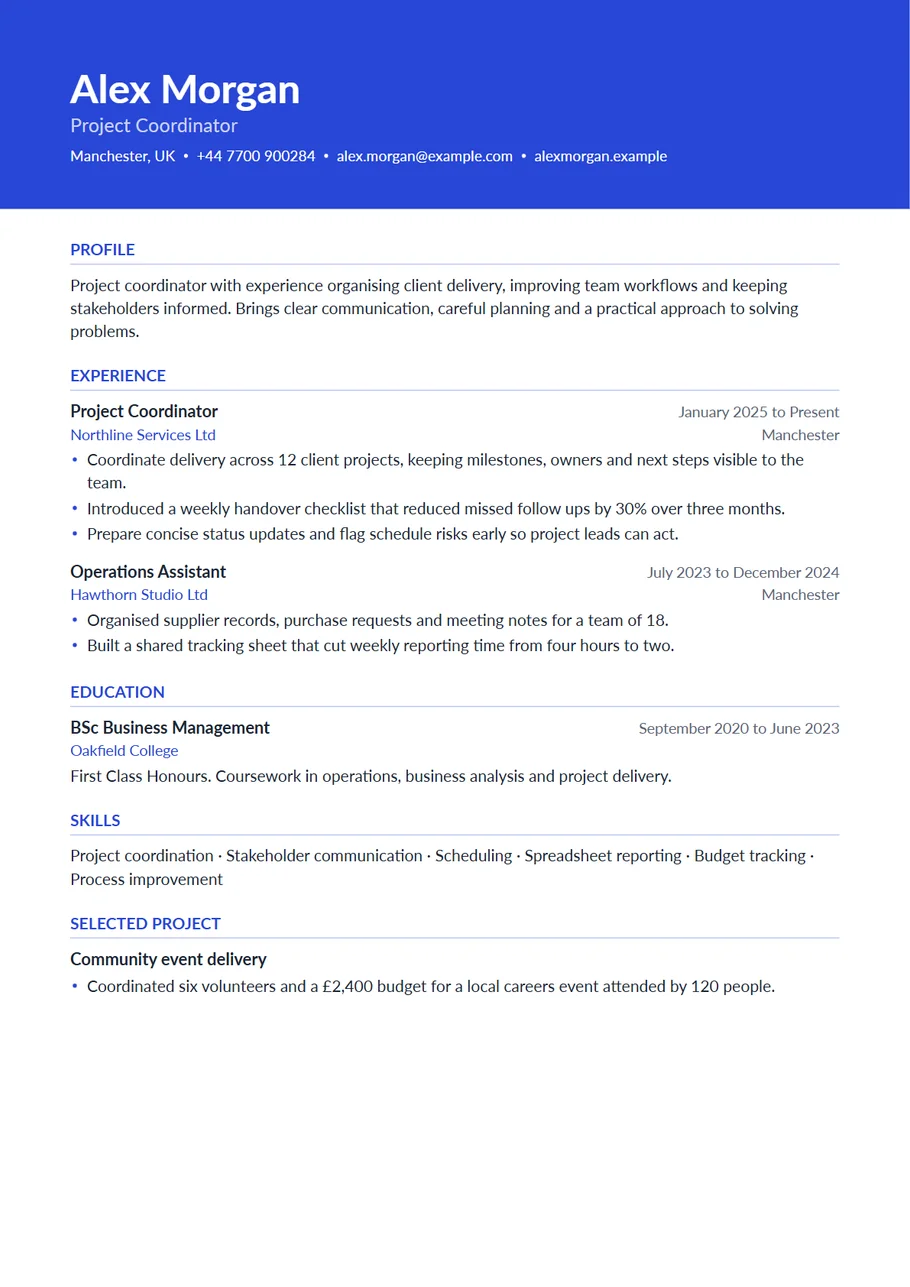
A professional resume has one job: to make the reader confident about you in the first few seconds. This template, called Horizon in the CV Maker, does it with a single strong element. Your name, the role you want and your contact details sit in a band of colour across the top of the page, and everything below is one calm, well spaced column.
It suits most office, sales, finance, operations, healthcare and technology roles, from your second job to a senior post. The band gives the page presence, and the column underneath keeps the reading order simple for people and for software.
Free, no account needed. Your CV is built in your browser and downloads as a PDF or an editable Word file, in A4 or US Letter.
What makes a resume look professional
Mostly restraint. The layout does a few things consistently and leaves the rest to your words:
- One accent colour, used for the band, the headings and the employer names, and nowhere else.
- Clear headings with a thin line under each, so the eye jumps from section to section.
- Job titles in bold with dates and places aligned on the right.
- Short bullet points that start with what you did and end with what changed.
- Generous margins and line spacing, so the page never looks crowded.
Writing the top of the page
The band is the first thing anyone reads, so make each line count. Use your full name as it appears on your documents. Under it, put the job title you are applying for rather than your current one if they differ: Operations Manager, not Senior Operations Coordinator Level 2. Then one phone number, one email address you check every day, your town and country, and a portfolio or profile link if it shows your work.
Leave your full street address, date of birth and nationality out unless the employer asks. They take space in the most valuable part of the page.
Example bullet points
- Managed a portfolio of 35 business accounts and kept renewals above target for three years running.
- Cut month end reporting from five days to three by standardising the regional spreadsheets.
- Led the move to a new booking system for a team of 22, with training sessions for every shift.
- Answered patient and visitor questions at a busy front desk and kept waiting times visible on a board.
Numbers help when they are true and you can explain them. When you have none, a precise sentence about scale or result works too.
Colour, fonts and spacing
The band comes in royal blue. The Design panel has ten colours that print well, including navy, teal, emerald, burgundy and charcoal, and a picker for any colour you like. Dark colours keep the white text easy to read; the template switches to dark text automatically if you pick a very light colour. You can also change the fonts, text size, line spacing and margins, and the preview updates as you click.
How long a professional resume should be
One page for up to around ten years of experience, two pages for longer careers or roles where publications, projects or certifications matter. Keep the last ten years in detail. Older roles can shrink to a title, an employer and dates, which still shows a steady career without filling the page.
A profile that sounds like a professional
The profile sits right under the band, so it is the first thing anyone reads after your name. Keep it to three or four lines. Start with what you are, not what you are looking for: Finance manager with nine years in manufacturing and retail. Add the one result you are proudest of, and finish with the kind of role you want next. Avoid lists of adjectives such as dynamic, passionate and results driven; the reader has seen them on every resume that day.
If you are changing direction, say so plainly and connect it to what you already do: Customer service team leader moving into training and development, with three years of running induction for new starters. One honest sentence about the change is more convincing than hiding it.
A cover letter in the same style
When an employer asks for a cover letter, a matching one looks considered. Use the same name, contact details and colour, keep it to one page, and say three things: why this role, why this employer, and the two pieces of your experience that fit it best.
Start with the Horizon layout
The CV Maker opens with this template chosen. Fill in one section at a time and watch the page update beside the form. If you change your mind, switch layout on the first step or the review screen: everything you typed comes with you.
Use the Horizon templateQuestions about this template
Is a coloured header professional?
Yes, when it is one colour used with restraint. A band across the top is common in finance, sales, technology and consulting. For very conservative fields, choose navy or charcoal.
Will the colour print in black and white?
The band prints as a dark grey with white text, which stays readable. If you expect the resume to be photocopied, a darker colour such as navy prints most cleanly.
Can I add a photo?
Yes. Add one in the Contact section and it appears in the band, beside your name, as a circle.
Can I get it as a Word document?
Yes. Choose Word on the review screen. The band, fonts and colours come with it, and every line stays editable.