Chronological resume template
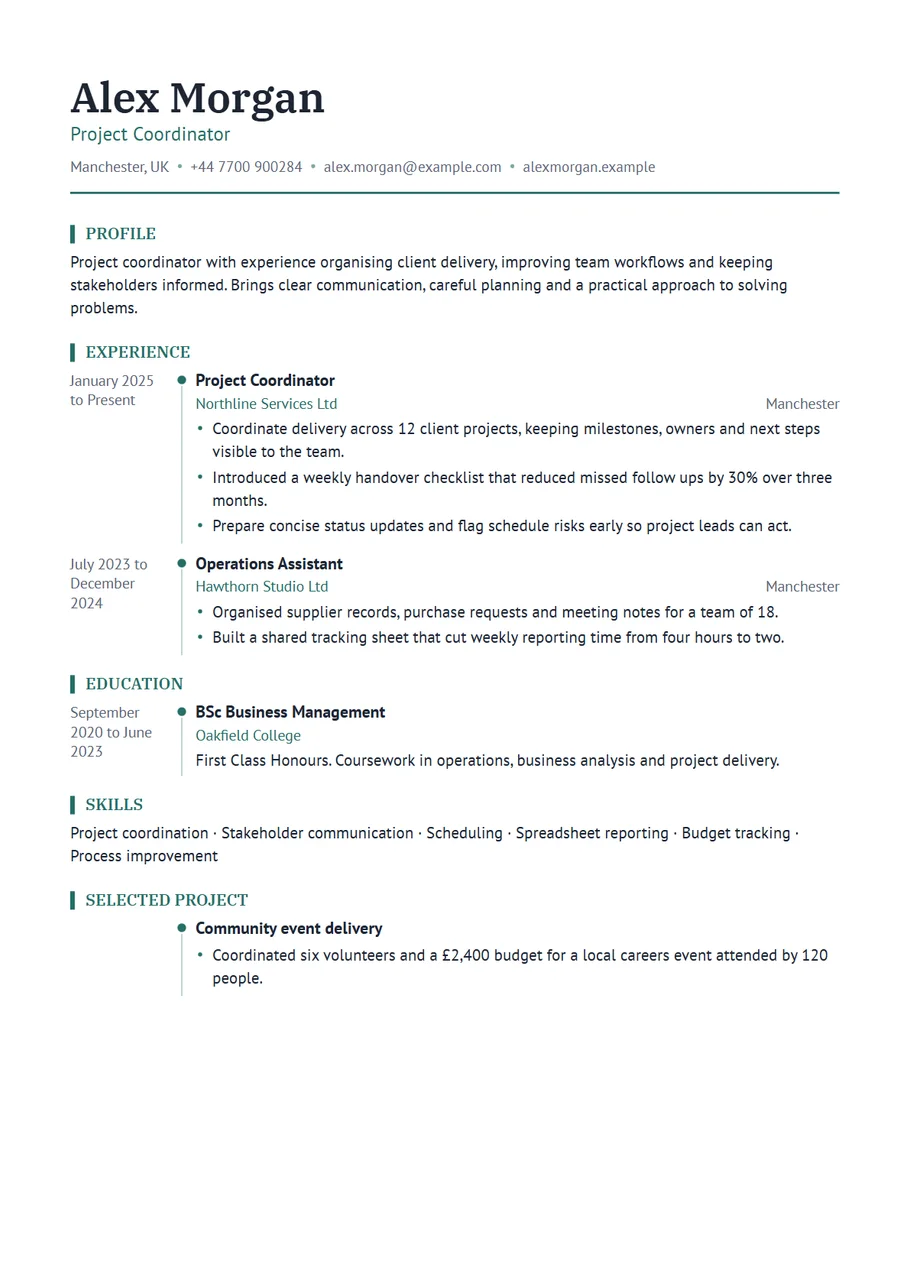
A chronological resume lists your jobs from the most recent backwards. It is the format most employers expect, because it answers their first questions straight away: what are you doing now, how long did you stay, and how did you get here. This template, called Timeline in the CV Maker, makes those answers impossible to miss by giving the dates a column of their own, with a thin line and a marker for each role.
Choose it when your work history is your strongest selling point: steady progress, roles that build on each other, or a long stay somewhere respected. It is also a good fit for trades, nursing, teaching and other fields where the length of experience matters.
Free, no account needed. Your CV is built in your browser and downloads as a PDF or an editable Word file, in A4 or US Letter.
How a chronological resume is ordered
- Name, target role and contact details at the top.
- A short profile: three or four lines on what you do and what you want next.
- Experience, most recent first, each role with its dates in the left column.
- Education, also most recent first.
- Skills, then any extras that help: training, certifications, languages, volunteering.
You can move any section in the editor. Most people keep Experience straight after the profile, because in this format it is the point of the page.
Writing dates that read well
Use month and year, written the same way every time: March 2021 to June 2024. Months show that a role lasted two and a half years rather than just two calendar years. For your current job, tick I still work here and the template writes Present. If you held two roles at the same employer, list them as two entries with their own dates, so the promotion is visible on the timeline.
Gaps are normal. If you took a year out to study, travel, care for someone or recover, you can add it as a short entry with one honest line. A gap explained in six words is better than a gap the reader has to wonder about.
Example entries
- Senior Staff Nurse, January 2021 to Present: led a team of eight on a 28 bed surgical ward and introduced a handover checklist used across the unit.
- Electrician, 2016 to 2021: completed domestic and light commercial installations, inspections and fault finding, working alone and as part of a crew of four.
- Year 6 Teacher, September 2019 to July 2023: raised reading results above the school average two years in a row.
When another format suits you better
If you are changing careers, or your most relevant experience is not your most recent, a skills first layout such as Technical may tell your story better. If you are a student or recent graduate, Graduate puts education and projects first. For everyone with a steady history in the field they are applying to, chronological is the format readers trust most.
Design and length
The timeline comes in teal with an editorial serif for headings. In the Design panel you can choose any colour, another pair of fonts, smaller or larger text and tighter or more relaxed spacing. Aim for one page with under ten years of experience and two at most for longer careers. Older roles can shrink to a title, an employer and dates, and still sit neatly on the timeline.
Showing promotions and progress
A chronological layout is at its best when it shows a career moving forward. If you were promoted, list each role as its own entry under the same employer, each with its own dates, so the timeline shows the step up. Put the result that earned the promotion in the earlier role and the new responsibility in the later one: Promoted to team leader after cutting the backlog from three weeks to four days.
If you returned to an employer, list the two periods separately and in order. If you worked two part time jobs at once, list both with their own dates; overlapping markers on the timeline are normal and easy to read. The aim is that a reader can tell your story in ten seconds just by following the dates down the page.
A last check before you send it
Read the date column from top to bottom on its own. It should run without overlaps you cannot explain, every role should have a start and an end or the word Present, and the most recent role should be at the top. Then read the job titles alone: together with the dates, they should tell the reader where you are heading.
Start with the Timeline layout
The CV Maker opens with this template chosen. Fill in one section at a time and watch the page update beside the form. If you change your mind, switch layout on the first step or the review screen: everything you typed comes with you.
Use the Timeline templateQuestions about this template
What is a reverse chronological resume?
It is a resume that lists your most recent job first and works backwards. When people say chronological resume, this is almost always what they mean.
Do I have to show every job?
No. Show the last ten to fifteen years in detail. Earlier jobs can be grouped into one short entry or left out if they add nothing for this application.
Can I use the timeline for education too?
Yes. Every section with dates uses the same date column, so education, training and volunteering line up with your jobs.
Does the Word file keep the date column?
Yes. The Word file puts the dates at the start of each entry with a tab, so the column lines up and stays editable.