Elegant CV template
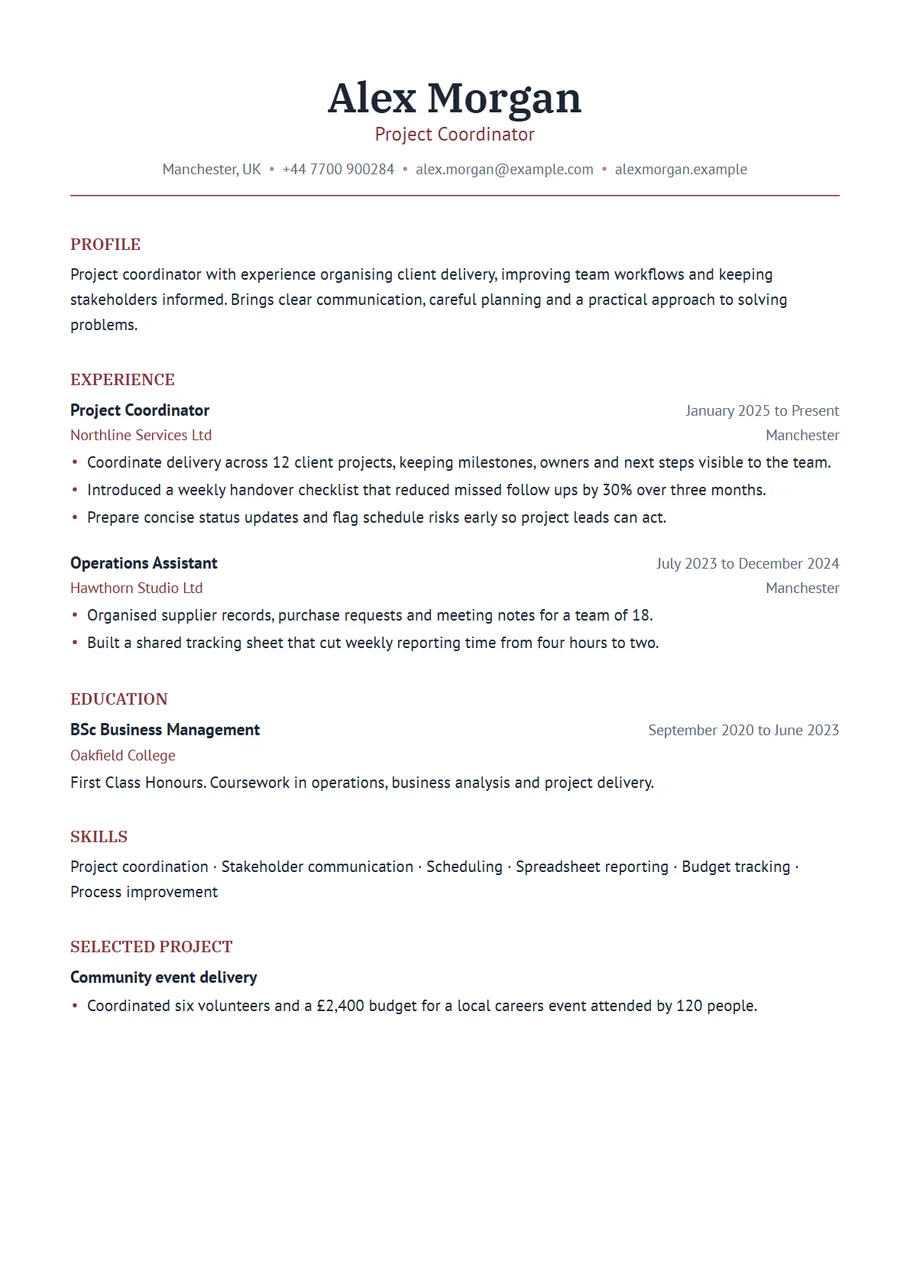
An elegant CV feels considered. Nothing shouts, nothing is crowded, and the type does most of the work. This template, called Elegant in the CV Maker, centres your name and contact details at the top, sets the headings in a refined serif, and gives every section a little more room to breathe than usual.
It suits fields where presentation is part of the job: law, hospitality management, luxury retail, the arts, publishing, education leadership, fundraising and client facing consulting. It also works well for a cover letter in the same style, sent together as a set.
Free, no account needed. Your CV is built in your browser and downloads as a PDF or an editable Word file, in A4 or US Letter.
What gives a CV an elegant feel
- A serif typeface for headings, which reads as formal and established, paired with a clean sans serif for the body so long paragraphs stay easy.
- A centred header with your name, role and contact details in one balanced block.
- One deep accent colour. Burgundy is the default; navy, bronze and charcoal give the same calm.
- Plain headings without boxes or bars, and more space between sections than a standard layout.
Writing to match the layout
An elegant layout rewards measured writing. Use full sentences in your profile and avoid stacks of buzzwords. In each role, choose the two or three results that matter most and describe them precisely. Formal does not mean stiff: write the way you would explain your work to a respected client.
Keep the CV in one tense per role: present for your current job, past for everything before. Small consistency like this is exactly what a careful reader notices.
Example profile
Hotel general manager with twelve years in independent and boutique hotels, known for steady teams and loyal guests. Led a 64 room property through a full refurbishment while keeping it open, and raised repeat bookings by a third over two years. Looking for a general manager role in a hotel where service is the product.
Three sentences: who you are, the proof, and what you want. That is all a profile needs.
Length and paper
Two pages are fine for experienced candidates in the UK, Ireland, Europe and Australia, and the relaxed spacing of this template means one page fills sooner than in a compact layout. If you need to fit more, choose Normal spacing in the Design panel; it keeps the serif character and gains several lines. Switch between A4 and US Letter above the preview before you download.
When elegant is not the right tone
For high volume online applications, technical roles where a skills list matters most, or any advert that asks for a plain file, a simpler template serves you better. Technical puts skills first, Plain is a straightforward single column in black, and you can switch in one click without retyping anything.
Small details that careful readers notice
An elegant CV is only as polished as its details. Write dates the same way throughout. Use the same punctuation at the end of every bullet point, or none at all. Keep job titles in the form your employer used. Make sure your email address is a simple one based on your name. Read the whole page once aloud: it is the fastest way to catch a missing word or a sentence that runs on too long.
If the role involves writing, such as communications, fundraising or legal work, the CV itself is a writing sample. Short, exact sentences in a calm layout show the reader exactly the skill they are hiring for.
A matching cover letter
For formal applications, send a cover letter in the same style: your name centred at the top, the same serif headings and colour, one page. Address it to a named person where you can find one. In three short paragraphs, say why you want this role, what you would bring to it with one example, and how you can be reached. The pair arrives looking like it was prepared for them, because it was.
A last check before you send it
Download the PDF and look at it at full size. The centred header should sit evenly, the headings should line up down the left edge, and the space between sections should look the same all the way down. If one section looks crowded, cut a line rather than changing the spacing; that evenness is what makes the page feel elegant in the first place.
This page is about the layout and what goes in it. For a longer, step by step piece on the writing itself, with more worked examples, read executive CV template: how to write one for a management role on our blog.
Start with the Elegant layout
The CV Maker opens with this template chosen. Fill in one section at a time and watch the page update beside the form. If you change your mind, switch layout on the first step or the review screen: everything you typed comes with you.
Use the Elegant templateQuestions about this template
Are serif fonts good for a CV?
Yes, especially for headings. A serif reads as formal and established. The body text uses a clean sans serif so longer paragraphs stay easy to read on screen and in print.
Can I add a photo?
Yes. Add one in the Contact section and it is centred above your name. You can choose a round, rounded or square frame.
Can I change the burgundy colour?
Yes. Choose any of the ten colours in the Design panel or pick your own. Navy, bronze and charcoal keep the same formal tone.
Will the fonts look the same on the employer's computer?
In the PDF, yes: both fonts are embedded. In the Word file the fonts are embedded too, but Word on some computers may substitute them, so check the file before sending.