Validate digital signature online
Choose the signed PDF. Read what the file proves, what remains unknown and which result needs follow-up.
- Secure & private
- Works on any device
- Nothing to install
- Every signature in the file
- Intact, or changed since signing
- Who signed, and when
- Trust reported separately
Upload a signed file to check it
.pdf, .p7m, .p7s, .m7m, .tsd, .tsr · checked, then deleted. Nothing is kept
Drag & drop files here
or choose a file from your device
On your computer? Get the Windows appOn your phone? Get the phone app
Trust your own certificate (optional)
Add a root or intermediate certificate (.cer, .crt, .pem, .p7b) to treat it as trusted for this check only. It is not stored.
How it works
Verify Signature in three steps
Upload the signed PDF
Drag the .pdf onto the panel, or click it to pick one. The check starts at once; nothing is kept afterwards.
Read the result
Each signature starts with one plain sentence: green if the document is unchanged since that person signed it. Below it, every check has its own line, and "Certificate details" shows who the certificate belongs to, who issued it and its fingerprint. "Not trusted" only means the issuer is not one we recognise. Normal for a company's own certificates.
If the file was changed after signing
The sentence turns amber and the changes are listed page by page. In this example, a comment was added on page 2. "Download the version that was signed" gives you the file exactly as it was signed. If there is no digital signature at all, the page says so and points out any signature picture it found. "Download report (PDF)" saves the whole result.
Verify Signature: a visual walkthrough
See whether a signed PDF is intact, who signed it and when, each answered on its own line.
Upload the signed PDF
Drag the .pdf onto the panel, or click it to pick one. The check starts at once; nothing is kept afterwards.
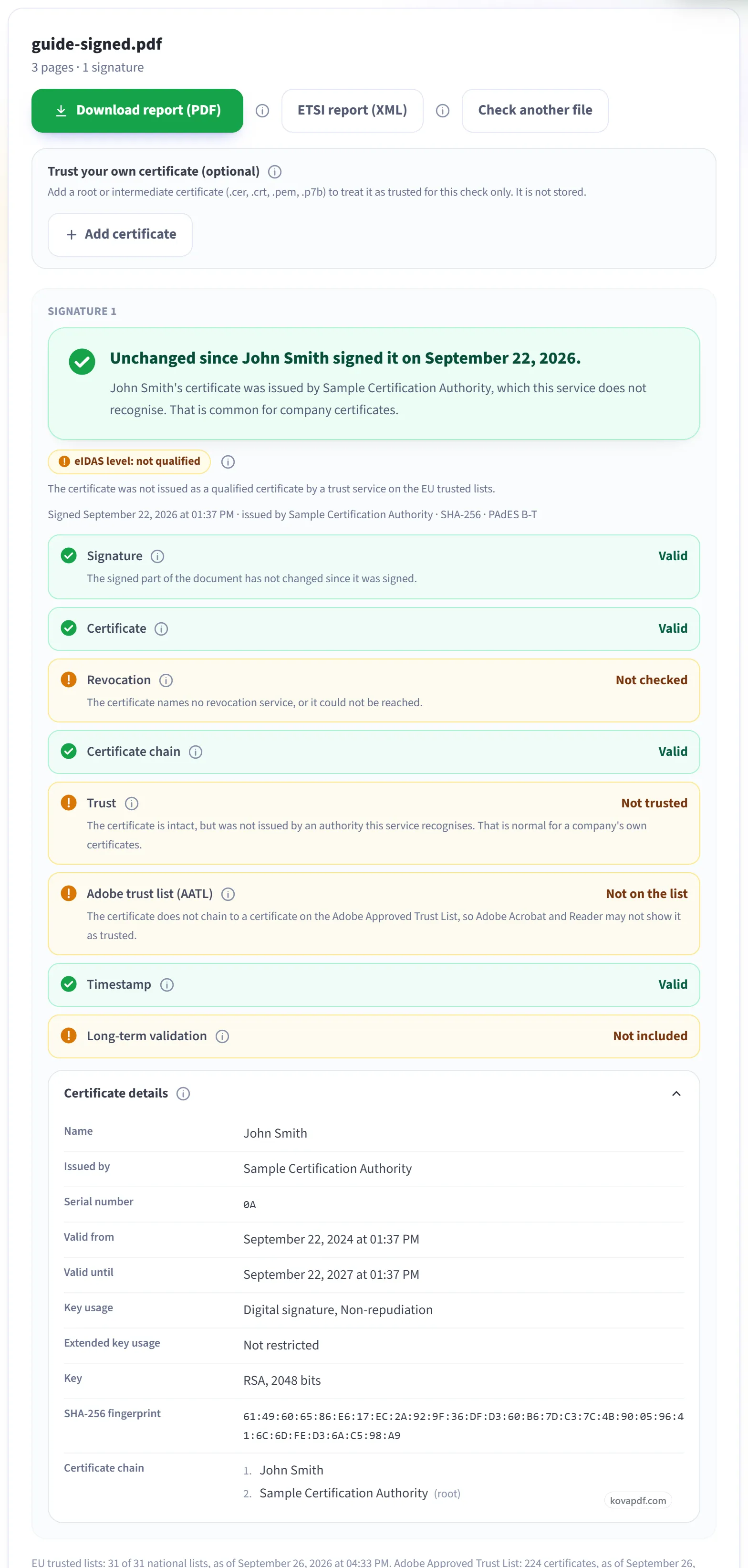
Read the result
Each signature starts with one plain sentence: green if the document is unchanged since that person signed it. Below it, every check has its own line, and "Certificate details" shows who the certificate belongs to, who issued it and its fingerprint. "Not trusted" only means the issuer is not one we recognise. Normal for a company's own certificates.
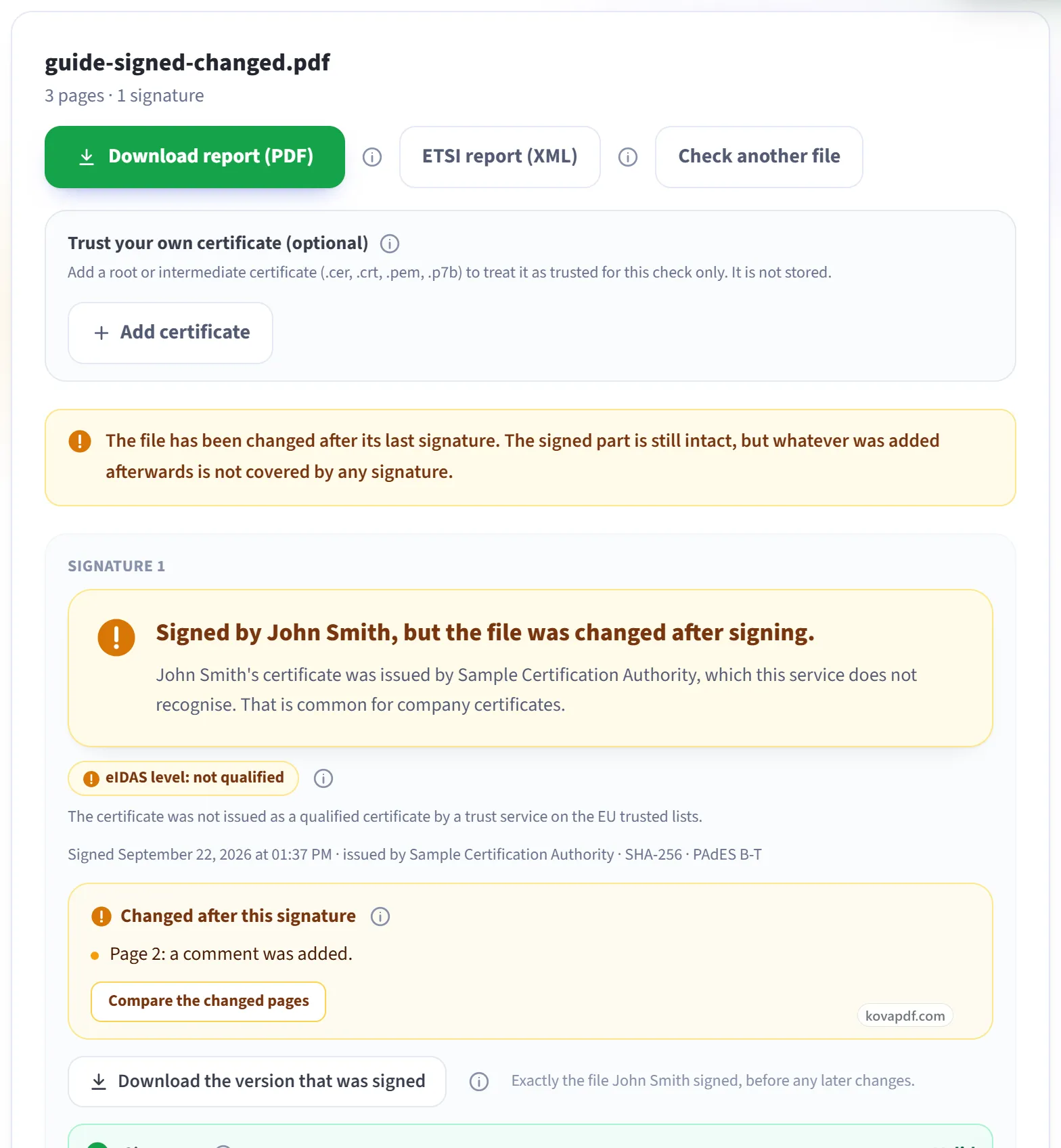
If the file was changed after signing
The sentence turns amber and the changes are listed page by page. In this example, a comment was added on page 2. "Download the version that was signed" gives you the file exactly as it was signed. If there is no digital signature at all, the page says so and points out any signature picture it found. "Download report (PDF)" saves the whole result.
Everything Verify Digital Signatures can do
Check every digital signature in a PDF: whether it still matches the document, who signed it, and whether their certificate can be trusted. Free, online, nothing kept.
Is the document intact
- Tells you plainly whether the document changed after signing
- Shows what changed, page by page, against the signed version
- Download the exact version that was signed
- Every signature in the file reported separately, in order
- Flags a signature image that has no real digital signature behind it
Who signed, and can they be trusted
- Full certificate details and the chain up to the root
- Revocation checked live by OCSP and CRL
- EU Trusted Lists: says whether it is a qualified signature or seal under eIDAS
- AATL: says whether Adobe trusts the issuer
- Add your own root certificate for a check we could not otherwise make
Time and long-term validity
- Timestamp checked, with the authority that issued it
- LTV and DSS data detected, so you know the signature survives certificate expiry
- Certification and permission rules (DocMDP) reported as the signer set them
Proof you can keep
- Download a PDF report of the whole check
- Download an ETSI TS 119 102-2 validation report in XML
- One plain-language verdict, with every fact shown on its own line
Turn the result into a practical question
| Question | Read this result | What it does not settle |
|---|---|---|
| Is the signed content intact? | Read this resultSignature and any later changes. | What it does not settleWhether every term in the agreement is sensible. |
| Who vouches for the credential? | Read this resultCertificate chain, Trust and the named trust sources. | What it does not settleWhether the named person had authority to accept the contract. |
| What supports the signing time? | Read this resultTimestamp and the overall findings. | What it does not settleAn independent time cannot be assumed from a printed date. |
Start with the file, not the words on its cover
To validate a digital signature online, choose the original PDF above. A digital signature is evidence embedded in the file. A typed name, a scanned autograph or a printed certificate page can look persuasive without providing that evidence.
Suppose Rafi at the fictional Birch Window Studio receives a signed project approval. He wants to know whether it is safe to accept the copy he has. The checker gives separate answers. It does not give a legal verdict on the agreement or confirm that a signer was allowed to approve the project.
Read these lines in ordinary language
Signature is the content check. Valid means the signed portion still matches the signature. If the file has later additions, those may need a separate decision. Invalid can mean changed signed content or a damaged signature.
Certificate is the signing credential's date and signing-use check. Certificate chain checks the sequence of certificates above it. Think of the chain as a sequence of endorsements; it can verify mathematically without ending at an authority you recognise.
Trust asks who vouches for that authority. Not trusted is not a synonym for forged. Trusted because you added it means your supplied certificate is the reason for that result on this check. Adobe trust list (AATL) asks about one particular public trust list.
Revocation asks whether the credential was cancelled early. Not checked means the checker could not obtain an answer, not that the certificate has been proved safe from cancellation.
Timestamp asks whether independent evidence supports the time. None means that evidence is absent. The signing date shown elsewhere may instead be the signing computer's claim.
Long-term validation can report that supporting material is present but not checked on that row. Presence alone is not a promise that the document will remain verifiable indefinitely.
Use the details to choose the next step
An overall result of indeterminate can mean the file is intact but evidence is incomplete. Read the findings beneath it. The certificate's subject, issuer, dates and fingerprint are in Certificate details. Other metadata can identify the hash method and signature profile; these technical labels do not replace the individual checks.
If the checker lists later changes, inspect them and use the downloadable signed version when offered. If no digital signature exists, obtain the original file or ask what signing process was used. Save a PDF report when you need a readable record, or the XML report when another system needs structured validation data.
Rafi can now ask a precise question, such as who issued the certificate or whether an added page was accepted. He should not turn a single valid line into a claim that every part of the transaction has been verified.
Use Verify Signature for another check, or check if a PDF was modified after signing for revisions. The signature result guide gives more detail without changing what the tool checks.
Validate digital signature online: common questions
What is a digital signature in a PDF?
It is embedded certificate-based evidence used to check signed content and the associated credential. A signature image alone is different.
Does Valid mean I should accept the agreement?
It is one technical result. Also consider trust, later changes, missing evidence and whether the signer had authority to accept the terms.
Is Not checked a failed signature?
Not necessarily. It often means evidence could not be obtained, such as a certificate cancellation response. Read the relevant line and findings.
Why is no digital signature found when I can see an autograph?
The visible autograph may be an image or drawing. The checker needs an embedded certificate signature to perform its cryptographic checks.
Can I keep the validation result?
When a result is available, the tool offers a readable PDF report and an XML report. Keep the original signed file with the report.
Related tools and pages
Adobe, Acrobat, Reader are trademarks of their owners. KovaPDF is not connected with, or endorsed by, any of them. This page compares products; it is not legal advice.