Why won't my PDF open?
Add the file that will not open. The repair tool rebuilds its structure, recovers every page it can, and tells you what could not be saved.
- Free to use
- Works on any device
- Nothing to install
- Checked before anything changes
- Recovers every page it can
- Checked again before you download
- Anything lost is listed
Drag & drop file here
or choose a file from your device
PDF · up to 80 MB · damaged files welcome
On your computer? Get the Windows appOn your phone? Get the phone app
- Checked before anything is changed
- You only get a file that passed our checks
- You see exactly what couldn't be recovered
Everything Repair PDF can do
Fix a PDF that won't open, shows errors or has missing pages.
What it fixes
- A damaged or missing internal index, which often causes "file is damaged" errors
- Files cut off during a download or copy, keeping every complete page
- A broken or missing list of pages, rebuilt from the pages themselves
- Damaged page content, keeping everything up to the point of damage
- Extra data before the start of the file, and wrong size values inside it
How you know it worked
- The file is checked first. If it is healthy, you are told so
- The repaired file is opened again and checked before you can download it
- Pages and text are compared with what the damaged file still held
- Anything that could not be recovered is listed by page number
What is kept
- Text stays real text you can select and search
- Fonts, images, links, bookmarks and form fields stay where they can be read
- Pages keep their size and rotation
- Nothing is made up. A page that can't be recovered is listed as lost
How it works
PDF won't open in three steps
Add the PDF
Damaged files are welcome; it does not need to open first.
Wait for the repair
The file is rebuilt and checked; you see how many pages were recovered and what was fixed.
Download the repaired PDF
Open it in any reader. If parts were lost, the report says which.
PDF won't open: a visual walkthrough
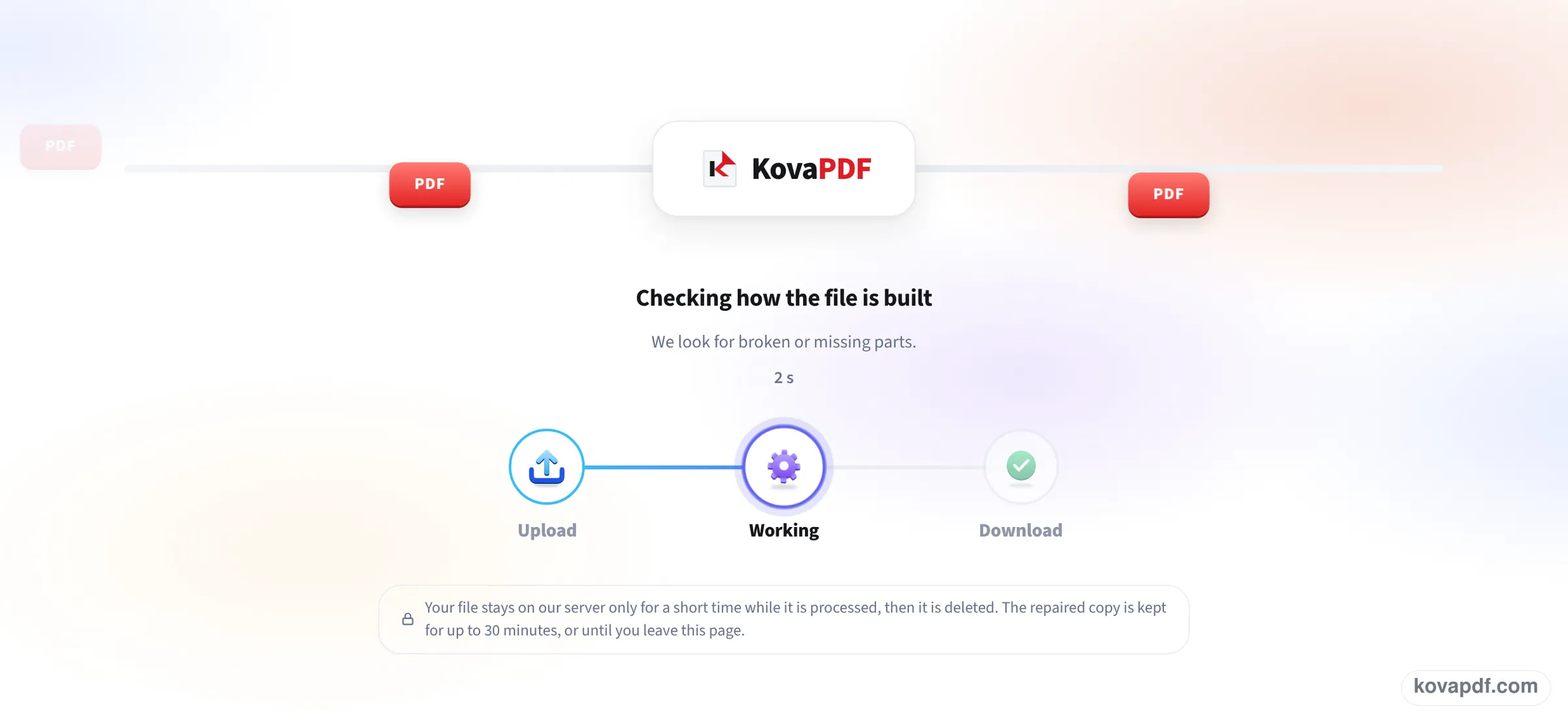
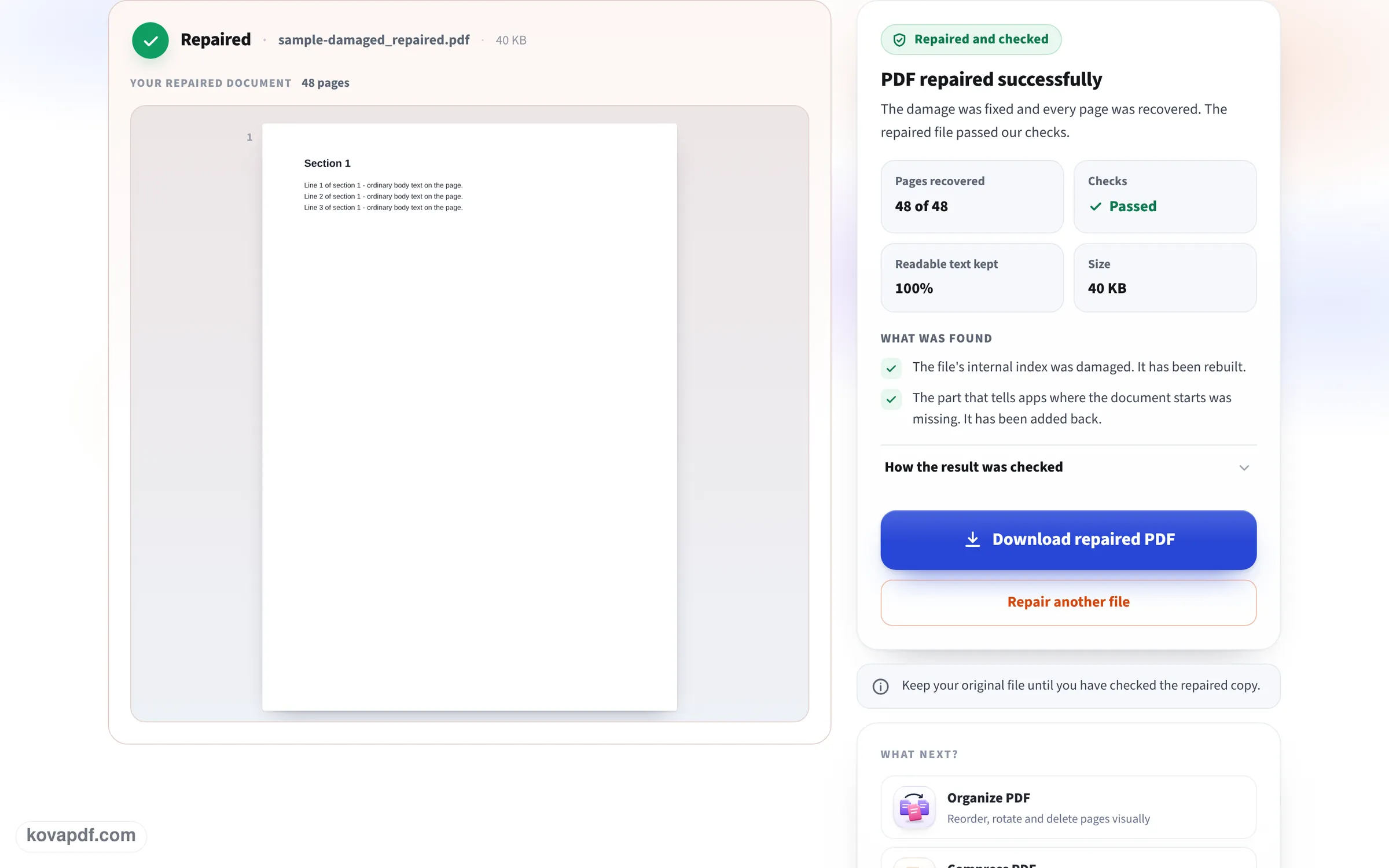
A broken file going through this page, photographed with a damaged copy of our long sample document: the upload box, the repair at work, and the report with the recovered pages.
Drop in the file that will not open
There is nothing to set. Attaching the file starts the repair, so a PDF your reader refuses can go straight in.

Let it rebuild and check the file
The progress card names the stage it is on, here checking how the file is built and looking for broken or missing parts, with a running timer. A repaired copy is only offered once it has passed the checks.
Read the report, then download
The result shows the repaired document with its page count, how many pages came back, whether the checks passed and what was found and fixed. Download repaired PDF saves the copy; keep the original until you have looked through it.
Five PDFs we damaged on purpose
We damaged copies of our own files the ways PDFs usually break, tried each in a standard PDF reader and a strict structure check, ran it through this page and opened the result. Measured on October 24, 2026.
| Damage | Before | After repair |
|---|---|---|
| Wrong index position (damaged cross reference table) in our 10-page report | The reader opened it by quietly fixing it; the strict check reported the damage | All 10 pages and all text; the report said the index was rebuilt |
| Email headers stuck in front of the same report | Did not start with %PDF, as every PDF must | All 10 pages and all text; the extra data was removed |
| 4,000 bytes in the middle wiped | Opened in the reader; the strict check found damaged data | All 10 pages and all text; page 1 shown in a standard font, which the report pointed out |
| Report cut off at 70% | Would not open at all | All 10 pages with their text; the report warned that the end was missing and asked us to check the page order |
| 3-page scan cut off at 80% | Failed the strict check: the end of the file was missing | Page 1 fully recovered; pages 2 and 3 not recovered, and the report named them |
A repair can only bring back what is still in the file. In our report the fonts and text sat in the first part of the file, so the cut copy came back whole; in the scan, the pictures of pages 2 and 3 were in the missing part, so those pages were gone. When pages are lost, you need the original again.
Each repair took between 3 and 9 seconds, upload included.
The usual reasons a PDF won't open
In rough order of how often we see them:
- The file is incomplete: a download, a sync or an email attachment was interrupted. Look at the size: a 2 KB "report" is a bad sign.
- It is not really a PDF: a web page or an error message saved with a .pdf name. Open it in a text editor; a real PDF starts with %PDF.
- It needs a password to open. Readers ask for one; some apps just say it cannot be opened. Unlock PDF tells you which it is.
- The index inside the file is damaged, which strict readers refuse and forgiving ones work around.
- The reader itself is the problem: an old app, or a browser extension. Try another browser before anything else.
Before you repair
Download or copy the file again if you can: a fresh, complete copy beats any repair. Ask the sender to send it again, or as a link instead of an attachment. If the PDF opens in one program but not another, the file is probably fine, and the program is not.
After the repair
Check every page of the repaired copy, especially the last ones. If pages are blank or missing, the original is the only full source; the report tells you exactly which pages are affected so you know what to ask for.
Read next: Remove PDF restrictions · Compress PDF for email
Frequently asked questions about PDF won't open
Why won't my PDF open?
Usually because the file is incomplete (an interrupted download or attachment), not really a PDF, protected with a password, or damaged inside. Repairing it here fixes the last case and recovers what it can in the first.
What do "Failed to load PDF document" and "Invalid PDF structure" mean?
The reader could not make sense of the file's structure. In our tests the copy cut off at 70% would not open at all, and after the repair all 10 pages opened again with their text.
Can every damaged PDF be fixed?
No. A repair restores the structure and recovers what is still in the file. Content that was never downloaded cannot be brought back; the report lists those pages.
My PDF opens on my phone but not on my computer. Why?
Some readers quietly work around damage that others refuse. Repairing the file makes it open everywhere.
Is it safe to upload a broken file?
Yes. It is repaired on our server and deleted as soon as the result is ready.
Will the repair change my document?
Only where it was broken. Our undamaged pages came back with all their text; where a font was lost, the report says which page now uses a standard font.
PDF won't open guides and articles



Related tools
All PDF tools · 15 step-by-step guides · How your files are handled
Also: Repair PDF