ATS friendly resume template
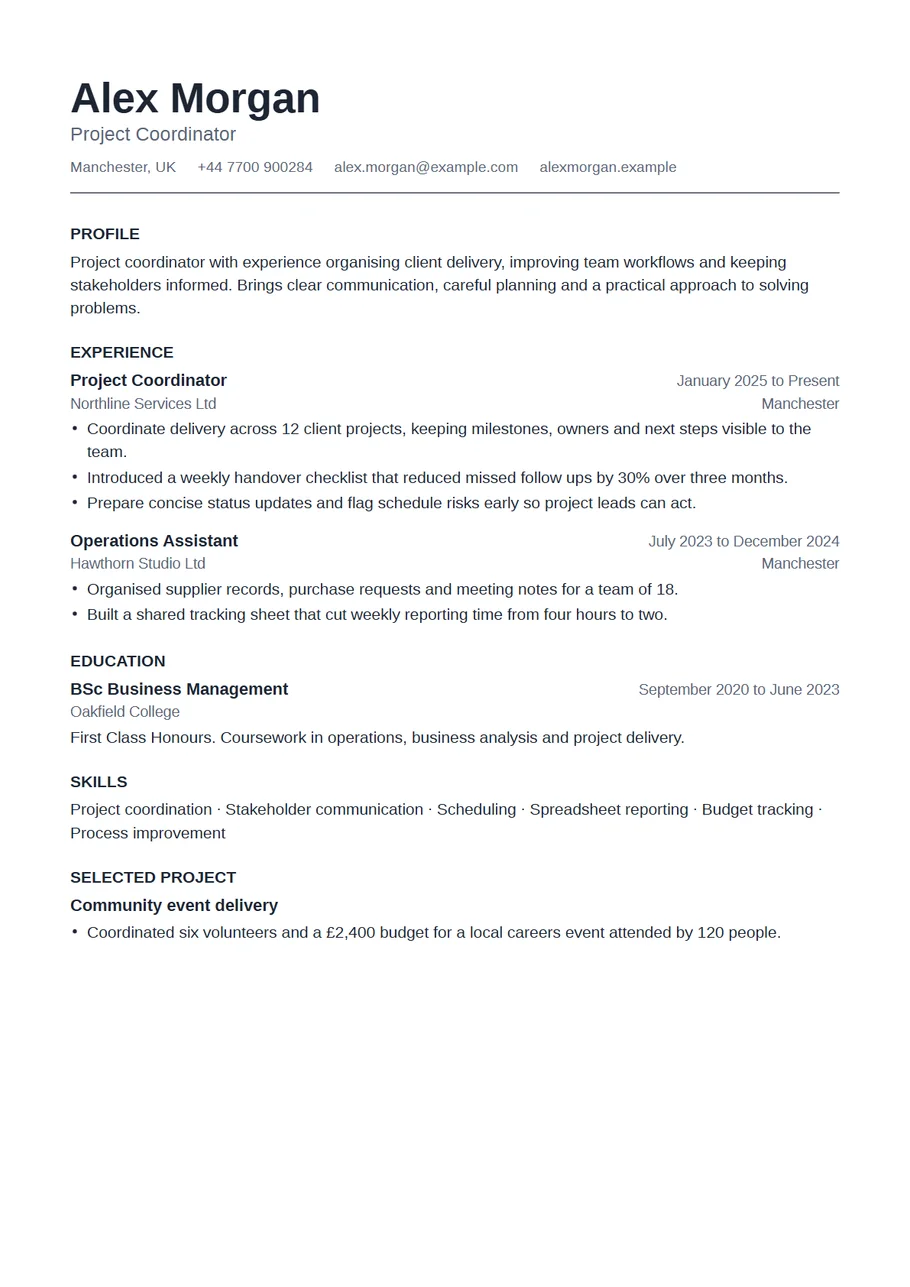
Many employers collect applications through software that reads your resume and files it before a person sees it. These systems handle simple documents best: one column, standard headings, real text and nothing in images or tables. This template, called Plain in the CV Maker, is built for exactly that situation, with black text, a single column and headings such as Experience, Education and Skills.
Use it whenever an advert asks you to upload a simple or plain file, when you apply through a large company's careers site, or when you expect your resume to be copied into a form. No layout can guarantee how a particular system will read a file, but a plain one gives it the fewest chances to go wrong.
Free, no account needed. Your CV is built in your browser and downloads as a PDF or an editable Word file, in A4 or US Letter.
What application systems read well
- Real, selectable text. Every word in this PDF is text, not a picture of text.
- One column, so the reading order is simply top to bottom.
- Standard headings: Profile, Experience, Education, Skills. Rename them only if you must.
- Dates written consistently, such as March 2021 to June 2024.
- Contact details in the body of the page, not in a header or footer.
- No icons, skill bars, charts or text boxes.
Matching the job advert
Software often looks for the words the employer used. Read the advert, note the skills and qualifications it names, and use the same words where they are true for you. If it asks for stakeholder management, write stakeholder management rather than working with partners. Put them in your skills list and in the bullet points where you used them, not in a hidden block of keywords.
PDF or Word?
Follow the advert. If it names a format, use it. If it does not, a PDF made here is a safe default because it keeps real text and embedded fonts. Some systems still ask for Word; choose Word on the review screen to get an editable .docx built from real paragraphs, with no text boxes or tables.
Example skills section
Customer onboarding · Account management · CRM reporting · Contract renewals · Spanish (fluent)
Keep skills concrete and checkable. Software, methods, licences and languages belong here; personality traits belong in your experience, shown through results.
Plain does not have to mean dull
The page uses a clean sans serif, clear spacing and bold job titles, so a person reading it after the software still finds it pleasant. Once your application reaches a person, for example at interview stage or through a referral, you can bring a designed version: switch to Sidebar, Horizon or Timeline and your words come with you.
Common mistakes that confuse application systems
- Putting your name or contact details in a page header or footer, where some systems never look.
- Writing section headings in unusual ways, such as My Journey instead of Experience.
- Sending a scan or a photo of a resume, which contains no text at all.
- Using tables or text boxes to line things up.
- Mixing date formats, which can make your experience look shorter than it is.
- Abbreviations the system may not know. Write the full name once, then the short form in brackets.
This template avoids all of these. The only things left to check are your words.
After the system, a person
Even when software reads your resume first, a recruiter or hiring manager reads it next, often in under a minute. So the same rules apply as for any good resume: your current role at the top of your experience, a result in every bullet point, and nothing on the page that does not help. Plain makes those things easy to see.
Keep a copy of the exact version you sent for each job. Save a job specific copy on the review screen, give it the employer's name, and you will know what they read when they call.
A last check before you send it
Open the review screen and choose Preview the reading order. That is close to what an application system sees: your name, contact details, then each section in turn. If anything appears in an odd place or a heading is missing, fix it in the editor before you download. Then copy a paragraph from the downloaded PDF into a plain text note to confirm the text comes out cleanly.
Start with the Plain layout
The CV Maker opens with this template chosen. Fill in one section at a time and watch the page update beside the form. If you change your mind, switch layout on the first step or the review screen: everything you typed comes with you.
Use the Plain templateQuestions about this template
What makes a resume ATS friendly?
Real text, one column, standard headings, consistent dates and no graphics or tables. This template has all of those. No template can guarantee how a particular system reads a file.
Can I add colour to it?
You can choose any colour in the Design panel, but for application systems black text is the safest. For a person, a designed template is the better choice.
Should I use PDF or Word?
Use the format the advert asks for. If it does not say, a PDF with real text is a safe choice. Both are available on the review screen.
Can I keep a designed version too?
Yes. Save a job specific copy on the review screen, switch template, and you have both versions with the same words.