Copy text from a scanned PDF
A scan is a picture, so the words cannot be selected. Add it here: every page is read with text recognition, ready to copy or save.
- Free to use
- Works on any device
- Stays on your device
- Embedded text read exactly
- Scanned pages recognised
- Every page in one file
- Copy it or download it
Drag & drop file here
or choose a file from your device
Choose the scanned PDF to copy text from
PDF files only
We'll work out the language from the document itself.
Everything PDF to Text can do
Get the text of every page out of a PDF. Text the file already carries is read exactly, and scanned pages are recognised for you.
What it reads
- Embedded text lifted exactly as the file stores it
- Scanned pages recognised automatically, page by page
- A document that mixes real text and scans handled throughout
- Line breaks kept, so the page reads in order
Document language
- Work the language out from the document itself
- Bangla, English, Hindi, Arabic, Chinese, Russian, Spanish, Portuguese and Dutch
- Your script and English read together, for names, dates and amounts
- Name the language yourself and go straight to recognition
In the workspace
- Every page on screen with its own thumbnail
- Jump to any page and read its text against the page
- Copy one page from the button on that page
- Pages open up as each one is read
Taking the text away
- Copy All Pages in a single click
- Download the whole document as a .txt file
- Each block labelled with its page number
- Page text you can paste straight into a document
How it works
Copy text from a scanned PDF in three steps
Add the scan
Drop the PDF in. Scanned pages are found and read automatically, in your browser.
Wait for the pages
The panel counts the pages as they are read, then says how many needed text recognition.
Copy or download
Copy one page, Copy All Pages, or Download as .txt.
Copy text from a scanned PDF: a visual walkthrough
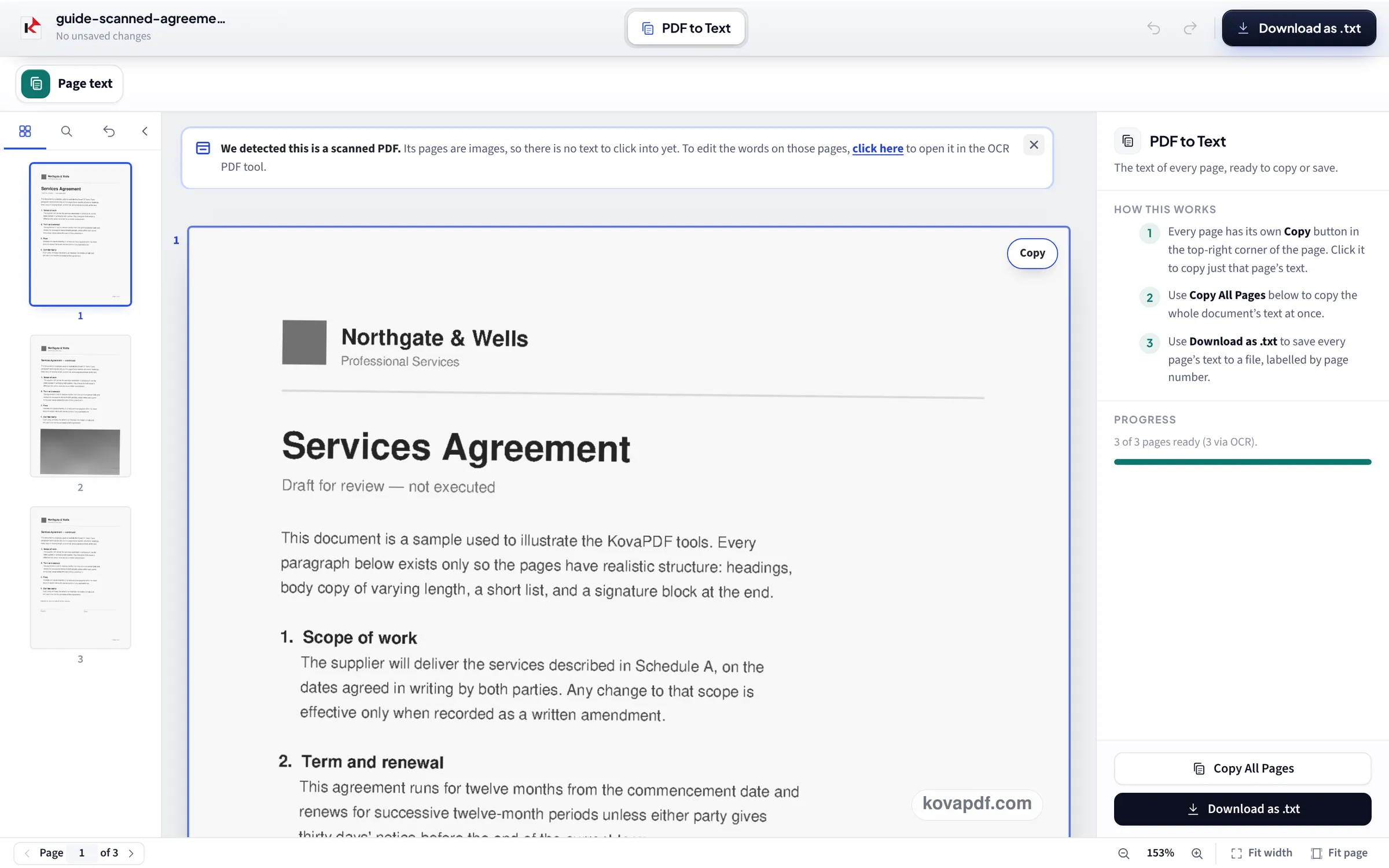
A scan of our sample agreement, read page by page: the upload, the progress panel once all three pages are done, and the whole text copied in one go.
Add the scan
Drop the scanned PDF on the box. Reading starts by itself; there is nothing to set.

Let every page be read
A banner says the file is a scan. Under Progress the panel counts the pages until it reads 3 of 3 pages ready (3 via OCR), and each page gets its own Copy button in its corner.
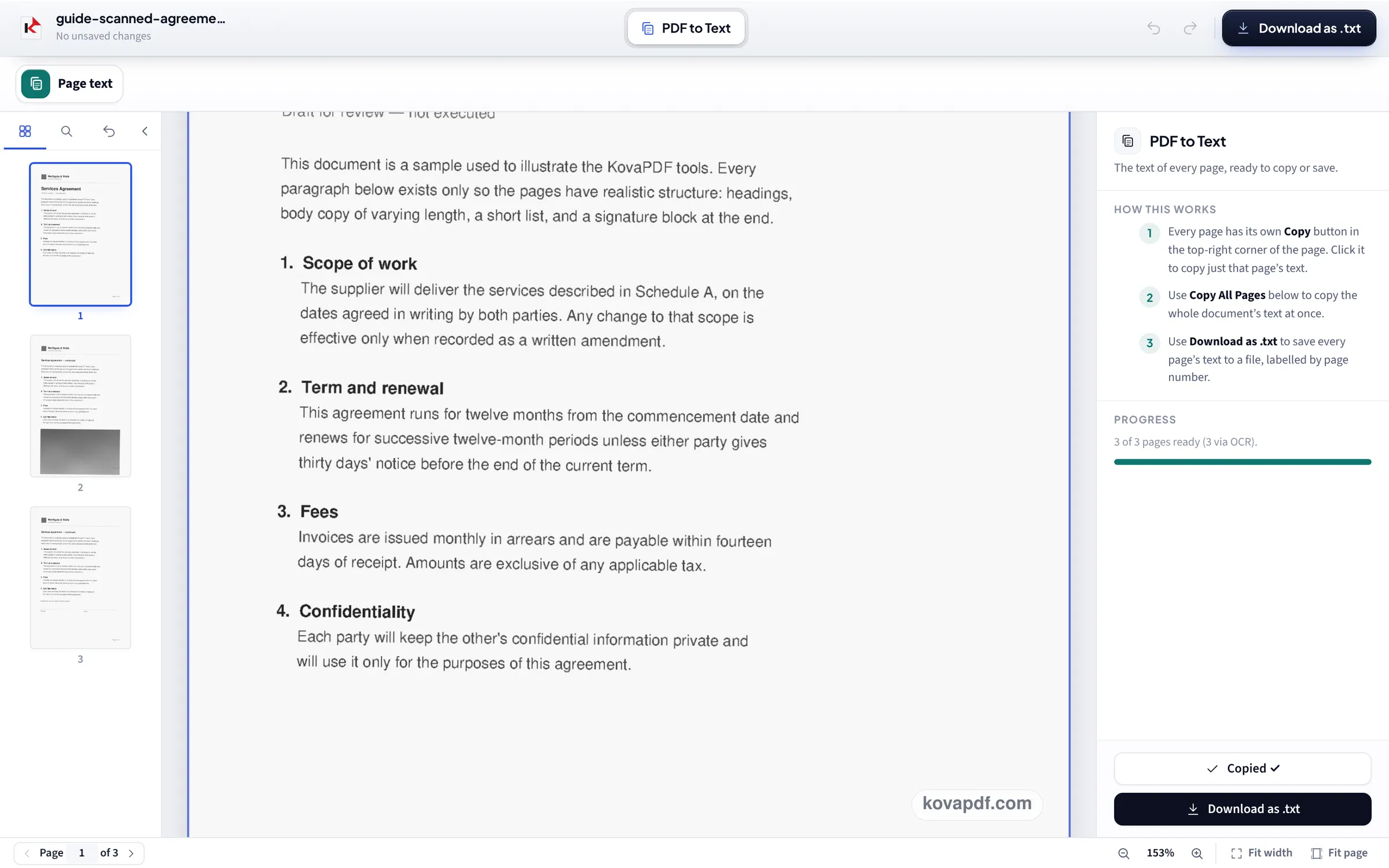
Copy All Pages
Copy All Pages puts the text of the whole document on your clipboard, in page order, and the button shows Copied. Download as .txt saves the same text as a file, each page labelled.
A 3-page scan read on 24 October
We printed our own 3-page letter to 300 DPI grey pictures, tilted 0.6° and toned like a flatbed scan, added the scan on this page in a 1366 pixel window, saved the .txt and compared it word by word with the letter's own text. Measured on October 24, 2026.
| Checked | Result |
|---|---|
| Pages read | 3 of 3, all three by text recognition |
| Words correct | 1,050 of 1,050 (100%) |
| Added by the tool | Only the page labels Page 1, Page 2 and Page 3 |
| Time to read | 47.5 s, on a test machine busy with several other jobs at once |
Accuracy and speed on 22 October
Our earlier run, on scans of our typed documents at 300 DPI, on a desktop computer with nothing else running: the .txt compared word by word with the originals. Measured on October 22, 2026.
| Scan | Time to read | Words correct | Notes |
|---|---|---|---|
| 3-page letter, grey | 12.8 s | 100% | All 4,072 characters; only page labels added |
| 10-page report, colour | 24.9 s | 100% | 13,390 characters |
| 1-page invoice with a ruled table | not timed | 88% | Every figure right; table borders read as | and a long item split over two lines |
Clean, straight scans of printed text are read almost perfectly. Tables are the hard case: the words and numbers come out, but grid lines can turn into stray | marks and a cell that wraps becomes two lines. Check figures before you paste them into a spreadsheet.
Why you cannot select text in a scan
A scanner or phone camera takes a picture of the page. To the PDF reader there are no letters, just dots, so selecting does nothing and search finds nothing. Text recognition looks at the picture and works out the letters, which is what makes copying possible.
If you want to keep the PDF itself and make it searchable, with the words selectable in place, use OCR PDF instead: it adds a hidden text layer to the scan and lets you edit it.
Getting the best result
Recognition is only as good as the scan:
- Turn sideways or upside down pages the right way first: Fix an upside down scanned PDF.
- 300 DPI is ideal; very small text below about 150 DPI starts to go wrong.
- Handwriting is not read reliably; printed and typed text is.
- Strong shadows, coloured paper and stamps over text lower the accuracy; Enhance Scan or Photo can clean the page first.
Privacy
On current computers and phones the recognition runs in your browser, so the scan is not uploaded for it; only a browser that cannot run it sends the pages to our server, which deletes them after reading. That matters for the documents people most often need to copy from: payslips, contracts, medical letters and IDs.
Read next: Fix an upside down scanned PDF · Compress a scanned PDF · Remove PDF restrictions
Frequently asked questions about Copy text from a scanned PDF
How do I copy text from a scanned PDF?
Add it here. Every scanned page is read with text recognition; then press Copy All Pages, copy a single page, or Download as .txt.
Why can't I highlight text in my PDF?
It is probably a scan: a picture of the page with no text in it. Text recognition turns the picture into words you can copy. If it is not a scan, the file may have copy restrictions, which Remove PDF restrictions takes off.
How accurate is it?
On clean 300 DPI scans of printed text, our tests got every word right. Tables come out with the right figures but sometimes with stray characters from grid lines.
Is my scan uploaded?
Not on current browsers: the text recognition runs on your device. A browser that cannot run it sends the pages to our server, which deletes them after reading.
Can it read handwriting?
Not reliably. It is made for printed and typed text.
How long does it take?
Seconds per page. On a free desktop computer our 3-page letter took 12.8 seconds and a 10-page report 24.9 seconds; on a busy machine the same kind of letter took 47.5 seconds. Phones are slower.
Copy text from a scanned PDF guides and articles



Related tools
All PDF tools · 15 step-by-step guides · How your files are handled
Also: PDF to Text · OCR PDF