Converting files
Convert a ZIP of images to one PDF in the right page order
In short
Check image filenames and orientation before converting the ZIP. Name sorting can put page2 before page10, but only your review can confirm that the pictures form the intended document. Compare the image count with the PDF pages and inspect both ends of the sequence.

Why does filename order matter?
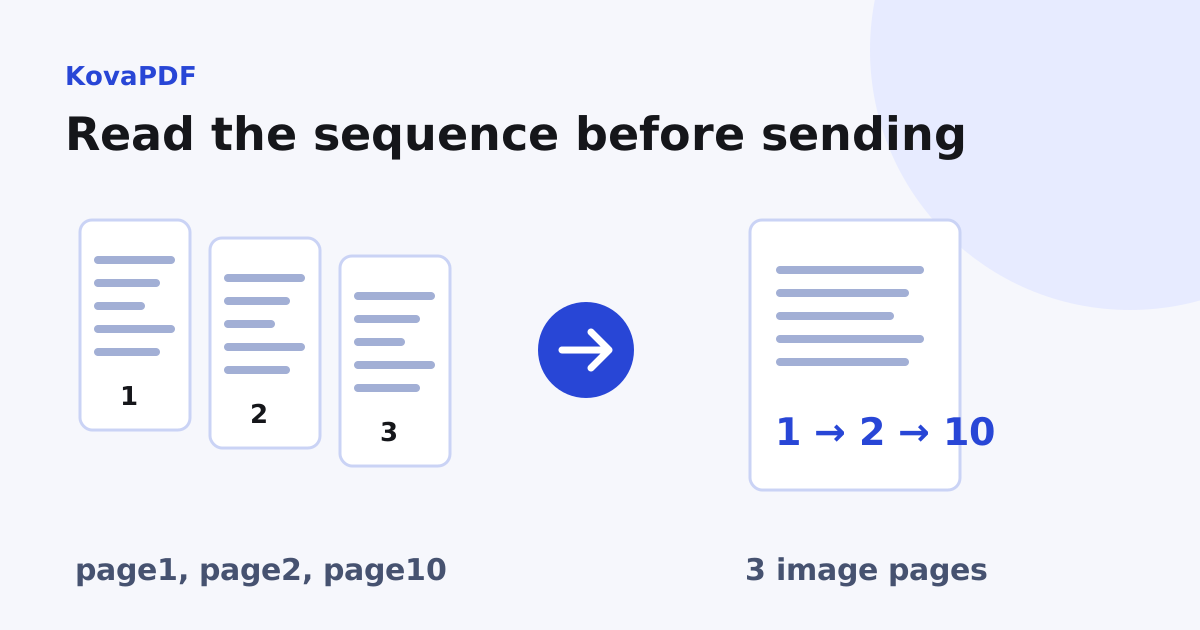
An archive contains entry names, not an explanation of the document's reading order. Names like page1, page2 and page10 look obvious to a person, but simple character sorting can place page10 before page2. A scanned contract assembled that way can separate a clause from its continuation.
Use ZIP to PDF and inspect the name sort order. Our test ZIP deliberately stored page10.png, page2.png and page1.png in that entry order. KovaPDF returned three pages, ordered page1.png, page2.png, page10.png. This tests natural sorting; it does not prove that page10 is the next missing page in a real document.
How do I prepare a complete sequence?
Check for gaps, repeats and alternate captures of the same page. A scan called page2-final might belong instead of page2, not after it. Keep both originals while deciding which is intended. Do not remove a page merely because it looks mostly blank: it may contain a signature, reverse-side note or required statement.
For a new scan set, sequential zero padded names make the order explicit. For a received archive, preserve the original ZIP and document any working-copy changes. Compare the page numbers printed inside the images with the filenames when both exist.
Will all PDF pages be the same size?
Do not assume so. Images can have different dimensions, orientation and density metadata. Depending on conversion choices, pages may keep source geometry rather than being fitted onto uniform paper. Our test used matching 1240 by 1754 pixel images, so it did not test a mixed camera and scanner set.
Open the output thumbnails and look for a single tiny page, unexpected landscape sheet or cropped edge. If the packet must print on one paper size, verify the final page boxes and preview a printed sample. A uniform thumbnail width is not a measurement of physical paper size.
What should I do with sideways photographs?
Check readable orientation after conversion. Camera rotation metadata and the pixels themselves are different things, so an image that looks upright in one viewer may need review in the PDF. Use Rotate PDF on a working copy if a page needs turning, then inspect its edges again.
If grey backgrounds or speckles obscure the writing, follow scan cleanup before OCR. Keep a colour original when stamps, highlighting or pencil marks carry meaning. Cleaning every image aggressively can remove useful evidence.
When should I use a different workflow?
For pictures you are selecting directly, JPG to PDF can avoid preparing a ZIP. For an archive containing existing PDFs, text and presentations, use the mixed packet guide, which accounts for multiple pages per component and skipped entries.
If you made the pictures from a PDF only to combine them again, consider keeping the original PDF pages instead. The page image conversion guide explains which document features become pixels and why rendering is a deliberate change of format.
Common questions
Will page10 be sorted before page2?
The tested name sort used natural numerical order and returned page1, page2, page10. Inspect the listed order for your own names.
Does three images always mean the document is complete?
No. The count cannot reveal a missing original page or two captures of the same page. Compare the sequence and printed labels.
Will every image have the same paper size?
Images may carry different geometry or density information. Inspect the resulting PDF page sizes before printing.
Can I correct a sideways page afterwards?
Use the rotation workflow on a copy, then verify orientation and page edges in the output.
Should I clean every image to black and white?
Only when that preserves the information. Colour stamps, pencil marks and highlights may be damaged by aggressive cleanup.
What if the archive also has text files and PDFs?
Use the mixed archive workflow and reconcile the page count of every converted component, including skipped items.
KovaPDF on your computer and phone
Use KovaPDF on your computer, where many tools work with no internet, and on your phone. The same account works in both.