White out a PDF
Drag over anything you want gone. The area turns white, the words under it leave the file, and you can type something new on top.
- Free to use
- Works on any device
- Nothing to install
- Type straight onto the page
- Images, shapes and signatures
- Pages added or removed
- Saves a real PDF
Drag & drop file here
or choose a file from your device
Upload the PDF you want to white out
PDF files only
Deleted after processing. Up to 200 pages and 50 MB per file.
How it works
White out a PDF in three steps
Open your PDF
Drop it in. Whiteout is already chosen in the editor.
Drag over what should go
Draw a box over the words, number or picture. It turns white straight away; drag again for more.
Type on top, or download
Choose Add text to write over the white area, or go straight to Review & download.
Is the text really gone? Our test
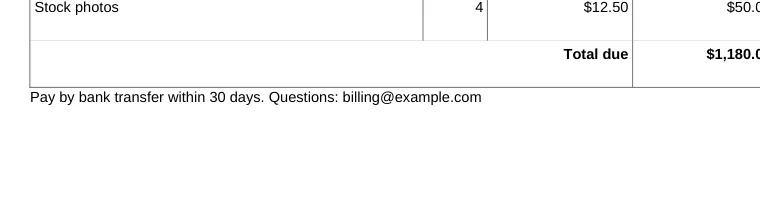
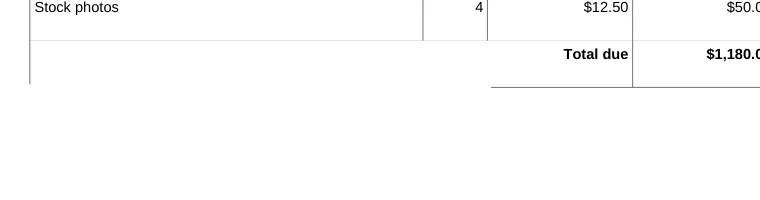
A white box that only hides words is a known way to leak them: copy the page and the old text comes back. We whited out one line of a real invoice on this page, saved it, and opened the downloaded file again. Measured on October 21, 2026.
| Check | Before | After download |
|---|---|---|
| The line on the page | “Pay by bank transfer within 30 days. Questions: billing@example.com” | A white area |
| Searching the file for “billing” | 1 match | 0 matches |
| Copying all the text of the page | Includes the line | The line is not there |
| Everything else on the invoice | Table, total and logo | Unchanged |
When the whiteout covers text the editor can read, that text is taken out of the page when you save, not just painted over. Text that is part of a picture, such as a scanned page or a logo, is covered by white only: the picture underneath is not changed.
Whiteout, edit or redact: which one you need
All three make something disappear from the page. They differ in what is left behind:
- Whiteout: a white area where you dragged, and the readable text under it removed. Right for a wrong date, an old address, or a space to write in.
- Edit text: change the words and keep the line. Better than whiteout plus typing when you only need different wording, because the font stays the same.
- Redact PDF: black boxes, and the text, pictures and hidden data under them removed for good. Use it for anything confidential, such as account numbers or names in a legal file.
Typing on the white area
After you white out, pick Add text and click inside the white area. New text is not erased by the whiteout under it, so you can cover an old figure and write the new one in the same place. Pick the size and color in the text panel so it matches the rest of the page.
White out a PDF: common questions
How do I white out text in a PDF for free?
Open the PDF here, drag a box over the text with Whiteout, then Review & download. The area turns white and the readable text under it is removed from the saved file.
Can someone remove the white box and see what was under it?
Not for text the editor can read: it is taken out of the page when you save, so there is nothing under the white to find. A picture under the white area is covered, not changed, so use Redact PDF for anything in a scan or a photo that must never be recovered.
Can I white out and then type something else?
Yes. Choose Add text and click inside the white area. Your new text stays on top.
Is whiteout the same as redaction?
No. Whiteout is for corrections and blank space. Redaction is for secrets: it removes the text, pictures and hidden data under each black box and is the tool to use for legal and personal information.
Can I white out part of a scanned page?
Yes. The white area covers the scan where you drag. Because a scan is a picture, the picture underneath is covered rather than changed, which looks the same on screen and on paper.
Can I undo a whiteout?
Yes, before you save: press Undo. After you download, the removed text is gone from that copy, so keep your original if you might need it.