Edit PDF text in the same font
Click a line, type the new words, and they are saved in the font the PDF already uses. Drop your PDF below to start.
- Free to use
- Works on any device
- Nothing to install
- Type straight onto the page
- Images, shapes and signatures
- Pages added or removed
- Saves a real PDF
Drag & drop file here
or choose a file from your device
Upload the PDF whose text you want to change
PDF files only
Deleted after processing. Up to 200 pages and 50 MB per file.
How it works
Edit PDF text in the same font in three steps
Open your PDF
Drop it in the box. Each line of text on the page becomes something you can click.
Click the line and retype it
Edit text is already chosen. Select the words you want to change and type over them; the font, size and color stay as they were.
Review and download
Review & download writes the change into the PDF. The save screen tells you if any letter had to come from a standard font.
What our test files looked like after download
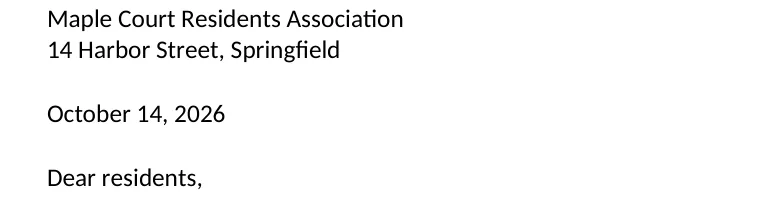
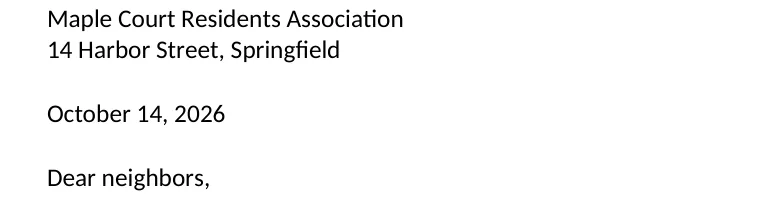
We edited three real PDFs in the editor on this page, saved them, then opened each downloaded file again in a separate reader to list its fonts and search its text. Measured on October 21, 2026.
| Test file | What we changed | Font of the new words | Old words in the text |
|---|---|---|---|
| Letter exported from a word processor, 3 pages, Carlito 11 pt | “Dear residents,” to “Dear neighbors,” | Carlito, 11 pt, the letter's own font | Gone. A search finds “Dear neighbors,” and the line no longer says “residents” |
| Same letter, bold heading in Liberation Serif Bold 18 pt | “Quarterly maintenance schedule” to “Quarterly maintenance plan” | Liberation Serif Bold, 18 pt, still bold | Gone |
| One-page invoice, Liberation Sans 10 pt | “Due date: November 1, 2026” to “November 15, 2026” | Liberation Sans, 10 pt | Gone. “November 1,” is nowhere in the file |
| Same letter, adding letters it never used | “Maple Court Residents Association” to “…Association, Zone 7” | Carlito for the words, a standard sans serif for “Z” and “7” | Gone |
The last row is the one limit worth knowing. Most PDFs carry only the letters they printed, so a capital or a digit the document never used is not in its copy of the font. That line is then saved in a standard font that looks close, and the save screen lists the letters that caused it, so you know before you send the file.
Size and color came through unchanged in every case. A long new line wraps where the old line ended, as it did in the last test.
Why fonts change in other editors, and what this one does instead
A PDF does not store a paragraph the way a word processor does. It stores letters placed at exact spots, drawn with a font that is often cut down to the letters the page needed. Many online editors cannot reuse that cut-down font, so they cover the old line with a white box and type the new words on top in Arial or Helvetica. The result looks patched, and the old words are still in the file underneath.
Here the editor reads which font each line was set in and draws your new words with that same font. Then it takes the old letters out of the page, so copying, searching or a screen reader finds only the new words.
When the same font is not possible
Three cases, and what happens in each:
- You type a letter the document never used. That line comes out in a standard look-alike font, and the save screen names the letters.
- The PDF names a font but does not include it, which is common in very old files. The line is drawn in the closest standard font.
- The page is a scan. There is no font at all, only a picture of letters; use Edit a scanned PDF, which reads the words first.
Edit PDF text in the same font: common questions
How do I edit text in a PDF without changing the font?
Open the PDF here, click the line and type over the words you want to change. The editor uses the font, size and color the line already had, and after you download, the new words are in that font. If you type a letter the file never contained, that one line uses a close standard font and you are told which letters.
Why does my PDF font change when I edit it?
Because most PDFs only carry the letters they printed, and many editors cannot reuse that partial font, so they swap in Arial or Helvetica. This editor reuses the PDF's own font whenever it has the letters you typed.
Will the old text still be hidden underneath?
No. When you save, the old letters of an edited line are taken out of the page. In our tests, searching the downloaded file for the old wording found nothing.
Can I keep bold and italic?
Yes. A bold heading stays bold, because the bold font the heading used is the one the new words are drawn with. You can also change the weight, size or color of a line yourself from the text panel.
Can I change the font on purpose?
Yes. Select the words and pick another font in the text panel. Choosing a font from your own computer is part of Pro.
Does it work on a scanned PDF?
A scan has no font, only a picture of the page. Use Edit a scanned PDF: it reads the words first and then lets you change them in a font that matches.
Do I need to install anything?
No. The editor runs in your browser on a computer or a phone. Your upload is deleted as soon as the edited PDF is ready.
Tools that go with it
Edit a scanned PDFWhite out a PDFWhy fonts change when Word becomes a PDF