Convert PDF to PDF/A
PDF/A is the archive form of PDF: fonts and colours travel inside the file, so it opens the same way in decades. Choose the version you were asked for and download a file that passed the check.
- Free to use
- Works on any device
- Nothing to install
- Checked before anything changes
- PDF/A-1b, 2b, 2u, 3b and 3u
- Validated before you download
- Every change explained
PDF/A
Drag & drop file here
or choose a file from your device
Choose the PDF to convert to PDF/A
PDF · up to 80 MB · checked before anything changes
Everything PDF to PDF/A can do
Turn a PDF into an ISO 19005 archival file that is validated before you download it.
Standards
- PDF/A-2b by default, the standard most archives, courts and agencies accept
- PDF/A-1b for older systems, PDF/A-2u and 3u when the text must stay searchable
- PDF/A-3b and 3u keep attached files of any type
- Every file is validated against the standard you chose; a file that fails is never handed out
Before converting
- Checks fonts, colours, forms, scripts, attachments, signatures and security first
- Says in plain words what will change for the standard you picked
- Warns before a digital signature or an attachment is removed
Keeping your document the same
- Text stays selectable and searchable, and is compared before and after
- Files that only need fixing are fixed in place: form fields, links, bookmarks and tags stay
- Fonts that were not embedded are embedded with the closest match, keeping every line's spacing
- Images are never downsampled or re-compressed as JPEG
- Scanned pages keep their image quality; existing searchable text layers stay
Limits
- Up to 50 MB and 200 pages per file
- Password-protected PDFs need their password removed first with Unlock PDF
- Accessibility-tagged standards (PDF/A-1a, 2a, 3a) and PDF/A-4 are not offered
How it works
Convert PDF to PDF/A in three steps
Add the PDF
It is read first, and a list shows what will be adjusted for the standard and what is fine.
Pick the version
PDF/A-2b is suggested. Open Other standards for 1b, 2u, 3b or 3u if the court or archive names one.
Download the checked file
Only a file that passed the PDF/A check is offered, with the standard, page count and size shown.
Convert PDF to PDF/A: a visual walkthrough
This page with a sample document: the upload box, the compatibility check with the standard chosen, and the validated result.
Add the PDF you need to archive or file
Drop it onto the box or press Choose File. A password-protected file is refused, with a link to Unlock PDF.

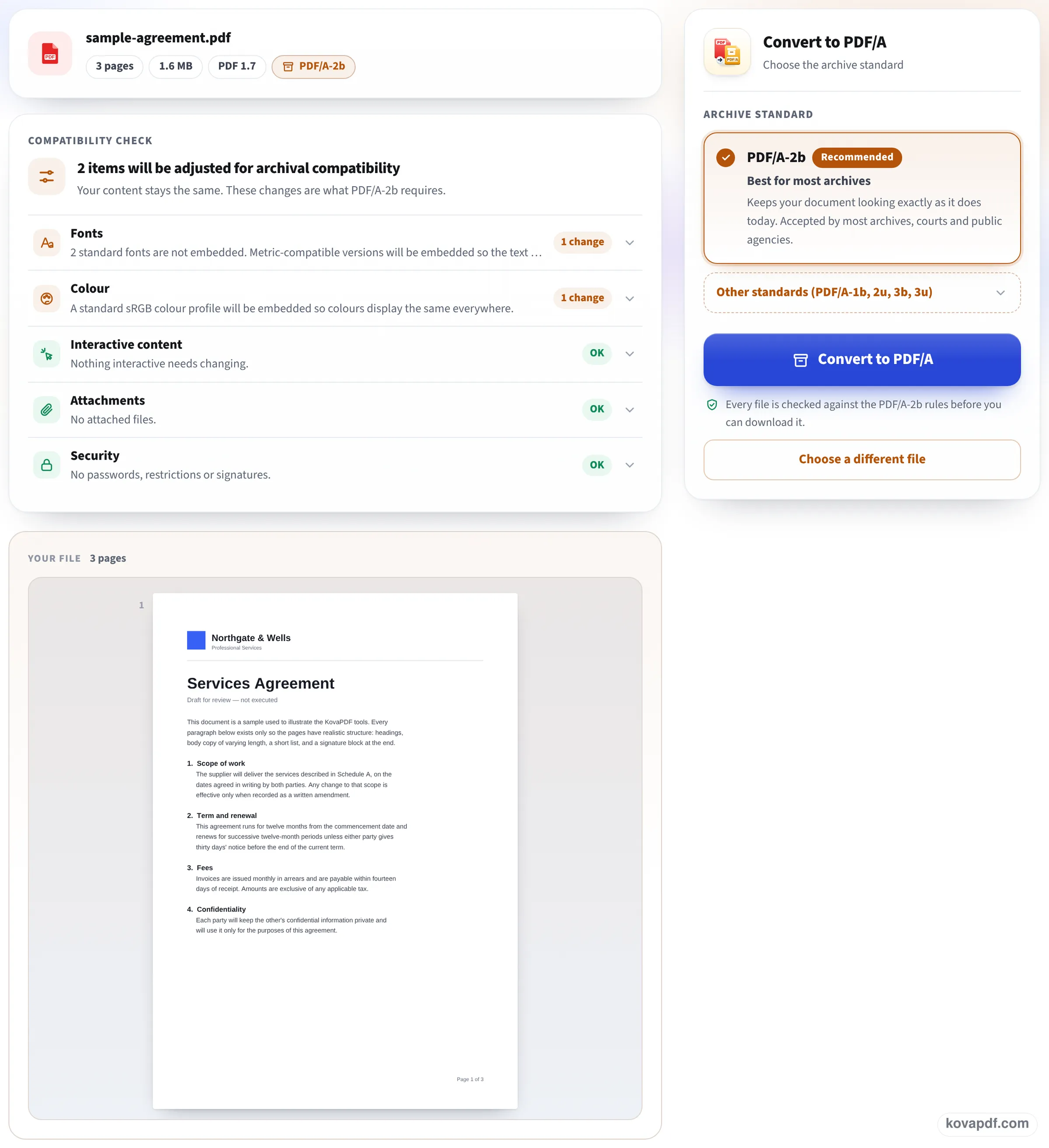
Read the check and press Convert to PDF/A
Fonts, colour, interactive content, attachments and security each get a line saying what will change. PDF/A-2b is selected; press Convert to PDF/A.
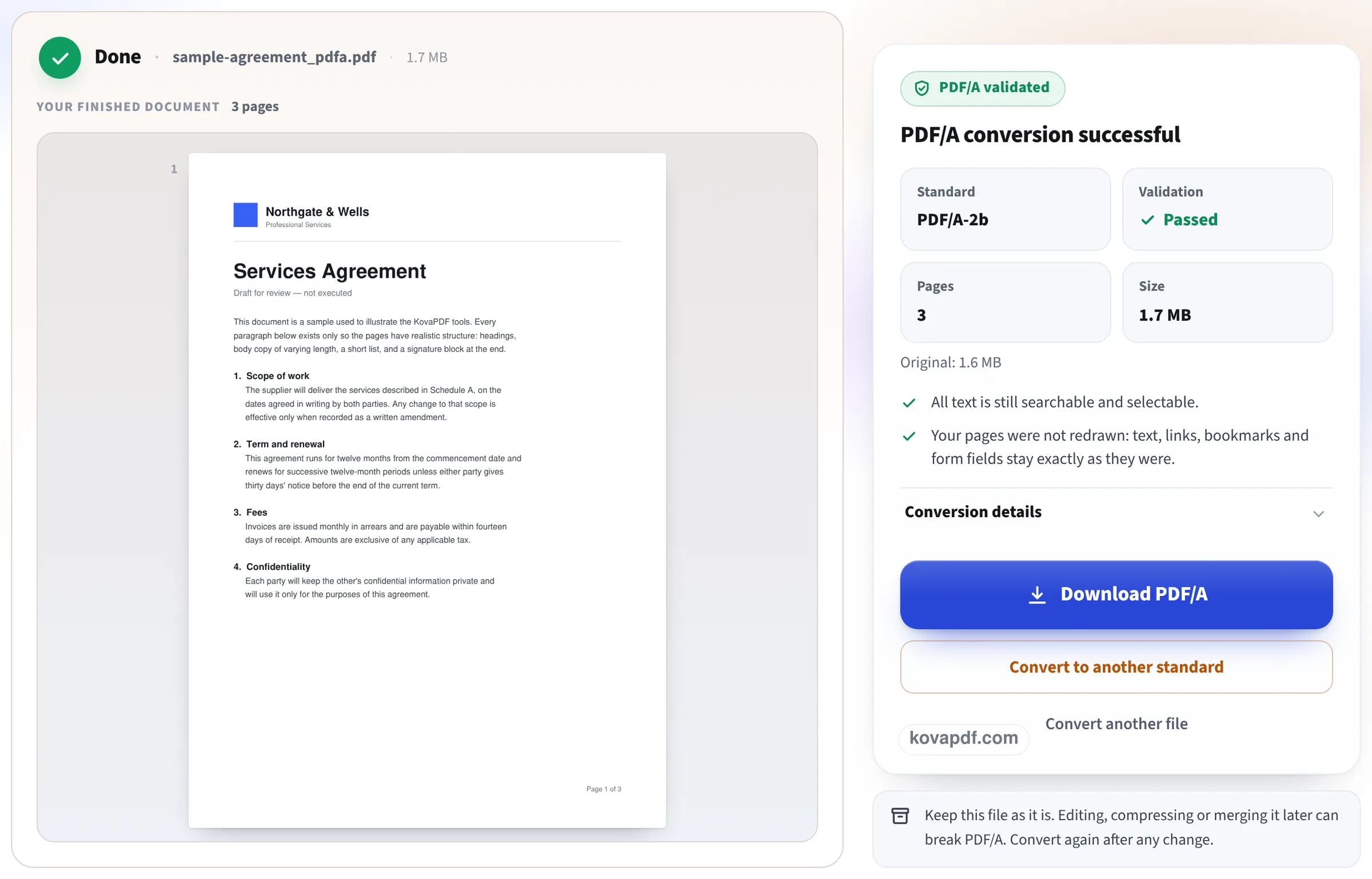
Download the validated PDF/A
The result reads PDF/A validated, with the standard, Passed, pages and size. Press Download PDF/A.
Three documents converted here
We converted our own files on this page and opened each download: we read the PDF/A identification it carries, ran our own second PDF/A check, and compared the text with the original. Measured on October 24, 2026.
| File | Before | After | Standard and check | Text |
|---|---|---|---|---|
| 4-page exhibit from a word processor | 48 KB, failed the PDF/A-2b check | 77 KB | PDF/A-2b, passed | 8,728 characters kept |
| Same exhibit as PDF/A-1b | 48 KB | 81 KB | PDF/A-1b, passed | 8,728 characters kept |
| 2-page account statement | 42 KB, failed the PDF/A-2b check | 71 KB | PDF/A-2b, passed | 1,921 characters kept |
| 4-page gray scan | 6.7 MB | 6.7 MB | PDF/A-2b, passed | picture only, 300 DPI kept |
The text files grew because PDF/A needs every font inside the file: both had a standard font that was not embedded, and the result screen explained that the fonts and a colour profile now travel with the document.
The scan's pages were not redrawn: its pictures stayed at 300 DPI, and the file grew by under 5 KB.
Who requires PDF/A, and who only prefers it
We checked these on the bodies' own published pages on 24 October 2026. Rules change, so read your court's or archive's current page before you file.
- Supreme Court of the United States: its electronic filing guidelines say documents submitted through the e-filing system should be in PDF/A, and text searchable where possible.
- New York State, Appellate Division, First Department: its technical requirements for e-filed documents accept only PDF files that are PDF/A compliant.
- US National Archives and Records Administration: its format guidance for transferring permanent electronic records lists PDF/A-1 and PDF/A-2 as preferred for text documents; ordinary PDF is acceptable.
- Florida state courts: PDF/A is the preferred format for the statewide e-filing portal, which still accepts other formats.
- US federal district courts: we found no general PDF/A rule. Each court's CM/ECF rules apply.
Which version to choose
Take the one you were told. With no instruction, PDF/A-2b suits most archives and keeps the look exactly. Choose 2u when the text must always be searchable and copyable, 1b only when an older system asks for PDF/A-1, and 3b or 3u when files attached inside the PDF must stay.
Do it last
Editing, compressing or merging a PDF/A file afterwards can break it, and the result screen says so too. Finish the document first, shrink it if a size limit applies, remove any password, and convert to PDF/A as the final step.
Read next: Prepare a PDF for court e-filing · Remove metadata from a PDF · Unlock a bank statement PDF
Frequently asked questions about Convert PDF to PDF/A
How do I convert a PDF to PDF/A?
Add it here, read the check, keep PDF/A-2b or choose the version you were asked for, and press Convert to PDF/A. Download the file once it shows Passed.
Who requires PDF/A?
Among the bodies we checked on 24 October 2026, the US Supreme Court's e-filing guidelines and New York's Appellate Division, First Department ask for it. The US National Archives prefers it for permanent records.
How do I know the file really is PDF/A?
The page checks every result against the standard and offers only files that passed. We also checked our downloads separately, and each carried the right PDF/A identification.
Why is my PDF/A bigger than the original?
PDF/A carries its fonts and a colour profile inside the file. Our 48 KB exhibit became 77 KB for that reason; a scan grew by only a few kilobytes.
Will my text still be searchable?
Yes, text that was searchable stays so. Our exhibit kept all 8,728 characters. A scan without text stays a picture.
Can I convert a password-protected PDF?
No. PDF/A does not allow encryption, and the page says so when you add a locked file, with a link to Unlock PDF. Remove the password there first.
Convert PDF to PDF/A guides and articles

Related tools
All PDF tools · 15 step-by-step guides · How your files are handled