Getting the most out of PDFs
How do I remove the white box when editing a PDF?
In short
The box appears because the editor hid the old words under a white rectangle instead of removing them; on a colored or watermarked page it shows. An editor that takes the old letters out of the file leaves no box to remove.
Try it on your file
Edit the line again, without a box
Open your original PDF (not the one with the box), click the line and retype it.
Drop your PDF here
It opens in PDF Editor with your file already loaded.
You changed a date or a price, saved, and now the line sits in a white strip on a cream page, or cuts a gap through a watermark. The new words are fine. The box around them is the problem.
Why the box is there
Many PDF editors do not really change the old text. They draw a white rectangle over it and write the new text on top. On white paper you never notice. On anything else (letterhead, a tinted form, a scan, a "DRAFT" watermark) the rectangle shows.
We tested both ways on the same page: a cream background, a faint red watermark, and one line changed from "thirty days" to "fourteen days".
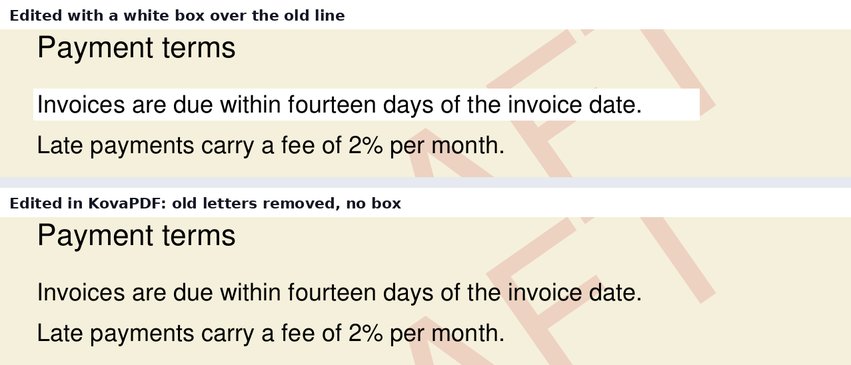
The part you cannot see
The box is not only a looks problem. With the white box, the old words are still in the file underneath. When we copied the text out of that version, it read:
Both versions are there, mixed together. Search the file for "thirty" and it is found. Anyone who copies the paragraph into an email, or a screen reader reading it aloud, gets both.
From the version made in KovaPDF's editor, the same copy gave one clean sentence: "Invoices are due within fourteen days of the invoice date."
How to get rid of the box
Start again from the original. The box is now part of the edited file. Removing it would bring the old words back into view. Open the PDF you had before the first edit.
Use an editor that removes the old letters. In the PDF Editor, click the line and retype it. When you save, the old letters under your edit are taken out of the page. Where they all come out cleanly, nothing is painted, so the paper color, the watermark and any picture behind the line show through as before. On the few pages where text cannot be taken out (text drawn as shapes, for example), a cover is still needed, and the editor paints it in the color it finds on the page there rather than plain white.
On a scan, there are no letters to remove. A scanned page is one picture. Any editor has to cover the old words. Run OCR PDF first, which lays real text over the scan, and match the cover to the paper.
Other "white box" problems
People mean different things by the same words, so two quick ones:
- A white border around every page. That is the page margin, not an edit. Crop PDF trims it.
- A white box behind a logo or signature you added. The picture has a white background. Use a PNG with a transparent background, or remove the background when you add it.
If the old words must be gone for good
Changing a figure on an invoice is editing. If that invoice has already gone to the client, do not quietly swap the PDF: issue a corrected invoice or a credit note and say what changed, as how to invoice as a freelancer explains. Hiding a bank number or a name before you share a file is redaction, and a white box is never enough for that. Redact PDF removes the content under the area and checks that nothing is left to copy.
Common questions
Why does my PDF editor put a white box behind edited text?
It hides the old words under a white rectangle instead of removing them. On white paper it is invisible; on color or a watermark it shows.
Can I remove the white box from a PDF I already edited?
Not cleanly. The box is what hides the old text, so removing it would bring the old words back. Edit the original file again instead.
Is the old text still in the file under the white box?
Usually yes. In our test, copying the text from the white-box version gave the old and new words mixed together.
How do I edit a PDF without leaving a white box?
Use an editor that removes the old letters when it saves. KovaPDF's PDF Editor does, and paints nothing where the old text came out cleanly.